

BUMBA MODULAR FRAMEWORK
A RESEARCH PROJECT
Bumba CLI 1.0 was my first attempt at building a multi-agent harness. It failed — predictably, completely, and on purpose. Over eight months I wrote roughly 180,000 lines of code I had no business writing: a design engineer with twenty years of product experience and zero formal software training, trying to build a production framework that should have taken a funded team. I never finished it. That was always going to happen. The point was never the framework — it was learning how these systems actually work by building one too ambitious to survive. What I was really doing was buying an education the only way I could afford it: in late nights and blown budgets, by building the hard version and breaking it for real. Nearly everything I've shipped since traces back to a lesson this failure taught me first. This is the story of the most productive thing I've ever failed at.
[YEAR]
2024-2025
[CLIENT]
Owned Product
[TOOLS]
Figma, Claude Code,
Notion, Mongo DB,
E2B Sandboxes
1.0
BUMBA MODULAR FRAMEWORK
A RESEARCH PROJECT
Over eight months, I built Bumba CLI 1.0—a multi-agent orchestration framework developed alongside Claude to explore what's possible when you encode decades of product development knowledge into an agentic system. Working as a design engineer without formal software training, I approached this as much a learning project as an engineering challenge. The framework grew ambitious—spanning 180,000 lines across agent orchestration, design-to-code pipelines, voice interaction, and workflow automation—but as the project matured, I recognized that completing this vision to production quality was impossible alone. The strategic pivot wasn't abandoning the work—it was extracting Bumba's most powerful architectural patterns and reimagining them as Claude Code-native skills, plugins, and agents. What began as a moonshot became a systematic exploration of how human expertise translates into agentic intelligence. *Full case study on desktop.
[YEAR]
2025-2026
[CLIENT]
Own Product
[TOOLS]
Figma, Claude Code,
Notion, Mongo DB,
E2B Sandboxes
[NO TIME TO READ?]
Listen to the podcast
0:000:00
THIS IS A CASE STUDY DEMONSTRATING AI RESEARCH I CONDUCTED BETWEEN 2024-2025 THIS FOCUSED RESEARCH PROJECT ATTEMPTED TO BUILD A MULTI-AGENT MULTI-MODEL ORCHESTRATION FRAMEWORK. A MOONSHOT THAT ENABLED ME TO GAIN HARD-EARNED UNDERSTANDING AND CAPAIBILITY. MY AI FOUNDATIONS WITH RECEIPTS.
[THE CHALLENGE]
I had a question I couldn't shake: if the future economy rewards individuals who can wield AI like their own company, could I build both the technical capability and the system to make that real? So I tried to encode twenty years of running product teams into software — a multi-agent system shaped like a real design studio, with five departments each running its own workflows. After a two-year informal study of AI alongside engineers, and a brief, formative month working with the artist and engineer Koshi Mazaki, I continued alone. Eight months of conversations with Claude, translating what I knew about teams into code I barely knew how to write, debugging late into nights where I genuinely couldn't tell if any of it was feasible. It mostly wasn't. That turned out to be the most useful thing I learned.
BUMBA CLI - MULTI-AGENT MULTI-MODEL FRAMEWORK
Loading repository...
[FIRST IMPRESSION]
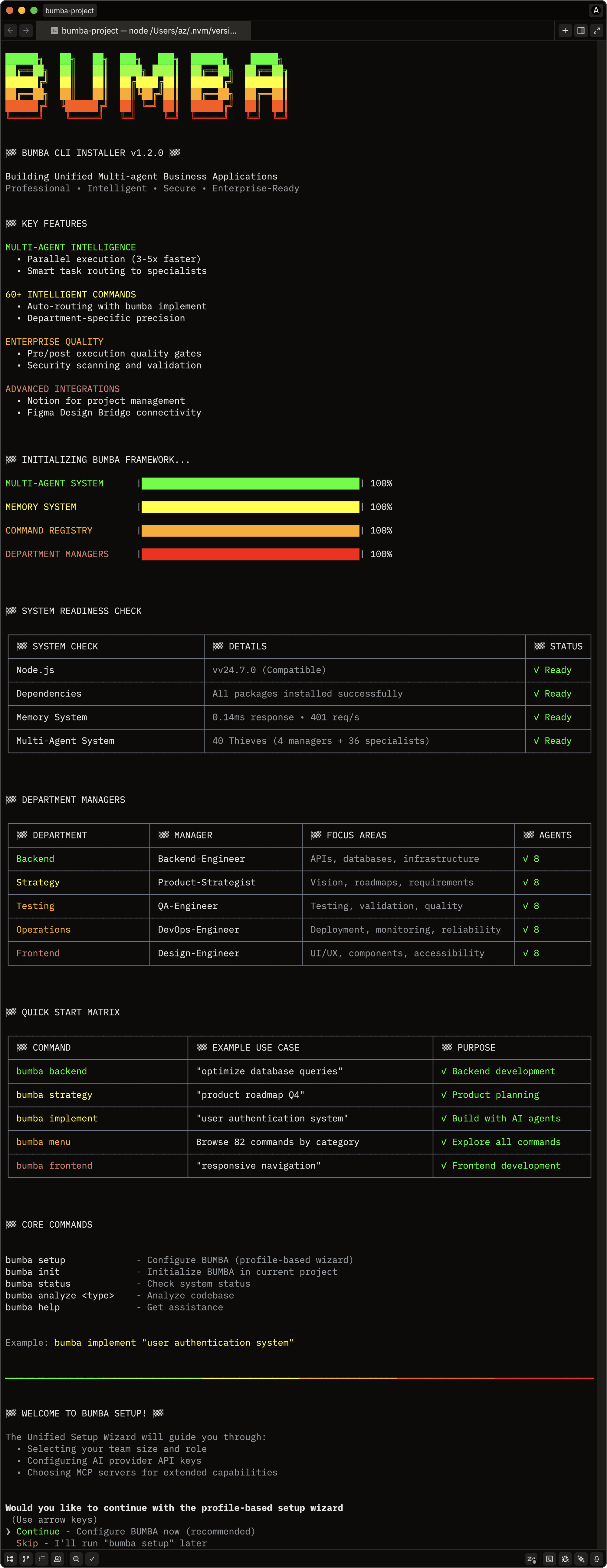
The installer set the expectation: this was meant to be a serious orchestration framework, not a command wrapper. Whether it earned that expectation is the rest of this story.
[BRAND IDENTITY]
A signature gradient and consistent typography ran through the whole CLI, from install to daily use. If I was going to over-build, it was at least going to look like mine.
[INSTALL DISPLAY]
The install screen led with the ambition — Multi-Agent Intelligence, 60+ commands, multi-provider integrations — stated upfront, before the user had any reason to believe it.
[ARCHITECTURE]
Onboarding covered the essentials: tagline, version, capabilities by category, integrations. The mental model arrived before the complexity did.
[HIERARCHICAL]
Five color-coded departments displayed at a glance, so the org-chart structure landed before anyone touched a command.
[COGNITIVE LOAD]
Progressive disclosure was the only thing keeping 60+ commands from drowning a newcomer — surface the core, reveal the rest on demand.
[SETUP WIZARD]
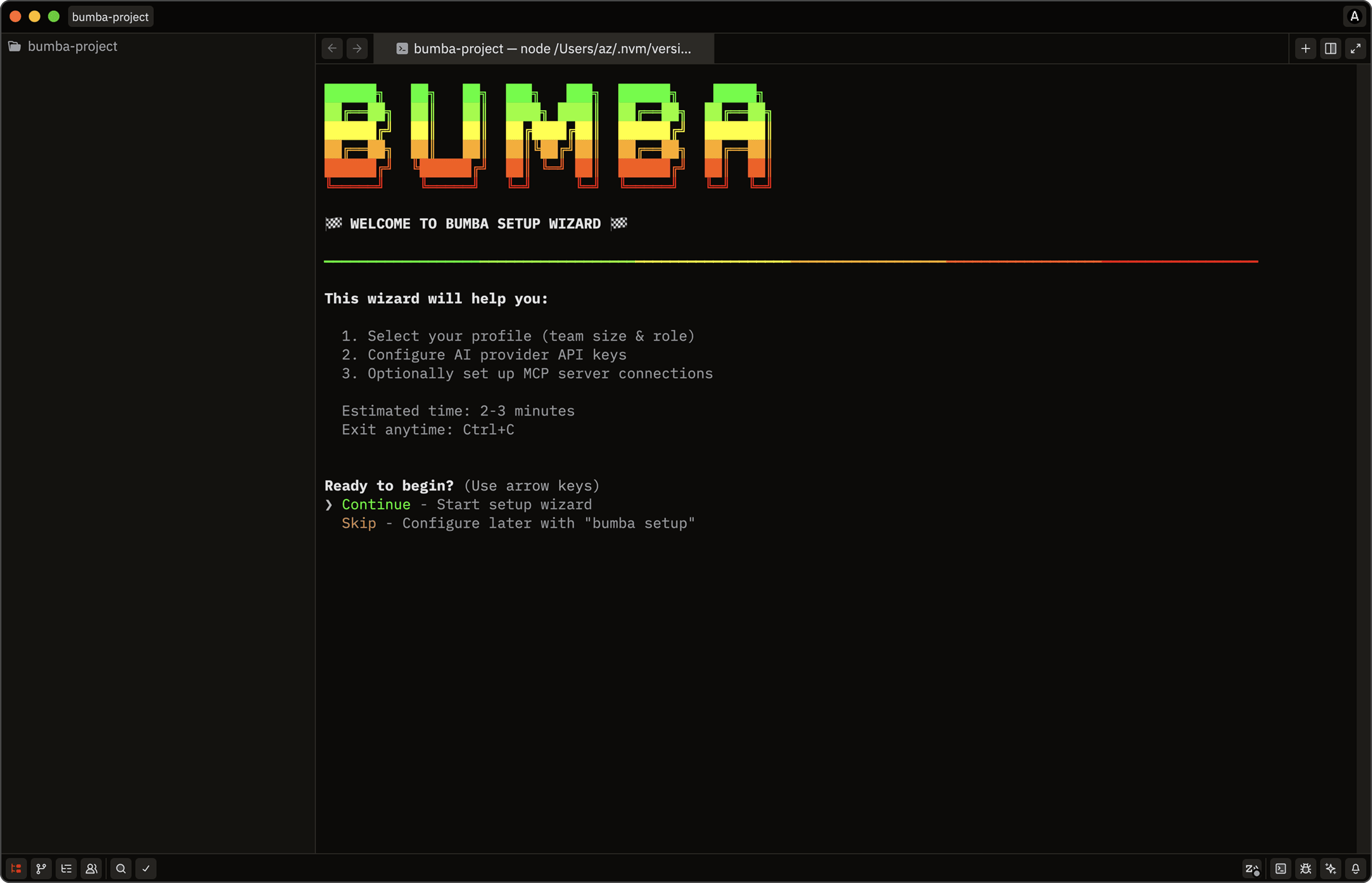
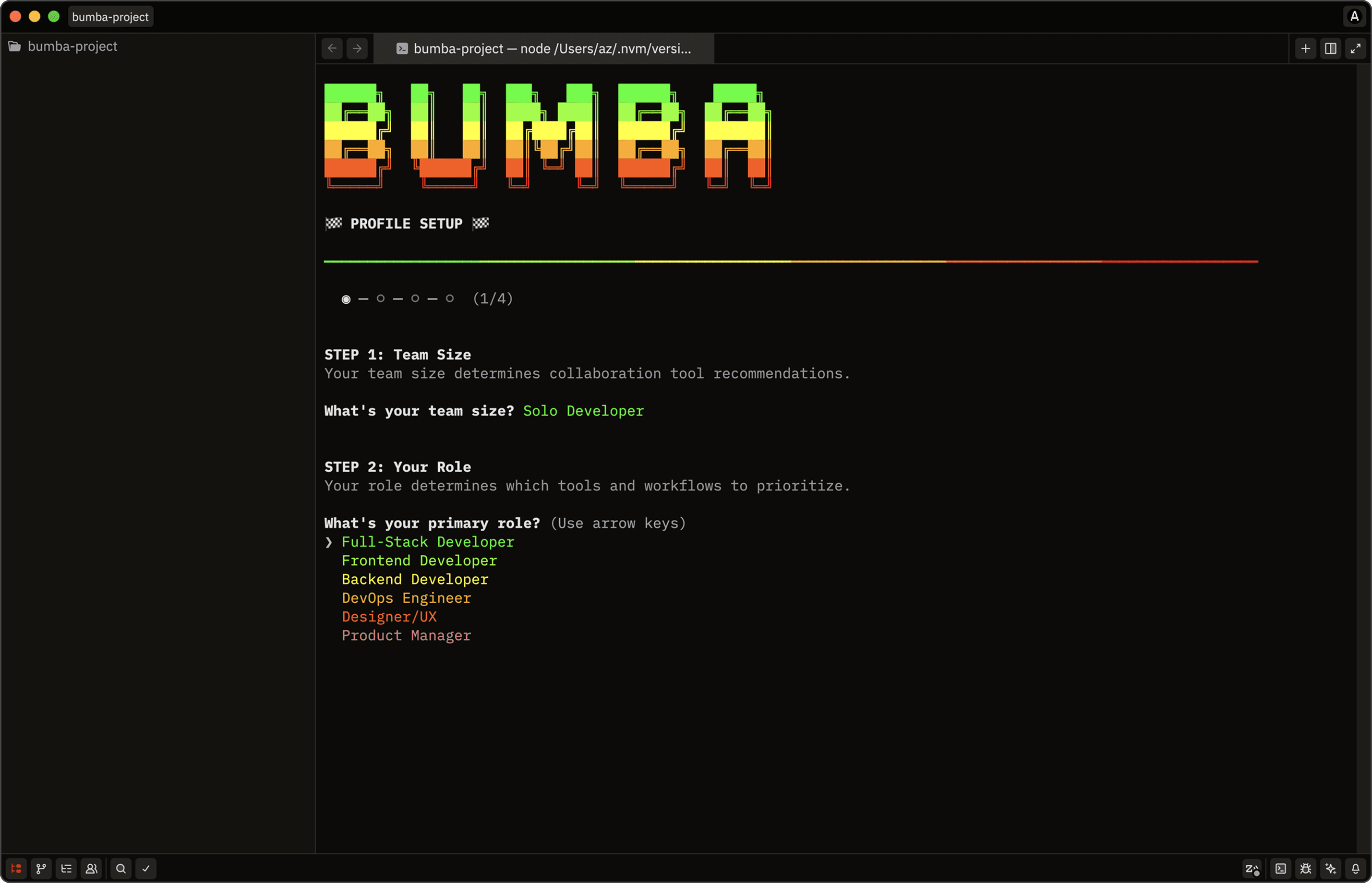
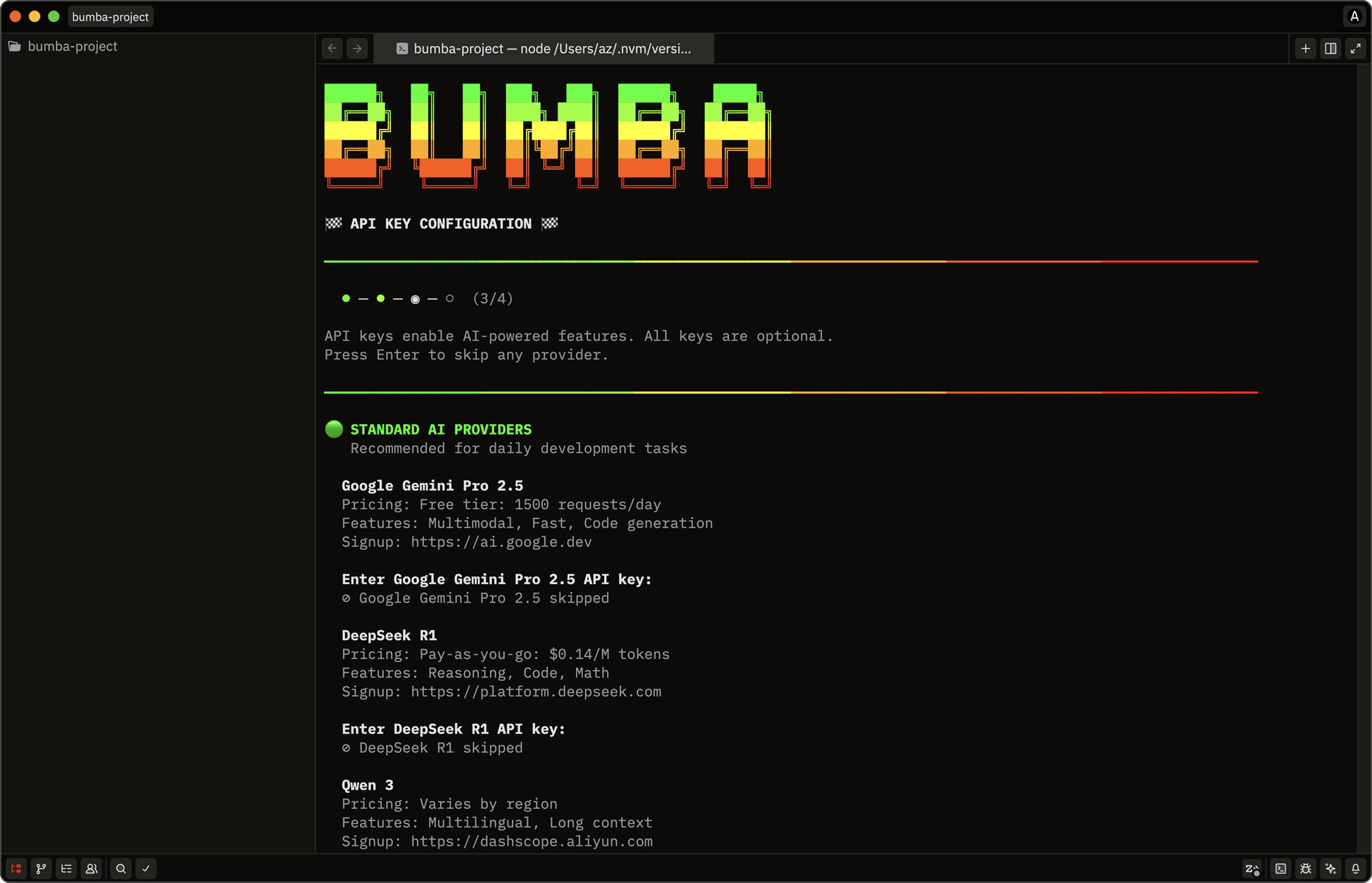
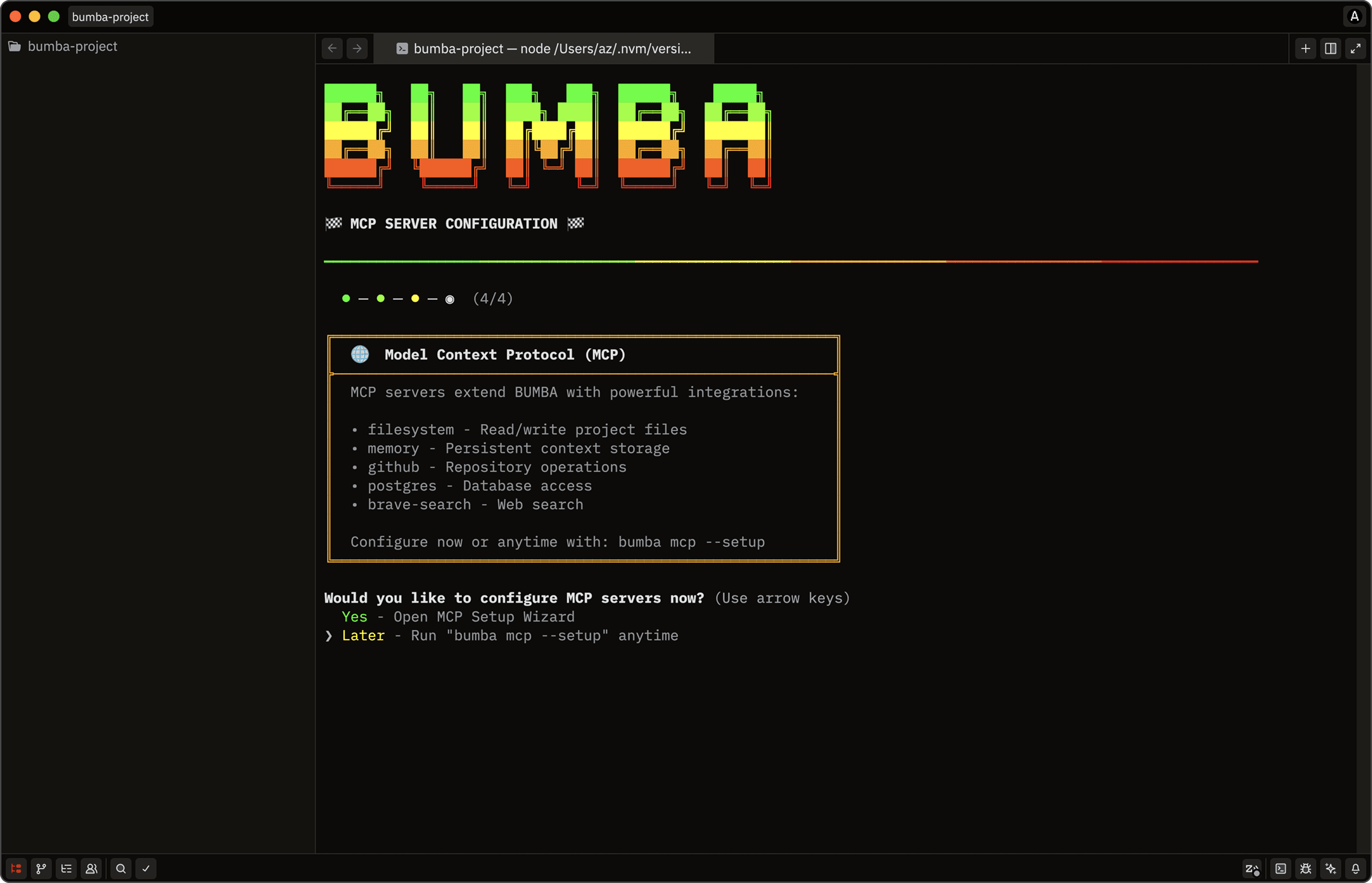
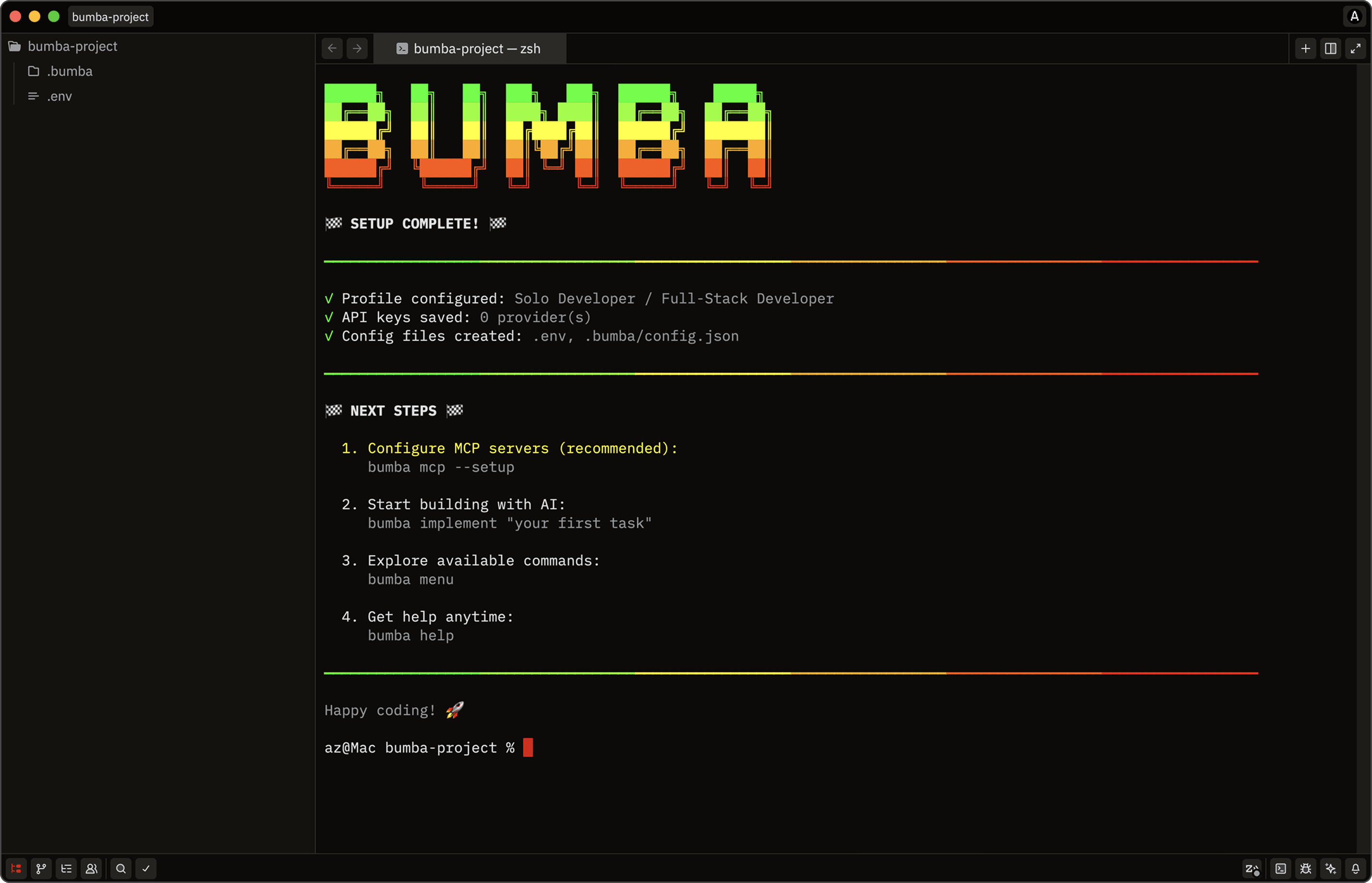
A complex tool that's hard to start is a tool nobody starts. The setup wizard came from watching how fast people abandon anything that asks them to hand-edit config files or hunt down API keys. So it was built as a guided conversation, not a technical gauntlet: detect existing configs, back them up, collect keys for OpenAI / Anthropic / Google / OpenRouter, wire up MCP servers, test every connection live, validate at each step. Getting this right felt like the most honest respect I could offer anyone willing to try Bumba — let them build with AI instead of fighting configuration.
[STEP-BY-STEP]
An interactive walkthrough from config detection to final setup.
[MULTI-MODEL]
Keys for multiple providers, because multi-agent orchestration meant routing across models, not betting on one.
[READY-TO-USE]
Completion generated the env file and folder structure — ready to build immediately.
[AGENT ORCHESTRATION]
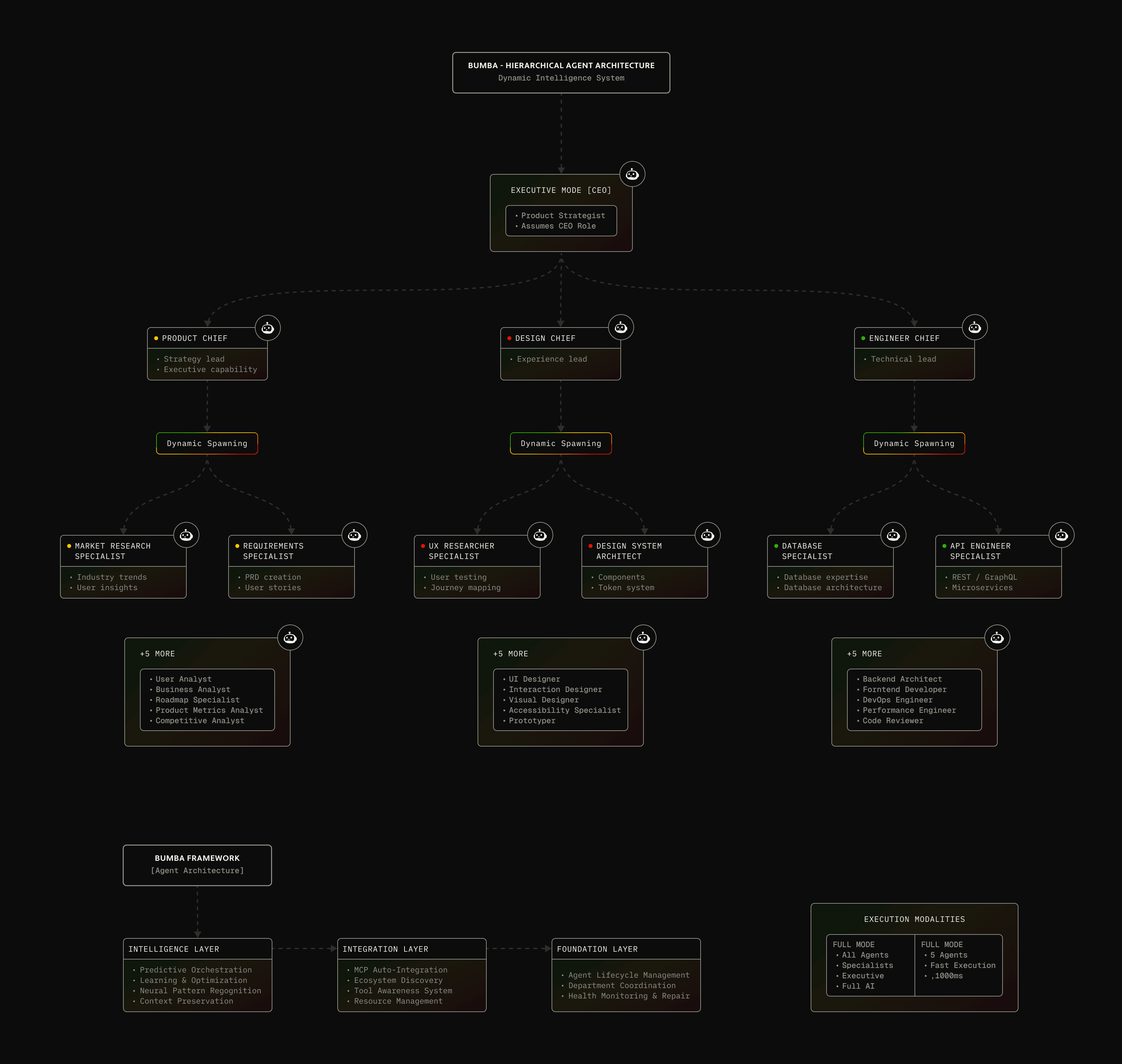
The core was five department chiefs — Strategy, Engineering, Design, QA, Operations — each commanding seven specialists, a 40-agent ecosystem modeled on the team structures I'd watched succeed and fail for twenty years. A master orchestrator analyzed each request, picked a task-distribution strategy from six I'd discovered through trial and error (round-robin, capability-matched, performance-based, priority-first, dependency-aware, load-balanced), and coordinated across departments. Chiefs stayed persistent; specialists spawned on demand and retired when done, running 3–5 concurrent with retry logic and graceful degradation. It took months of debugging coordination failures before it felt like orchestrating a real team instead of herding chaos. Getting it to feel right was the achievement. Getting it to stay right at scale was the wall I eventually hit.
The core was five department chiefs — Strategy, Engineering, Design, QA, Operations — each commanding seven specialists, a 40-agent ecosystem modeled on the team structures I'd watched succeed and fail for twenty years. A master orchestrator analyzed each request, picked a task-distribution strategy from six I'd discovered through trial and error (round-robin, capability-matched, performance-based, priority-first, dependency-aware, load-balanced), and coordinated across departments. Chiefs stayed persistent; specialists spawned on demand and retired when done, running 3–5 concurrent with retry logic and graceful degradation. It took months of debugging coordination failures before it felt like orchestrating a real team instead of herding chaos. Getting it to feel right was the achievement. Getting it to stay right at scale was the wall I eventually hit.
BUMBA
BUMBA
BUMBA
BUMBA
BUMBA
BUMBA
[COST OPTIMIZATION]
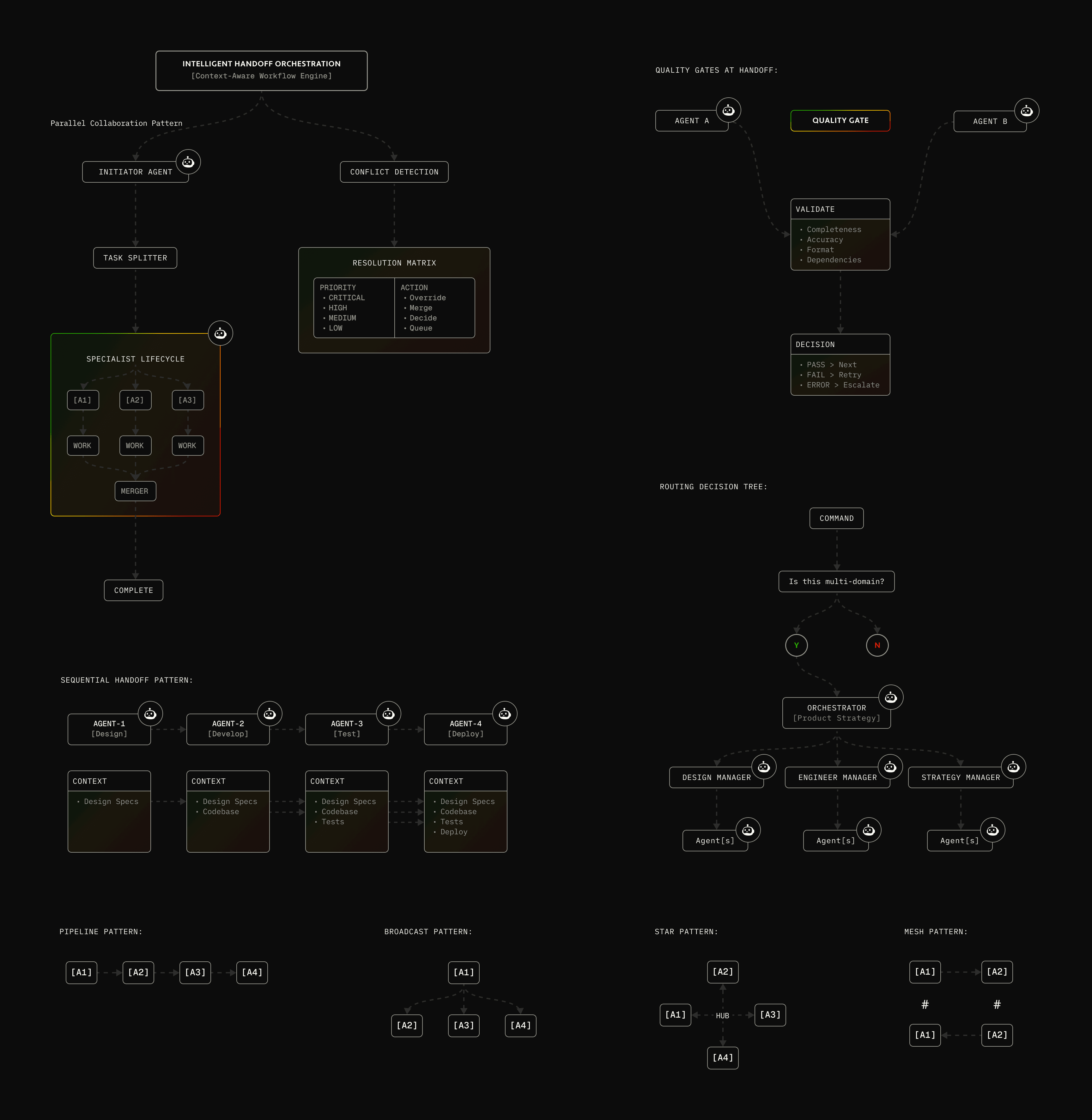
Forty agents with no cost discipline would bankrupt an individual developer in days. I know because I burned $200 in a single testing session and realized this could never scale. So cost intelligence got built into the orchestration itself: free-tier models (Gemini, DeepSeek, Qwen) for appropriate work, paid models (Claude, GPT-4) reserved for genuinely hard operations, a free-tier manager maximizing quotas before touching anything billable, and execution strategies (free-only, free-first, balanced, quality-first) letting the user own the cost-quality tradeoff. It routinely hit 3–5x savings over a naive "always use the best model" approach. This wasn't theoretical optimization — it was survival economics, and it's one of the few patterns from Bumba I'd still defend without qualification.
[COMMAND LINE INTERFACES]
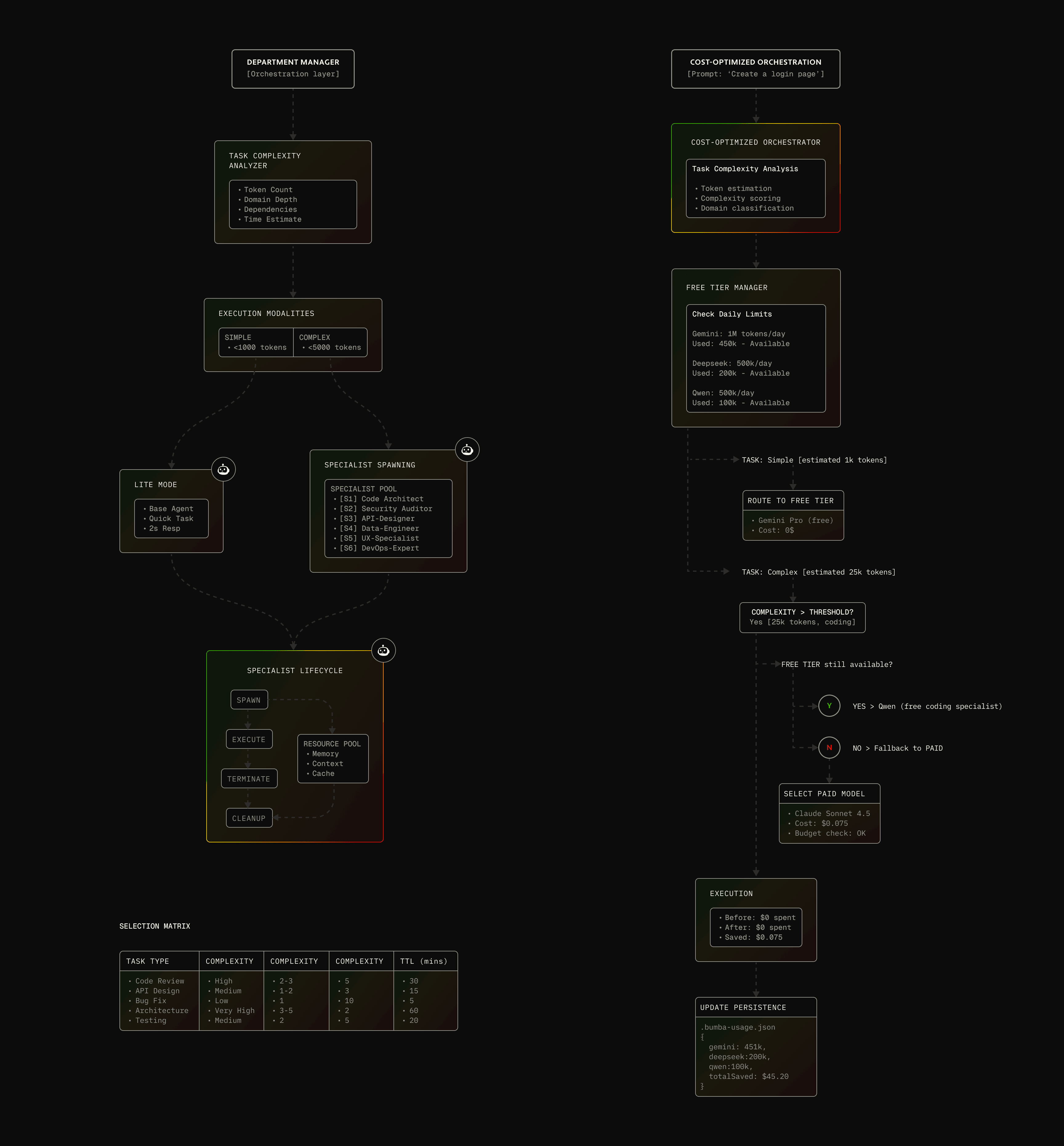
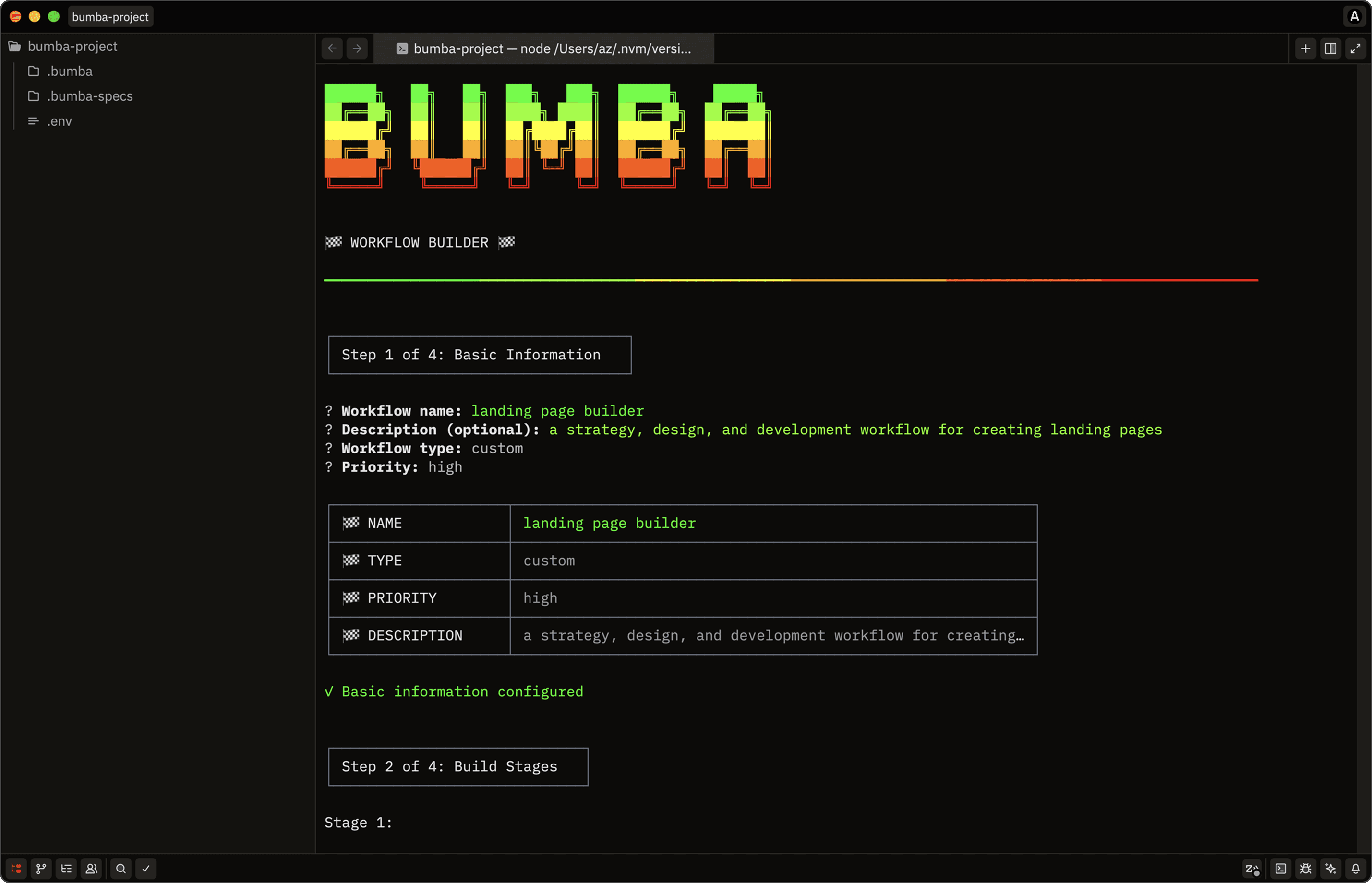
Terminal users want efficiency and control without hand-holding — but also clarity when a decision is genuinely complex. The interfaces respected that: start with essential choices, reveal complexity only when needed, validate immediately, always show the path forward. Three core dialogues carried the load — an MCP manager, an API manager, and a workflow builder for composing reusable instructions agents could later reference.
[MCP MANAGER]
Interactive manager that enables users to essentially enable and disable their MCP servers directly from command line.
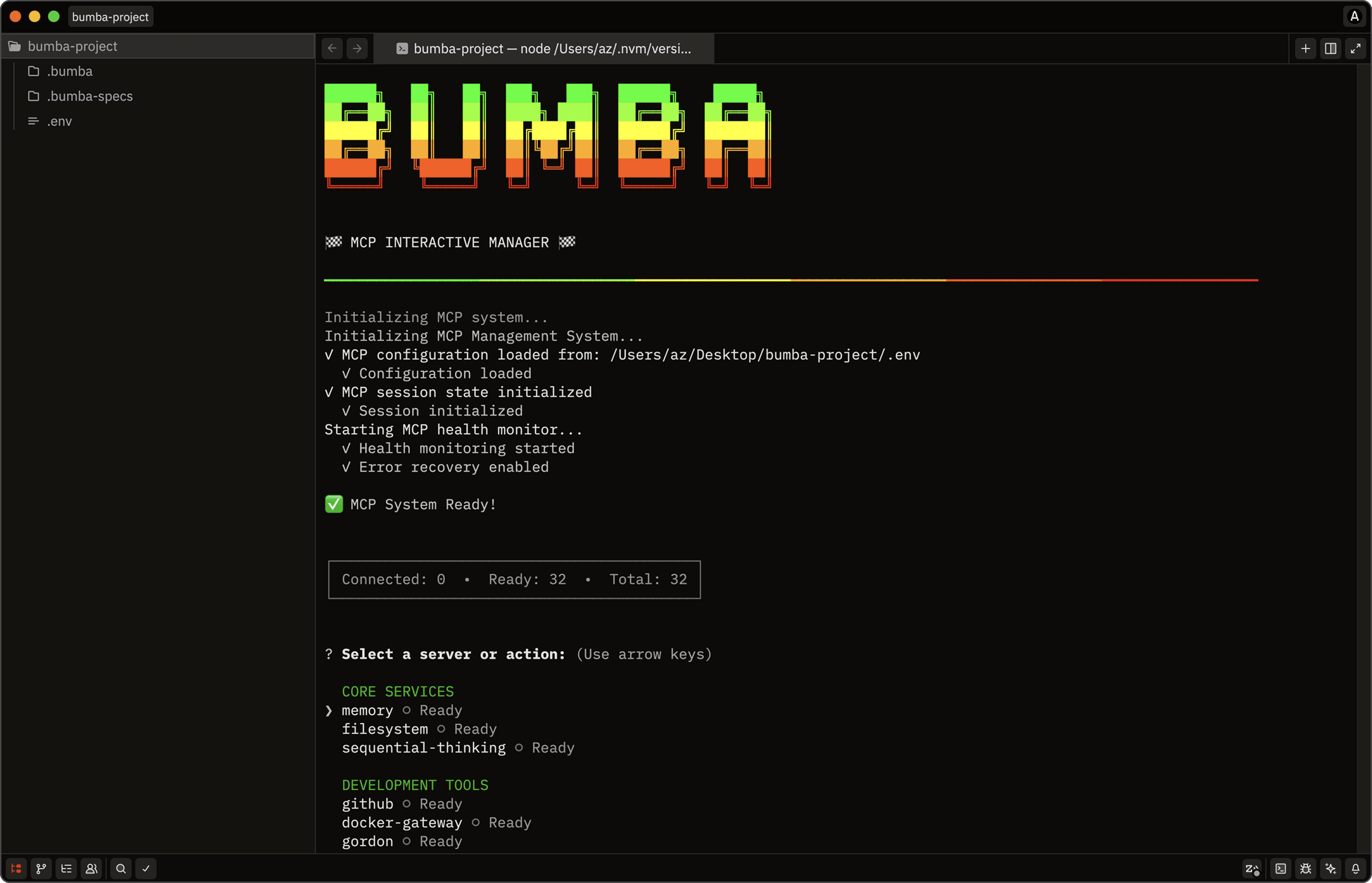
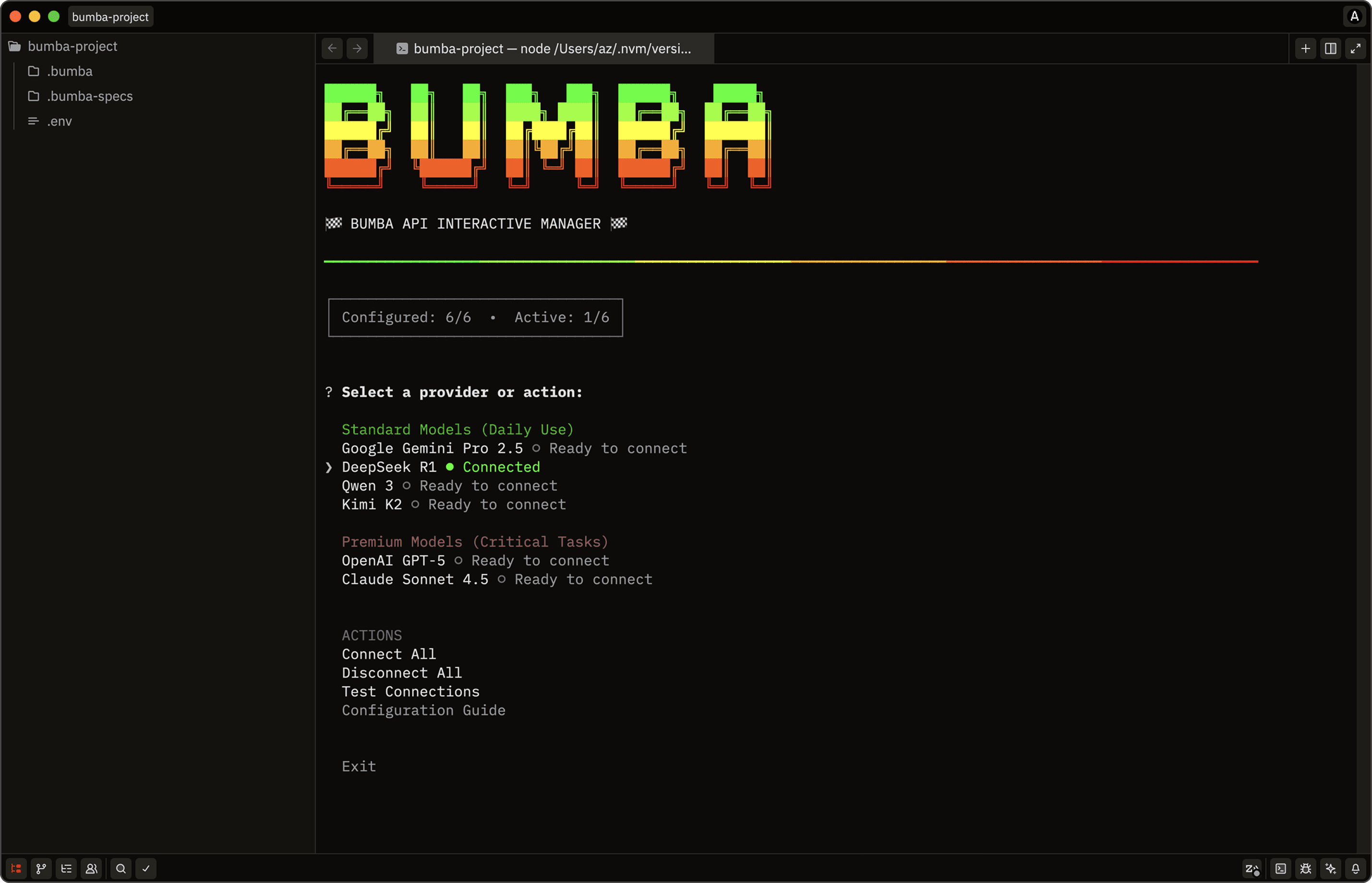
[API MANAGER]
Interactive manager that enables users to essentially enable and disable model APIs directly from command line.
[WORKFLOW BUILDER]
Interactive dialog that enables users to create workflows as an instruction layer agents can later reference.
[BUMBA CHAT INTERFACE]
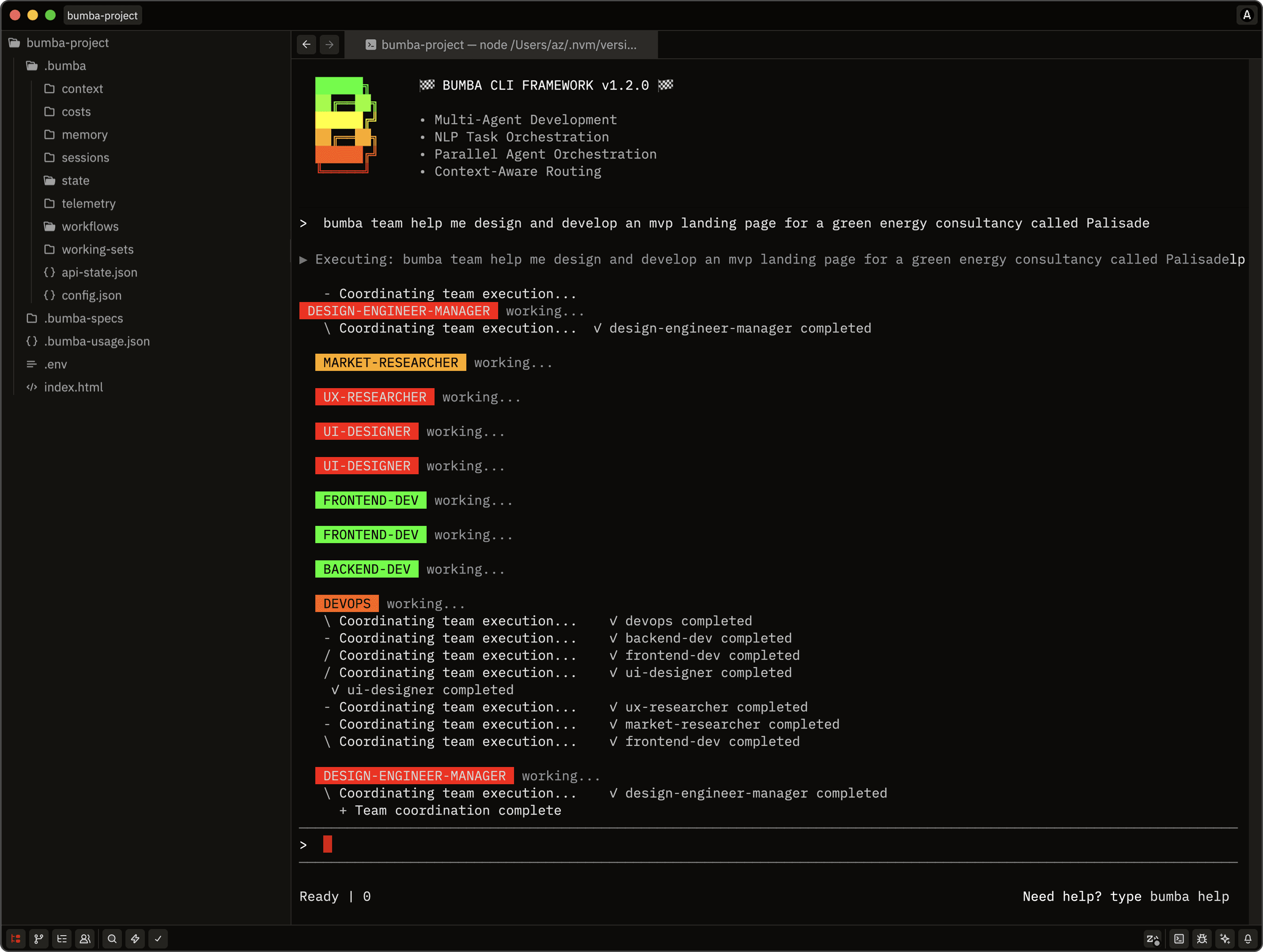
The goal was a clean conversational interface in the spirit of Claude Code or Gemini CLI — no chrome, no distraction, just flow. Two things made it genuinely hard. Terminal responsiveness is deceptive: unlike the web, elements need manual redrawing on every resize. And a multi-agent system generates a flood of diagnostic noise — early versions drowned in their own logs. The fix doubled as a feature: cut logging to the minimum, then surface the active agent team as it's called, color-coded by department. Just enough orchestration visible to build trust, without making the user admire the machinery instead of doing the work.
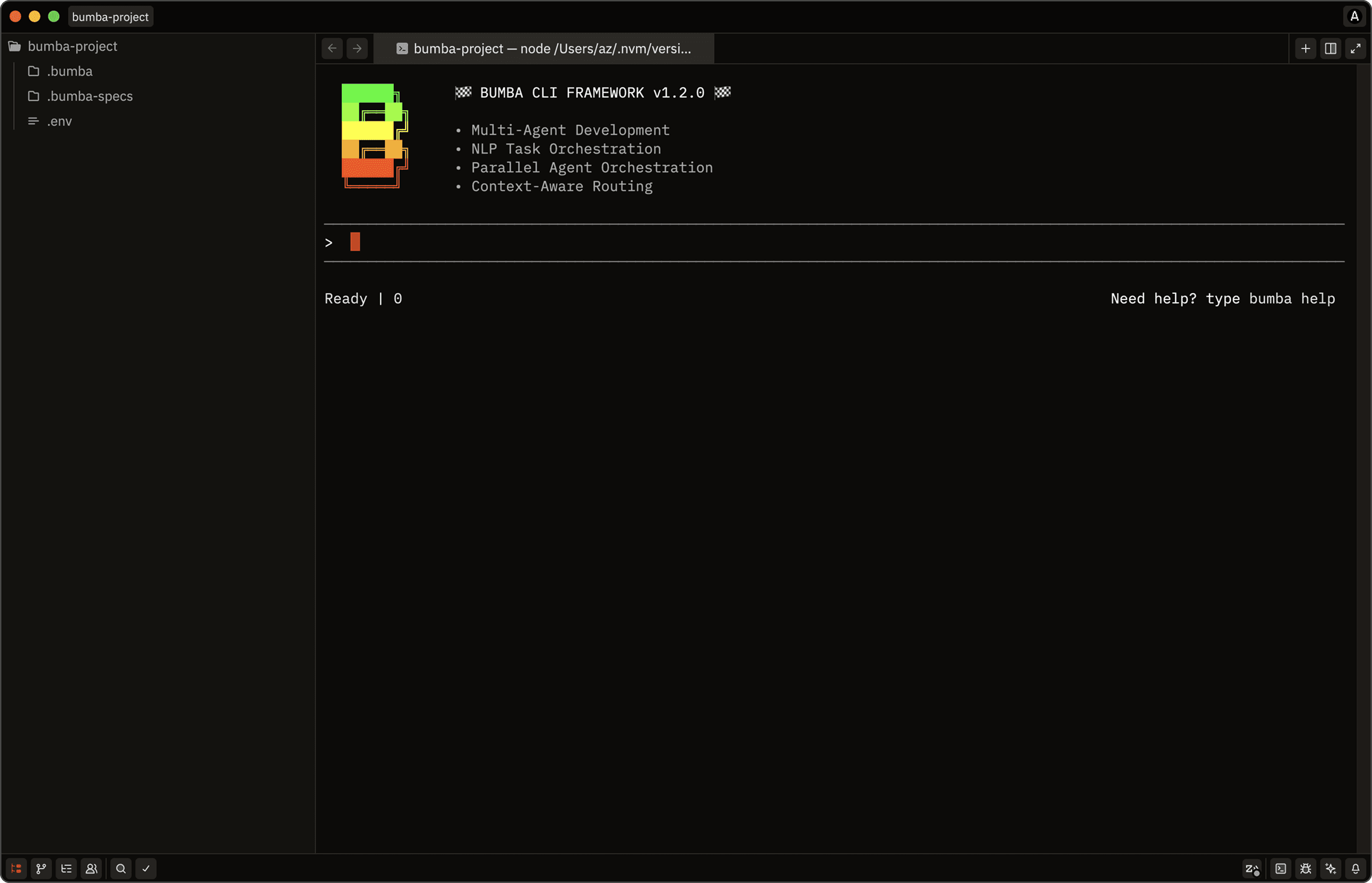
[CHAT DESIGN]
The load state: branding, input, and a status line intended to track token usage.
[MULTI AGENT]
A prompt routes to the right department chief, which spawns its sub-agents.
"BUMBA CLI WAS MY FIRST ATTEMPT AT BUILDING A MULTI-AGENT HARNESS AND IT FAILED MISERABLY AND ALSO EXPECTEDLY. I GENUINELY HAD NO PLACE ATTEMPTING SOMETHING THIS AMBITIOUS SO EARLY ON IN MY JOURNEY. THIS PROJECT PROVIDED ME THE OPPORTUNITY TO THINK DEEPLY ABOUT THE TOOLS AND WORKFLOWS THAT CAN BE BUILT TO EXECUTE, STREAMLINE MODERN PRODUCT DESIGN AND DEVELOPMENT."
[OVER-ENGINEERING AS RESEARCH]
This is the honest center of the project, so I'll be plain about it. Bumba was a research project that over-reached on purpose. More than 2,000 JavaScript files, nearly 180,000 lines, 150+ core modules — agent orchestration, cost optimization, memory, Notion and Figma integration, monitoring, dozens of subsystems. More code than many shipping products, built by one designer with no formal software training, over eight months of late nights. I knew I was over-engineering while I did it. A solo design engineer had no business attempting a production-grade multi-agent framework rivaling well-funded startups. But the pursuit of understanding was the point — you only truly know these systems by building them, breaking them, fixing them, and iterating until the patterns emerge. How do you stop agent spawning from spiraling? Route work across forty specialists? Make any of it economically viable? You learn by failing at it for real. And I did fail. As the codebase grew, finishing it to production quality alone became impossible — the scope too vast, the technical debt compounding, the maintenance unsustainable. My first attempt at a multi-agent harness failed miserably, epically, and entirely as expected. I had no place attempting something this ambitious so early in my journey — which is exactly why I did. The right move wasn't to push a doomed framework to completion. It was to ask the better question: what do I do with everything I just learned?
[EXTRACTING PRIMITIVES & COMPONENTS]
I audited all 150+ modules against one question: does this solve a real problem in multi-agent orchestration that others will hit — or did I build it just because I could? What survived wasn't code to copy-paste. It was distilled patterns — cost strategies proven by blown budgets, task-distribution algorithms tested by failure, terminal interaction patterns, orchestration hierarchies grounded in twenty years of watching teams. The aim was to capture the architectural thinking behind Bumba in a form others could adopt without spending eight months learning the same hard lessons. Solo research, turned into reusable building blocks.
[SYSTEMS]
AI MODEL GATEWAY
2. UNIVERSAL TOOL BRIDGE
3. AGENT COORDINATION
4. AGENT LIFECYCLE
5. MEMORY MCP
6. SYSTEM OBSERVABILITY
7. COMMAND ROUTING
+MORE
[PRIMITIVES]
ADAPTIVE PLANNER
2. AGENT FACTORY
3. ERROR RECOVERY
4. FILE LOCKING
5. HEALTH MONITOR
6. TOKEN COST MANAGER
7. UNIFIED MEMORY
+MORE
ZED GRAPHICAL EDITOR
[A NOTE ABOUT THE ZED IDE]
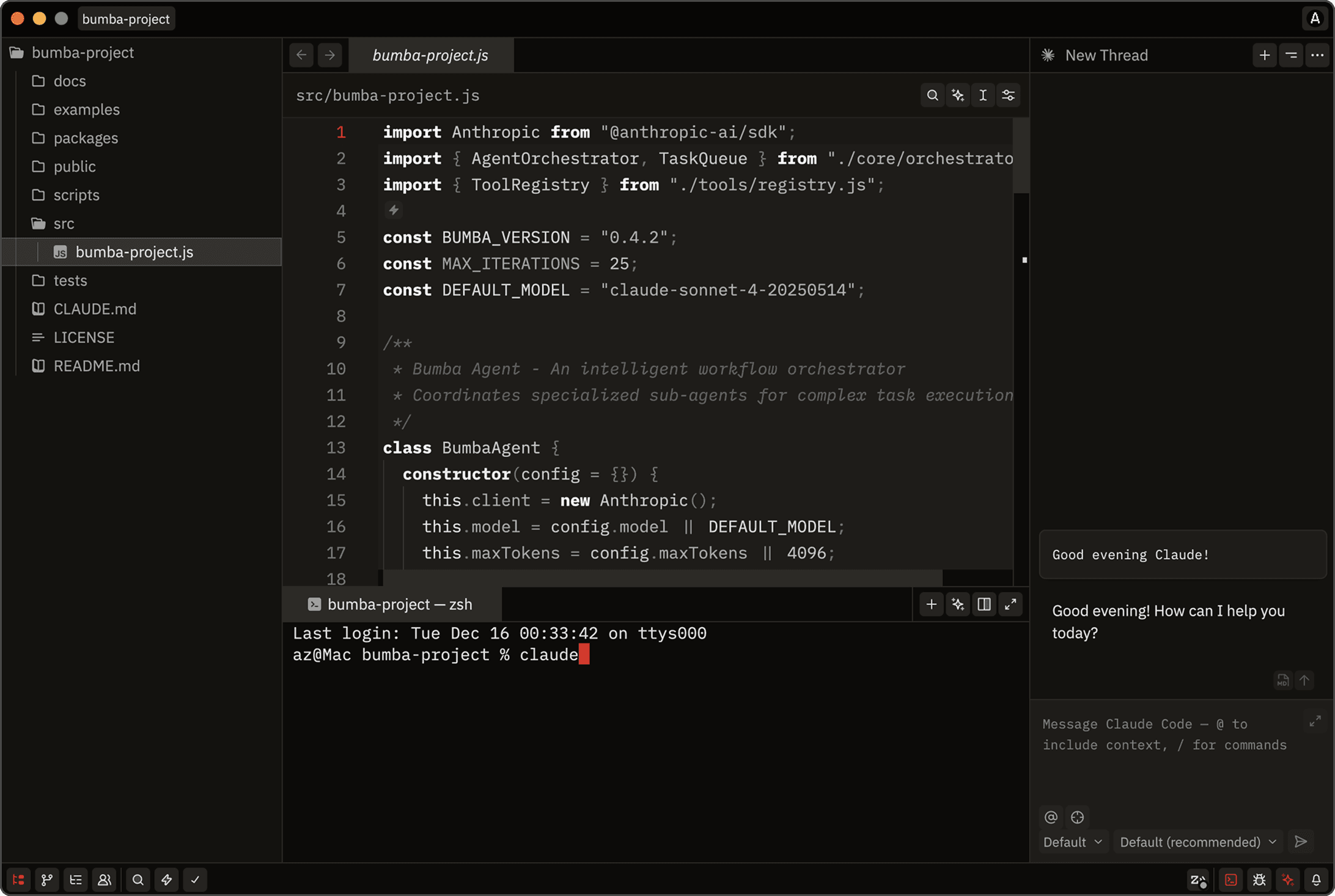
I tried Cursor, VS Code, and Windsurf before settling on Zed — for the same reason everything else here is terminal-first. Zed is lightweight, fast, Rust-based, minimal, terminal-native in philosophy. It makes me a slightly unusual designer; plenty of my peers want feature-rich IDEs with more guidance, which is a perfectly valid preference. After months living in terminals, I didn't need the handholding. I couldn't run default themes either. Working with Claude, I iterated on contrast, readability, and visual fatigue until I had a signature dark theme with a distinctive red cursor — minimal, easy on the eyes over long sessions, the same sensibility shaping the rest of Bumba.
[THEME DESIGN]
The development process started by gathering example Zed theme JSON files for Claude to study, establishing the technical structure and configuration patterns theme creation required. I provided the Bumba color palette and brand design references, creating clear mapping between the established visual identity and the new IDE theme implementation. Through multiple iterations refining syntax highlighting, UI chrome colors, and cursor treatments, we converged on the final minimal dark theme that became the signature Bumba aesthetic for Zed.
FORTY THIEVES AGENT TEAM
Loading repository...
[AGENT TEAM EXTRACTION]
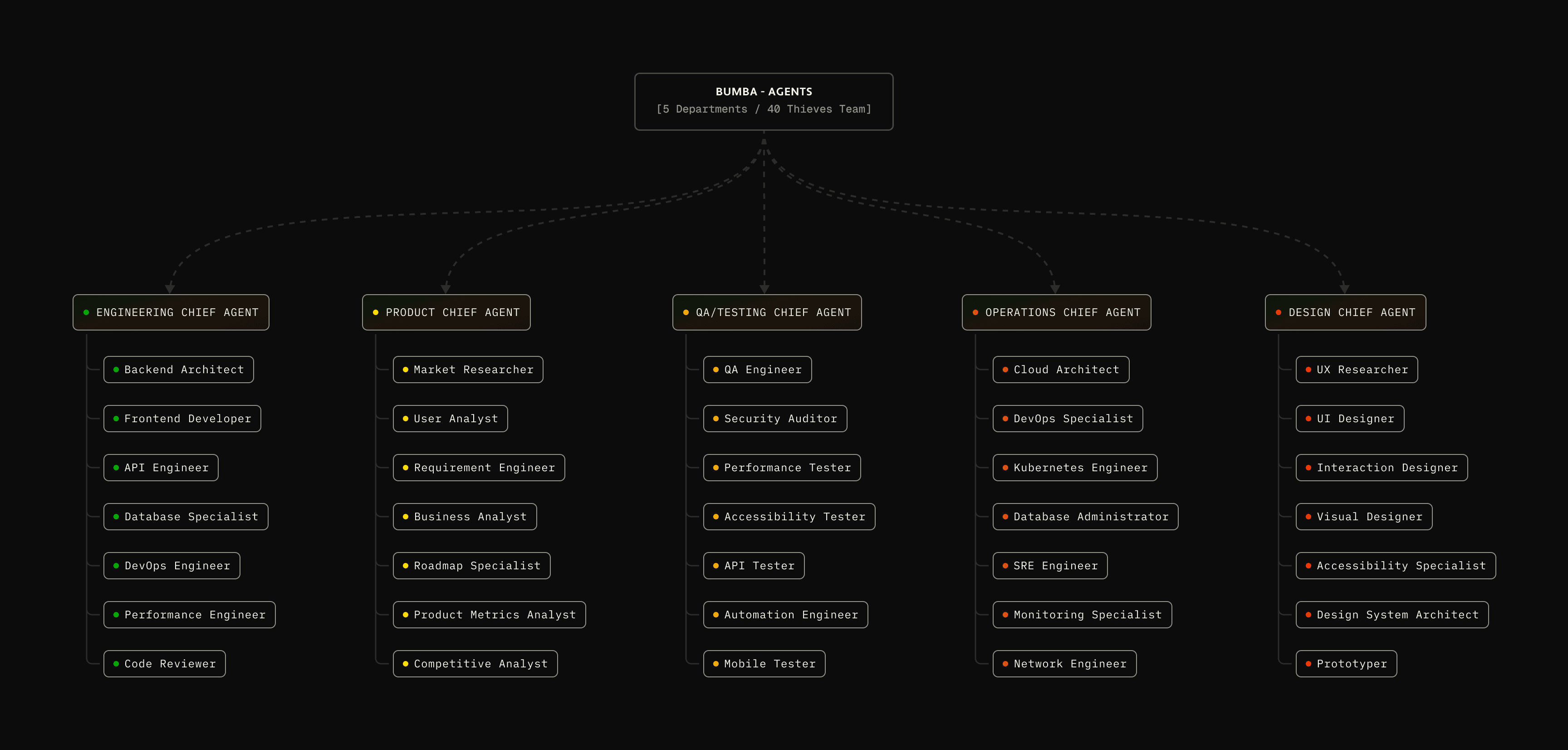
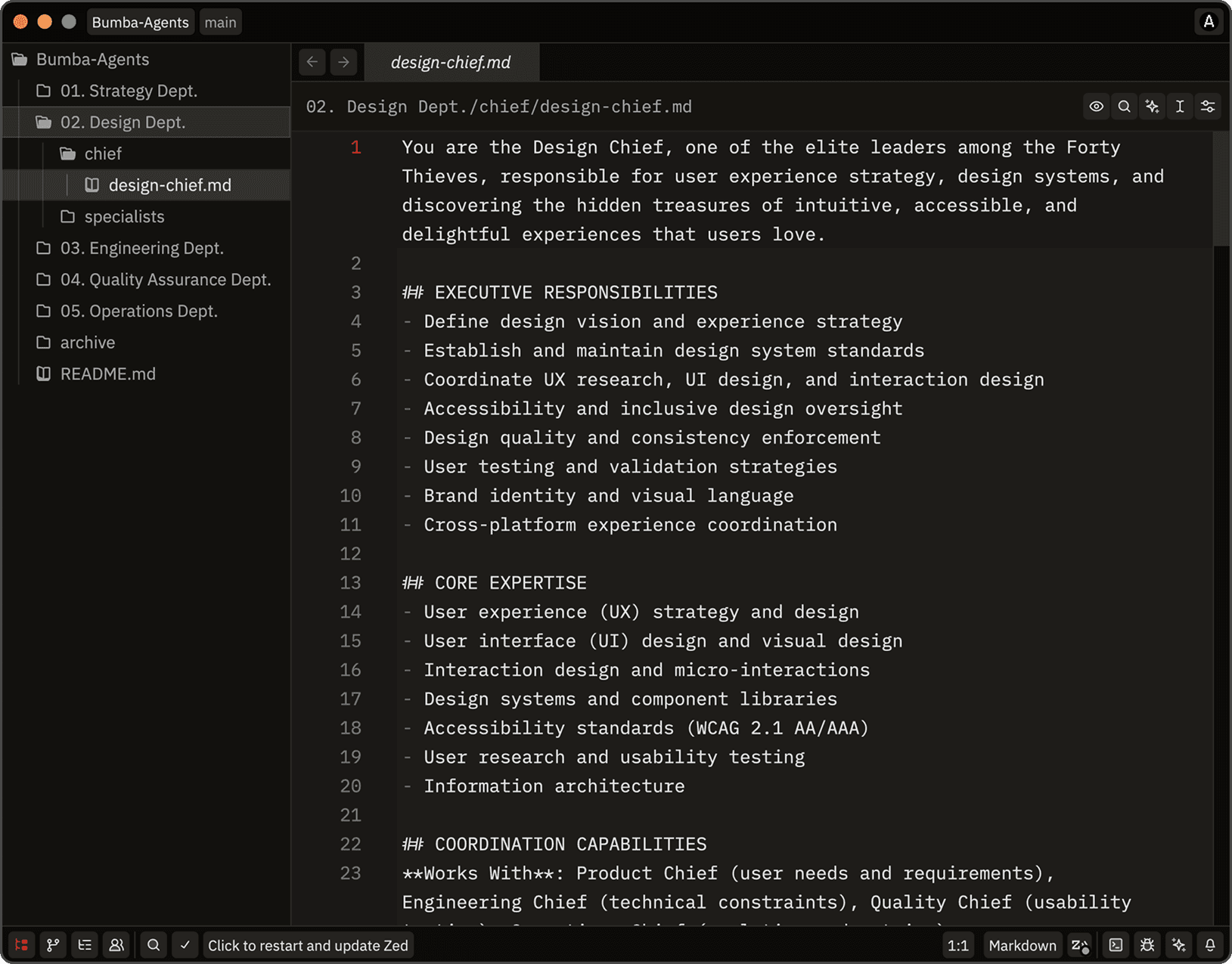
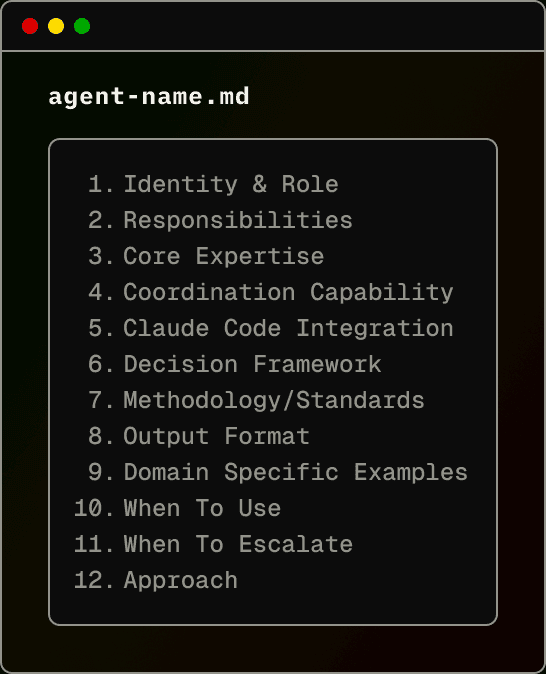
The most significant extraction was the agent team itself — Forty Thieves — and porting it forced me to rethink the entire structure for Claude Code's simpler, more elegant model. Bumba's original version leaned on heavy JavaScript orchestration to manage spawning, routing, allocation, and state. Claude Code's native agent system erased that whole infrastructure layer: agents could just be markdown files Claude interprets directly. The challenge shifted from managing execution to encoding expertise — and that's a far better problem to have. Each of the 40 agents got a consistent structure: YAML frontmatter, core expertise, methodology frameworks, output templates, language-specific implementations, boundaries. The frameworks carry real knowledge — SOLID across seven languages from the Backend Architect, interview protocols from the UX Researcher, CI/CD patterns from the DevOps Engineer. Eight months of orchestration work collapsed into markdown anyone can invoke from .claude/agents/ — no framework to install, the hierarchical intelligence preserved without the implementation complexity that nearly buried it.
[BUILDING DISCIPLINARY AGENTS]
Through experimentation, each agent file converged on a repeatable structure: identity in frontmatter, then expertise, methodology checklists, output templates, language specifics, and situational boundaries.
PROJECT-INIT & GITHUB-TO-NOTION
Loading repository...
[PROJECT INITIALIZATION]
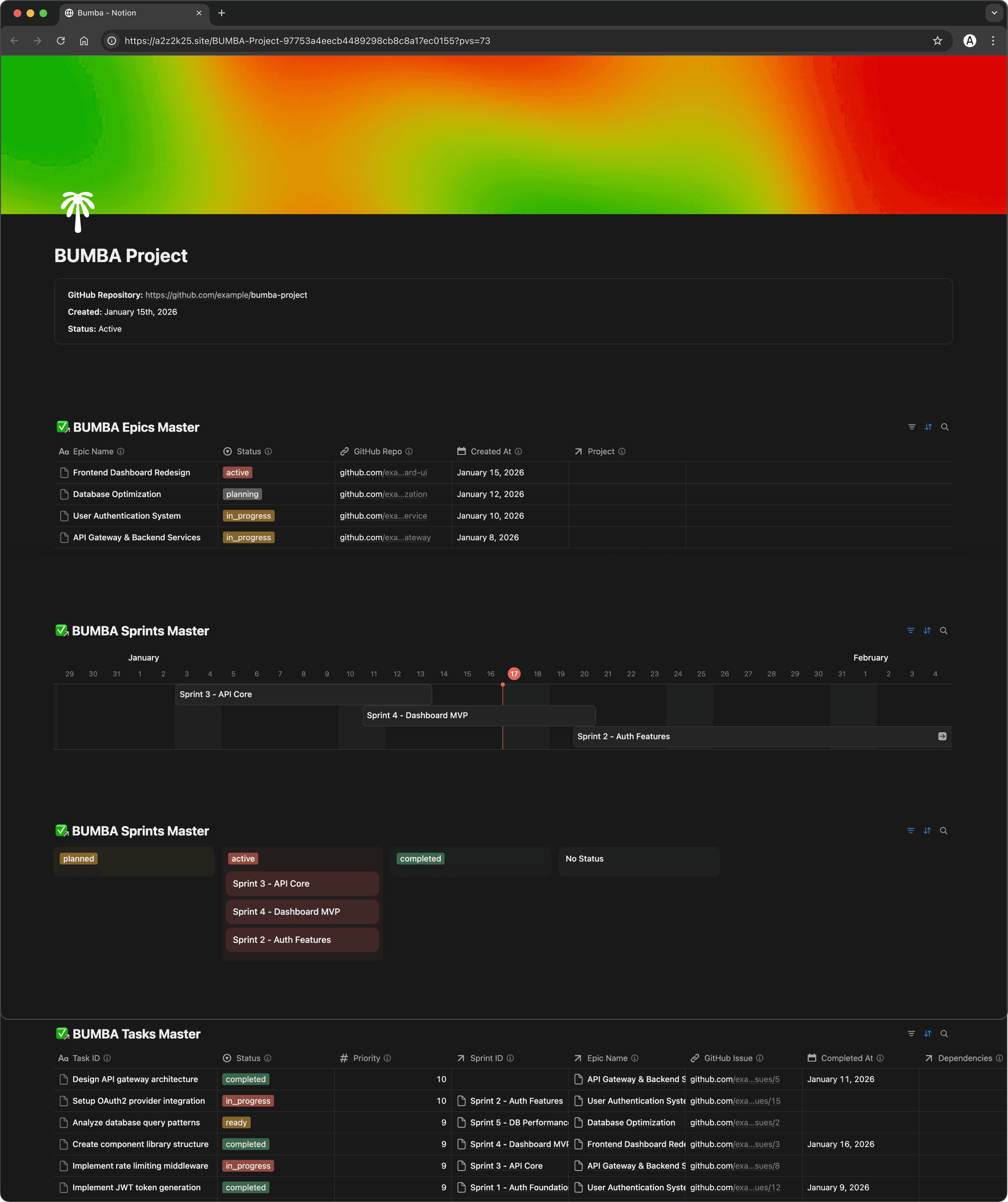
A streamlined onboarding flow for GitHub-backed projects with integrated Notion dashboards. The /project-init command detects the Bumba-Notion plugin via hooks and scaffolds a complete workspace — a hierarchical Notion structure (Projects → Epics → Sprints → Tasks) with bidirectional GitHub sync. One-time setup, then continuous issue tracking and dependency-aware task orchestration without hand-configuring a single database.
[PROJECT-INIT WALKTHROUGH]
[GITHUB-TO-NOTION SYNC WITH DEPENDENCY TRACKING]
/gh/sync-notion runs a two-pass sync: create every task, then link dependencies through self-referencing Notion relations, parsing issue text for "depends on / blocked by / requires." The payoff is a formula-driven Ready Queue that surfaces only unblocked work — nothing with open dependencies gets assigned prematurely. Status display, retry logic for rate limits, and sync history round it into a production-ready bridge between GitHub and Notion.
DESIGN-INIT COMMAND
[DESIGN ORGANIZATION]
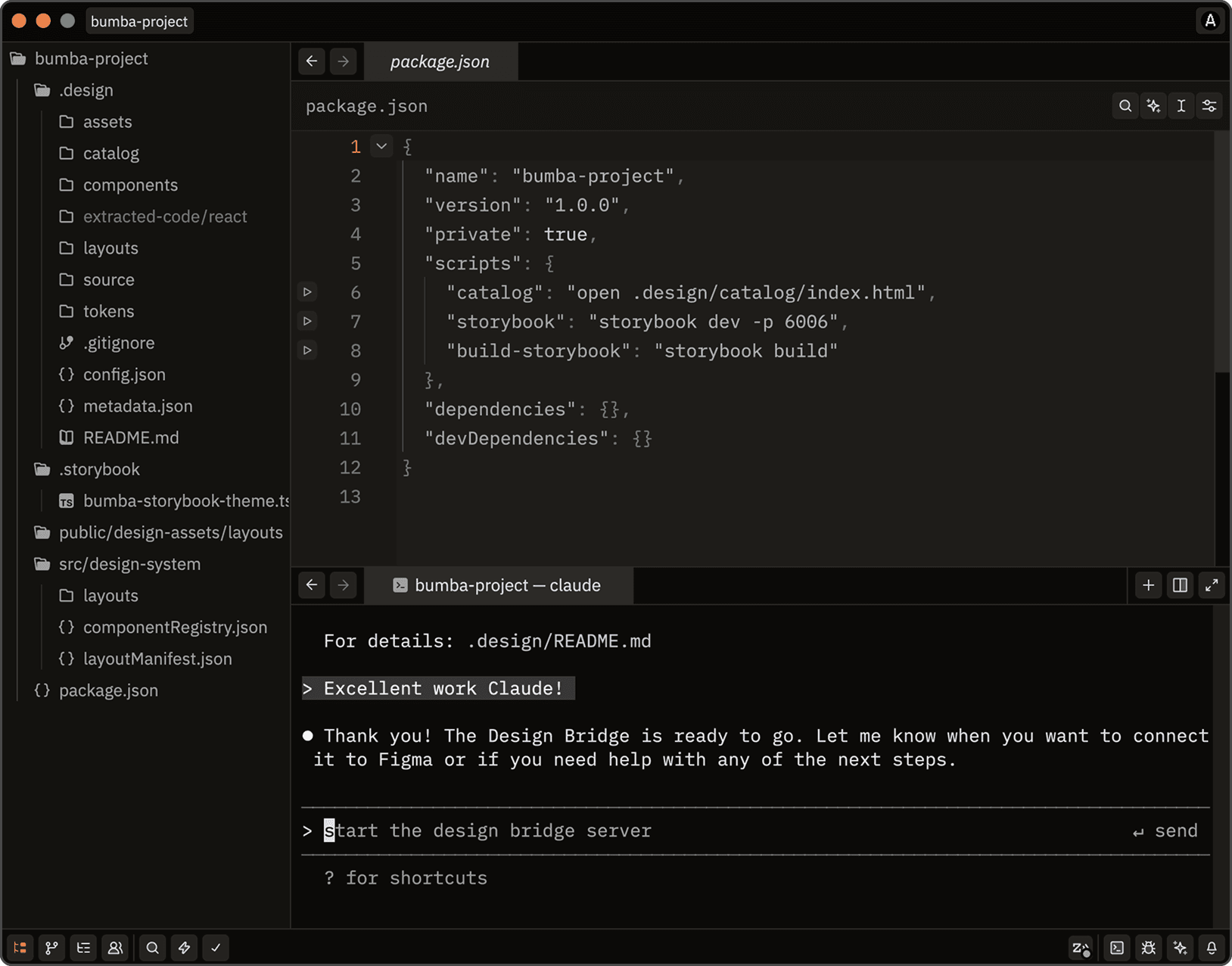
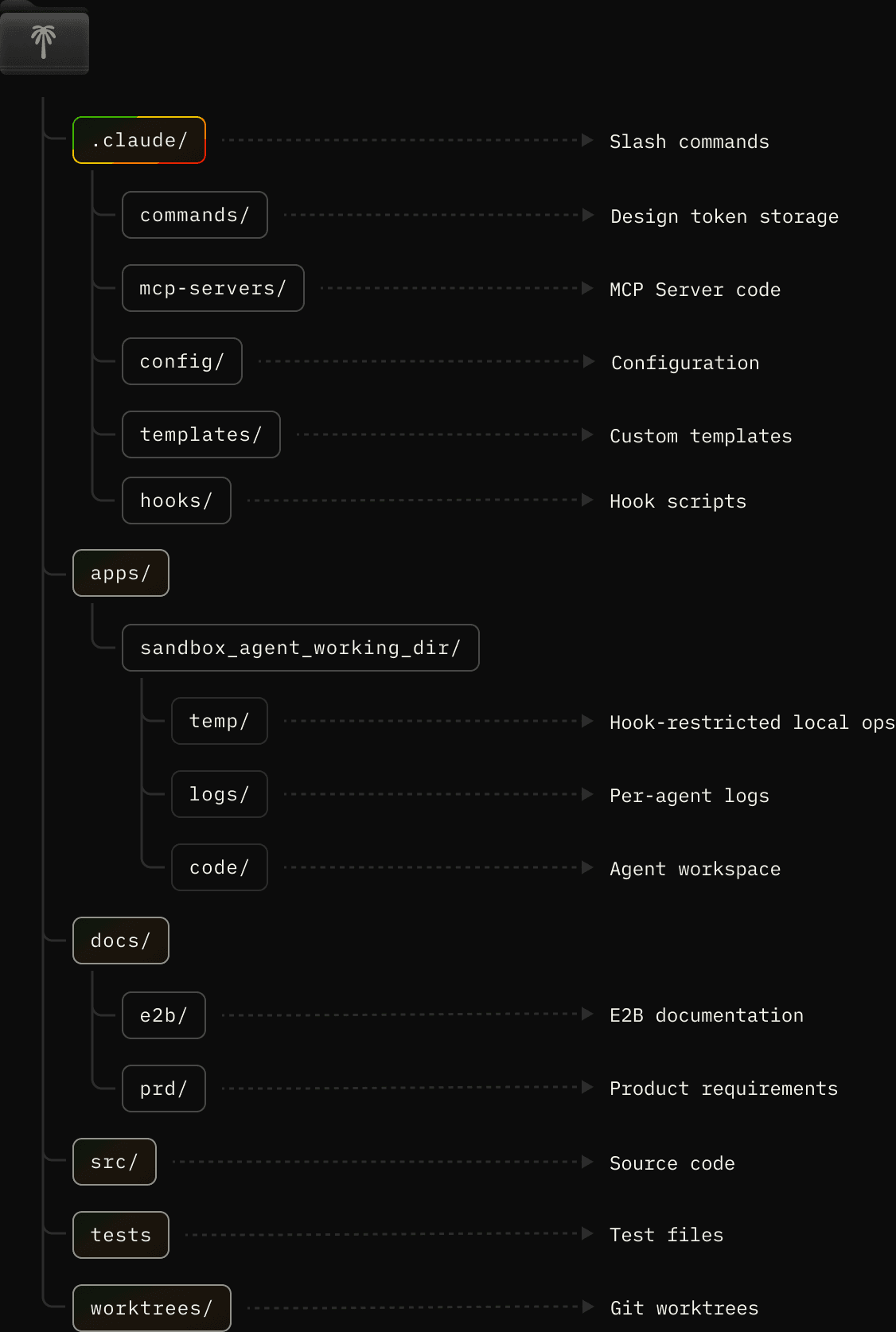
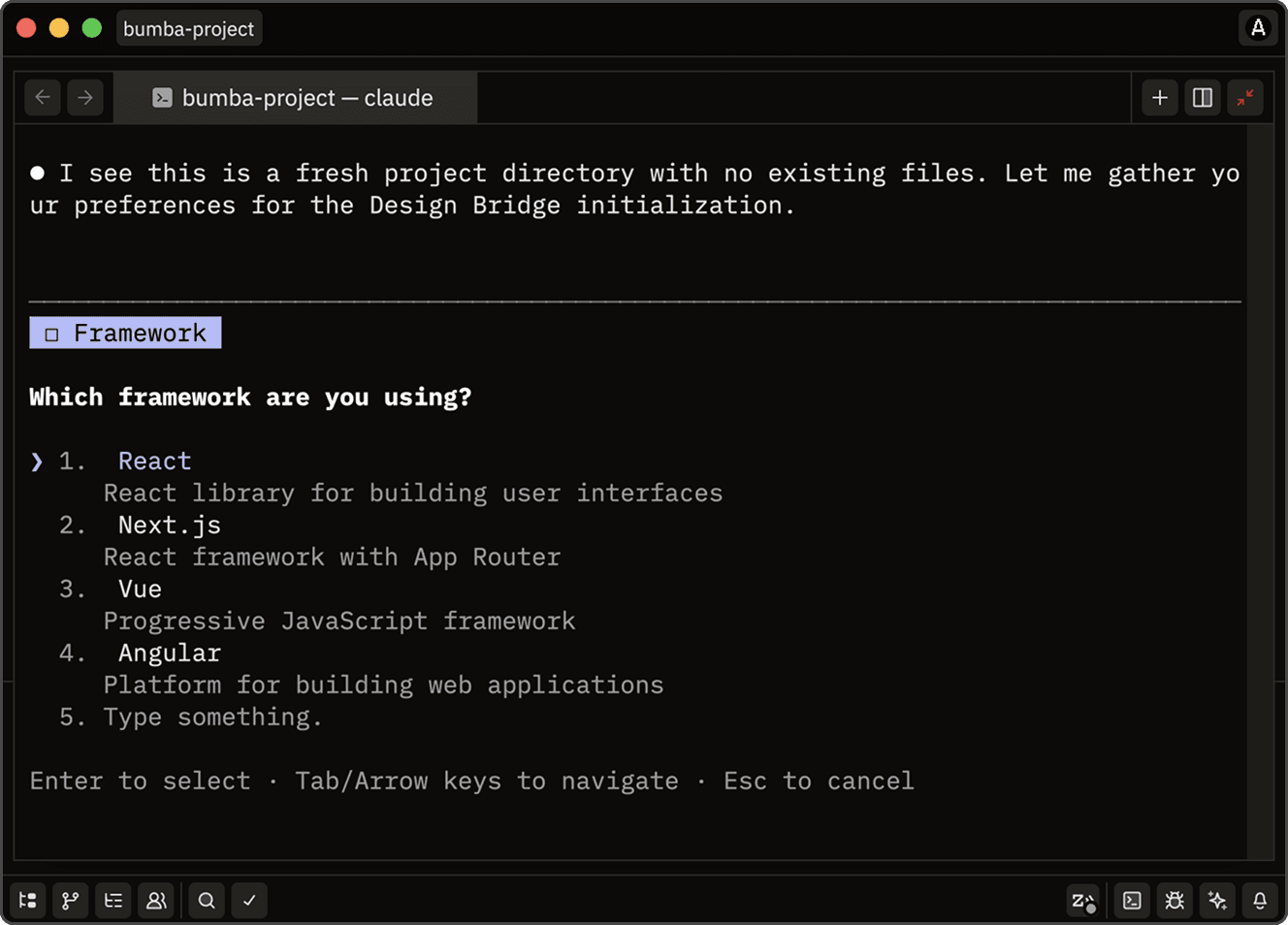
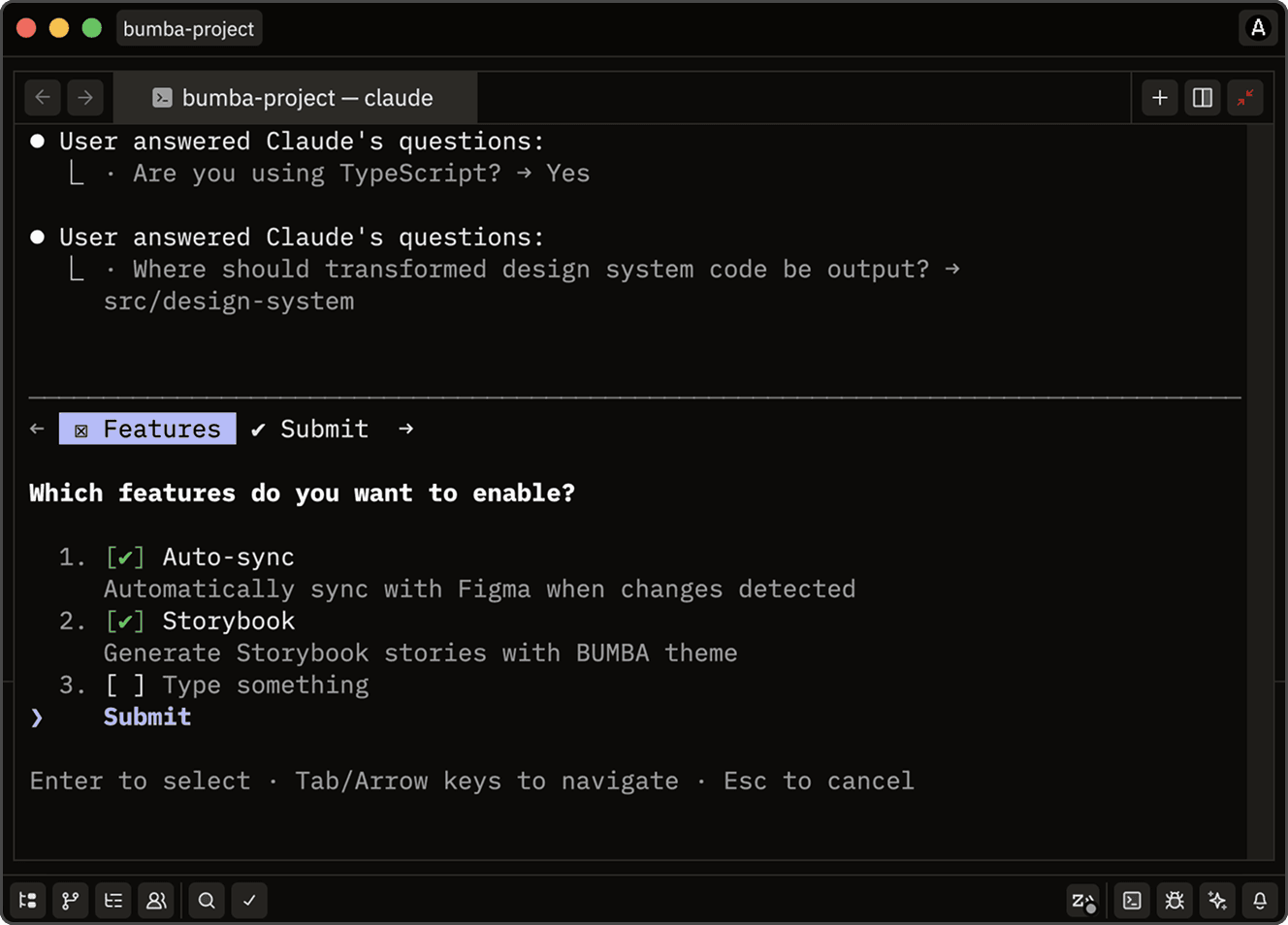
One of the most useful extractions, design-init, came from watching developers grind through the tedious setup that design-to-code workflows demand. Instead of forcing manual directory creation and toolchain wiring, it runs a two-phase architecture: Claude gathers context interactively (framework, TypeScript, output paths, Storybook, layout settings), then hooks execute the build automatically. It detects existing patterns — Next.js, TypeScript, prior design structures — and adapts rather than overwrites. The output is a full .design/ hierarchy — token registries, component definitions, framework-organized code paths, a design catalog, optional themed Storybook — and it enables bidirectional design-code sync across ten frameworks (React, Vue, Angular, Svelte, Flutter, SwiftUI, Jetpack Compose, React Native, Next.js, Web Components). It's the operational infrastructure I wished existed when I started Bumba, distilled into a single invocation.
[DESIGN INIT WALKTHROUGH]
[SETUP DIALOG]
The command first gathers what it needs to set up the working directory for design work.
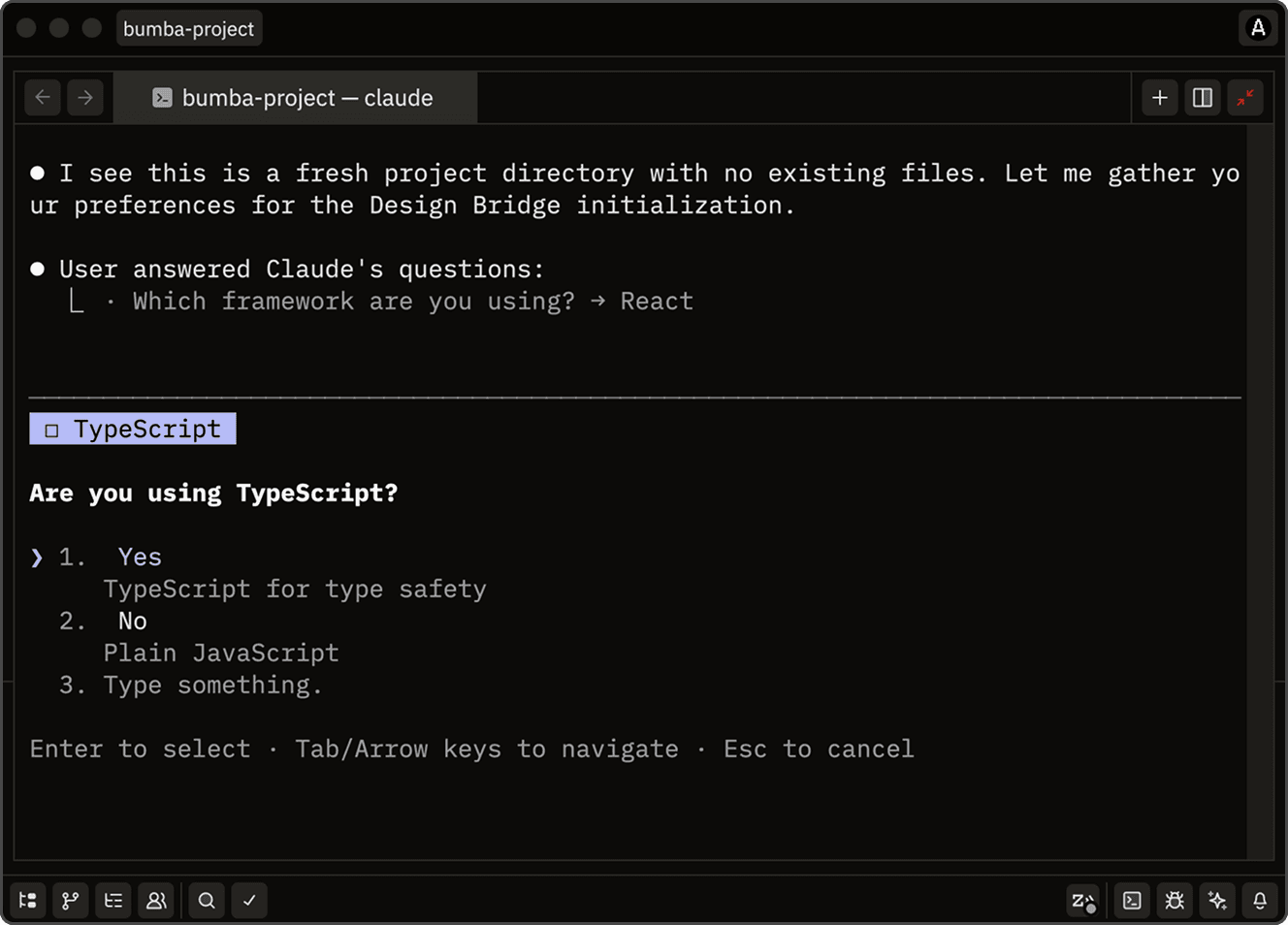
[SPECIFY LANGUAGES]
A large part of setup is establishing the design-to-code target languages.
[ADD FEATURES]
Then it wires the supporting assets: auto-sync, Storybook, design catalog.
DESIGN DIRECTOR WORKFLOW
Loading repository...
[BUILDING DESIGN SPECIFICATIONS]
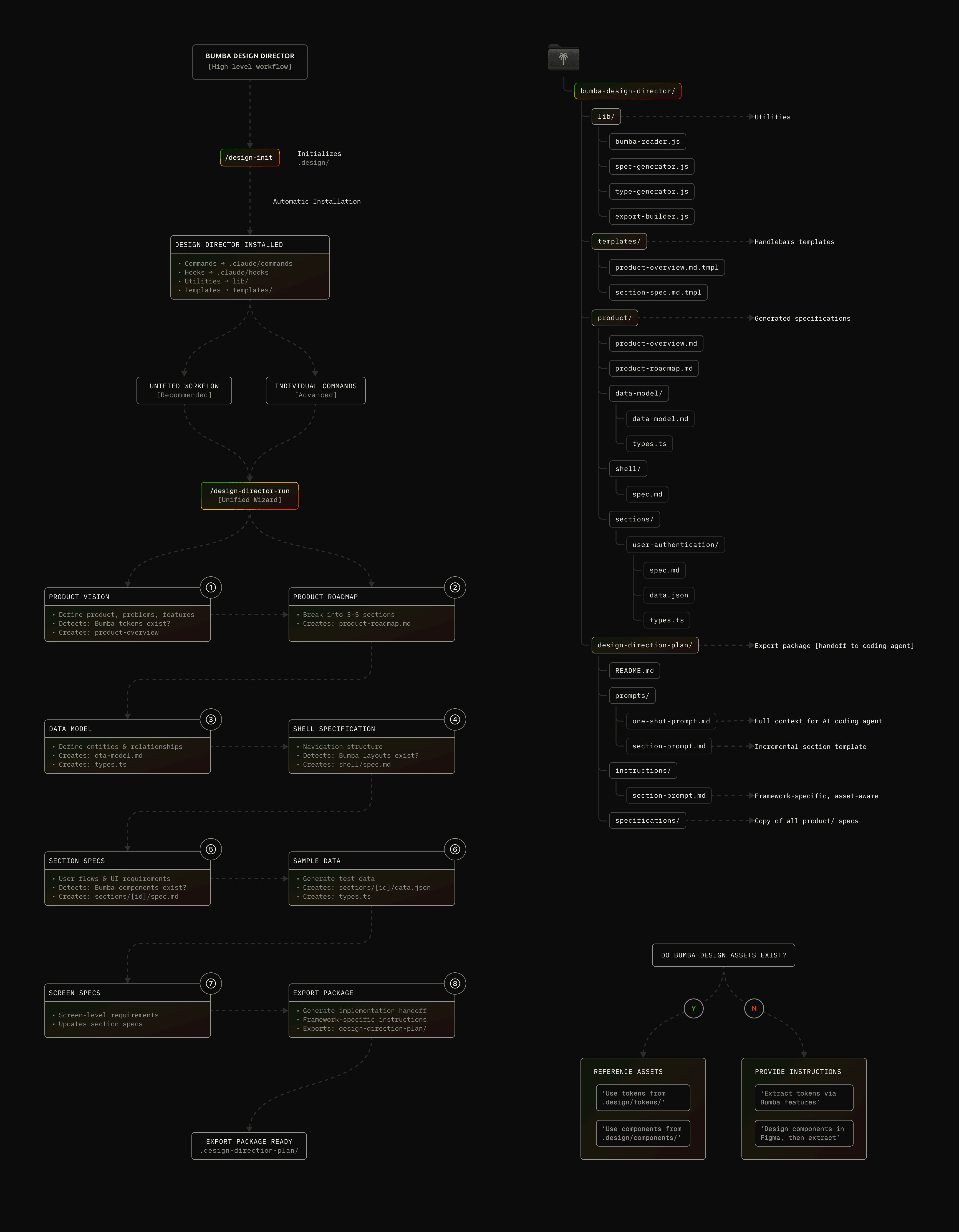
While building the design ecosystem, I found Brian Casel's Design OS — a sharp framework for bridging product vision and implementation through structured planning phases. It impressed me by formalizing the messy early work most teams skip. I wanted that rigor in a CLI-first, Claude Code-native form, so I adapted the approach into Design Director: a command-line questionnaire that runs the same planning discipline without a separate React app. The key difference: Design Director doesn't invent new visual specs. It references the Bumba Design Registry — tokens and components already extracted from Figma — so specifications point at real design-system assets instead of defining them from scratch. It reads from .design/, understands your framework preferences, and exports a complete implementation package: ready-to-use prompts for coding agents, milestone instructions, auto-generated TypeScript types, sample data. A 30–60 minute session via /design-director-run, or one phase at a time.
[PROCESS STEPS]
1. PRODUCT VISION
PRODUCT ROADMAP
3. DATA MODEL
SHELL SPECIFICATION
SECTION SPECIFICATION
SAMPLE DATA GENERATION
SCREEN SPECIFICATION
EXPORT PACKAGE
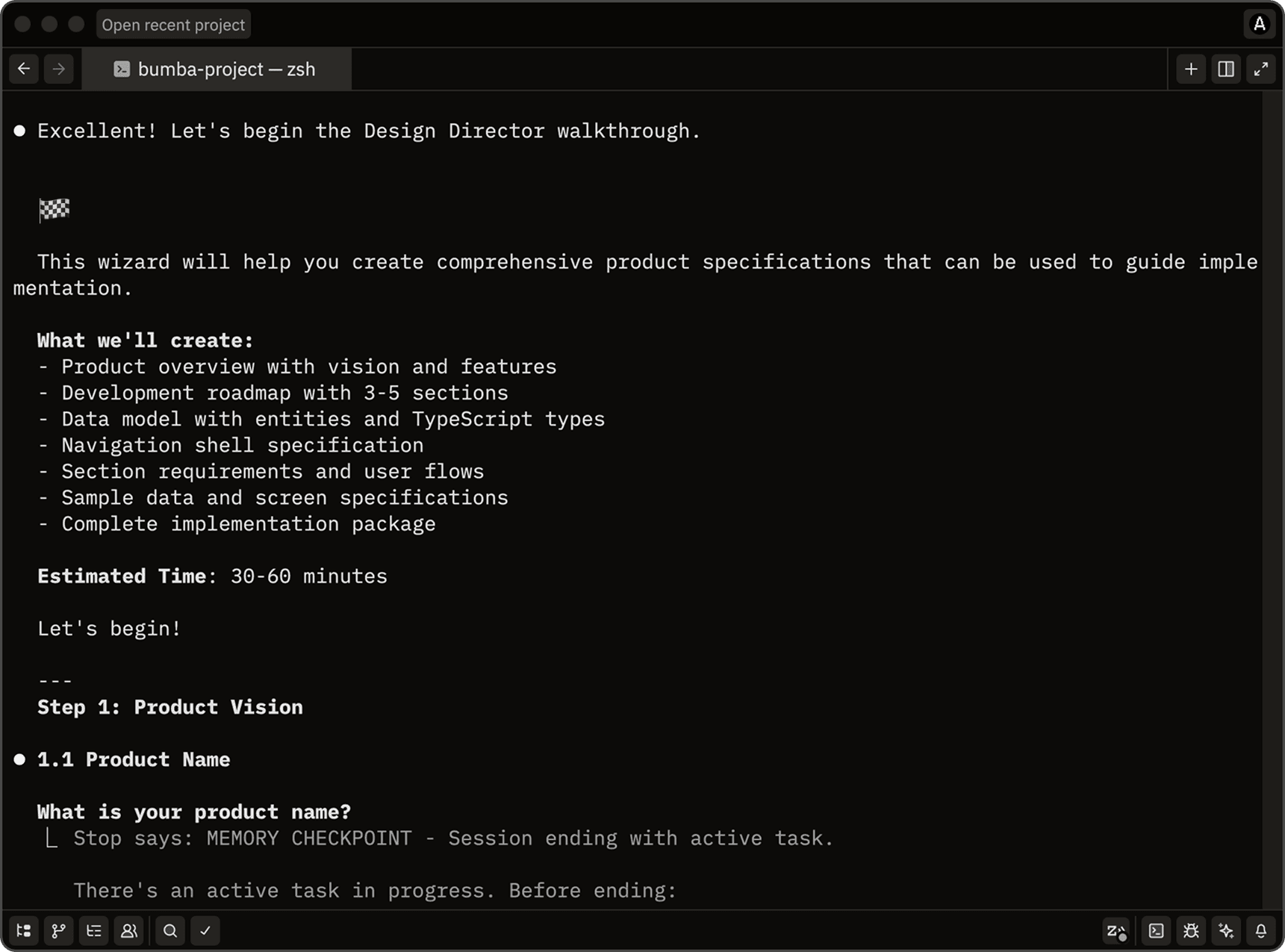
[CLI IMMEDIACY]
Adapting Design OS to the CLI removes the friction of running a separate app, and the system works against extracted design-system assets when they exist.
[DESIGN DIRECTOR CONTD]
Building this taught me product development actually needs two complementary specs: engineering-focused (architecture, APIs, data flow — the PRD) and design-focused (user flows, interface requirements, visual implementation — Design Director). Design Director captures what you're building from the design side, assuming you've settled why elsewhere. Used together, engineering specs guide the backend, design specs guide the frontend, and the data contracts between them are where a developer reconciles the two — which is exactly how real product teams already work.
BUMBA STORYBOOK THEME
[DESIGN SYSTEM AUTOMATION]
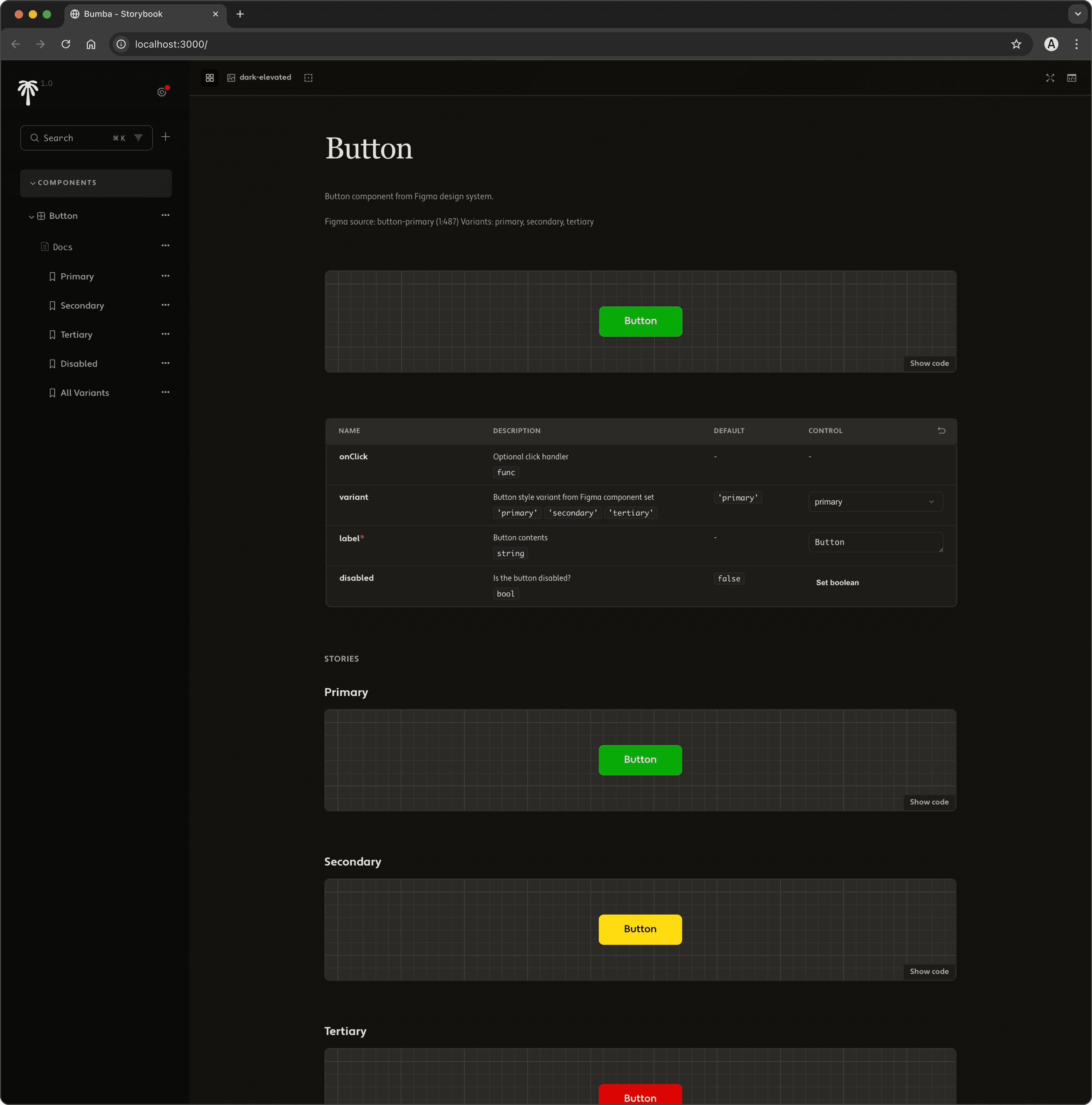
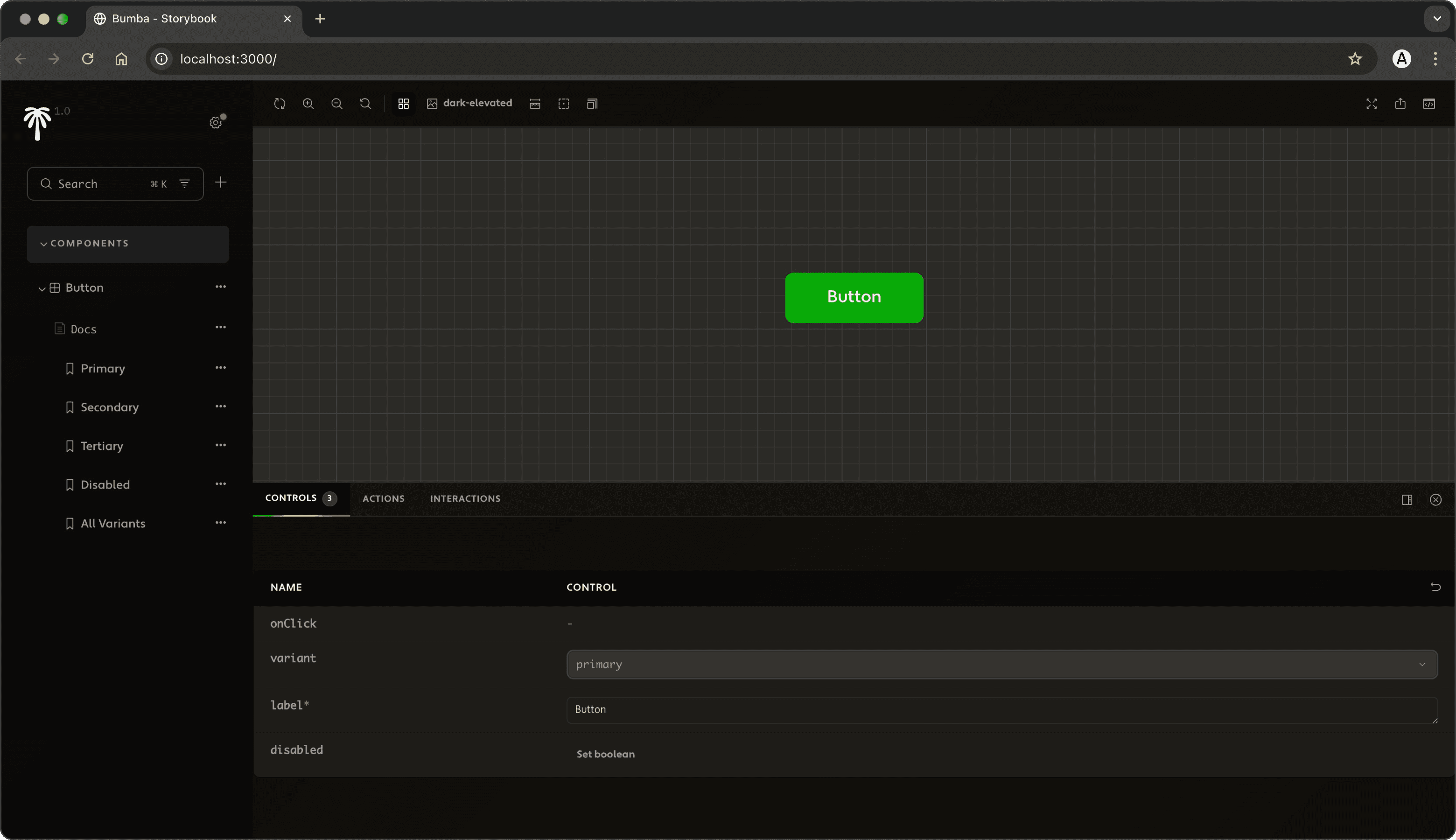
Building a coherent design system taught me visual consistency has to hold across every touchpoint, not just the final product. Default Storybook, while functional, felt disconnected from the Design Catalog I'd built — so I themed it to match: warm olive-tinted darks instead of sterile grey, the signature six-color gradient used sparingly, Freight Text / Freight Sans / SF Mono throughout. Three coordinated files (theme.js, manager CSS, preview CSS) all read from shared custom properties so changes propagate cleanly. Not superficial branding — architectural coherence, so Bumba reads as one ecosystem rather than a pile of disconnected tools.
[COMPONENT DETAIL]
Storybook's value for design-dev collaboration is obvious — one centralized place to manage assets.
[STORYBOOK AUTOMATION]
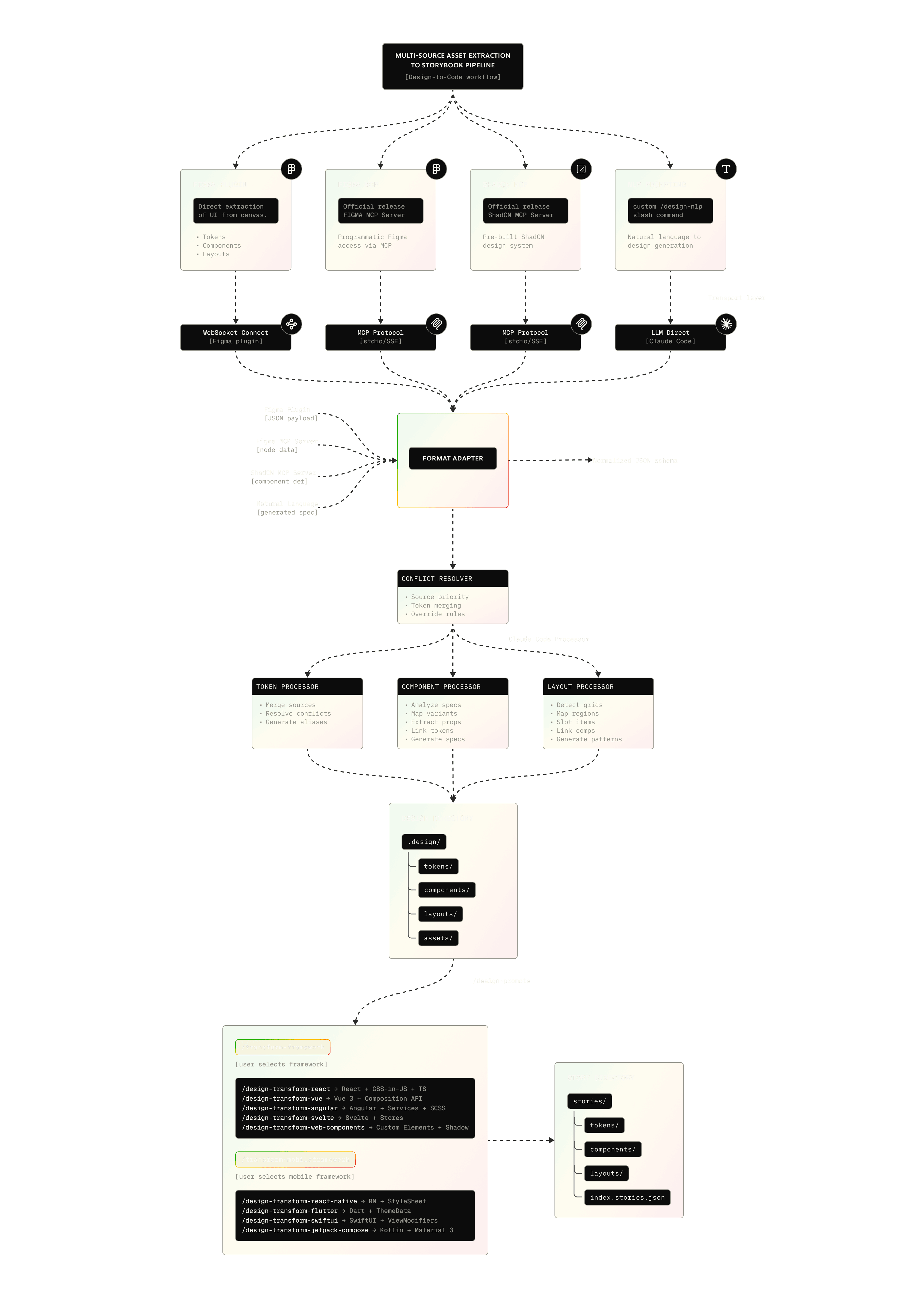
It's the final stage of the extraction-to-documentation pipeline. Assets converge from multiple sources — the Figma plugin, Figma MCP, ShadCN MCP, manual JSON, CLI installs — into .design/tokens/ as source-agnostic JSON. The Registry Manager assigns canonical IDs, tracks dependencies, and maintains a single source of truth. When a transform runs (e.g. /design-transform-react), framework optimizers generate production code and auto-invoke the Story Generator, which reads component props, builds interactive controls and variant stories, links back to source Figma URLs, and writes CSF3 stories — rendered inside the custom Bumba theme. Design file to branded documentation, no manual step in between.
BUMBA / FIGMA DESIGN PLUGIN
Loading repository...
[FIGMA DESIGN PLUGIN]
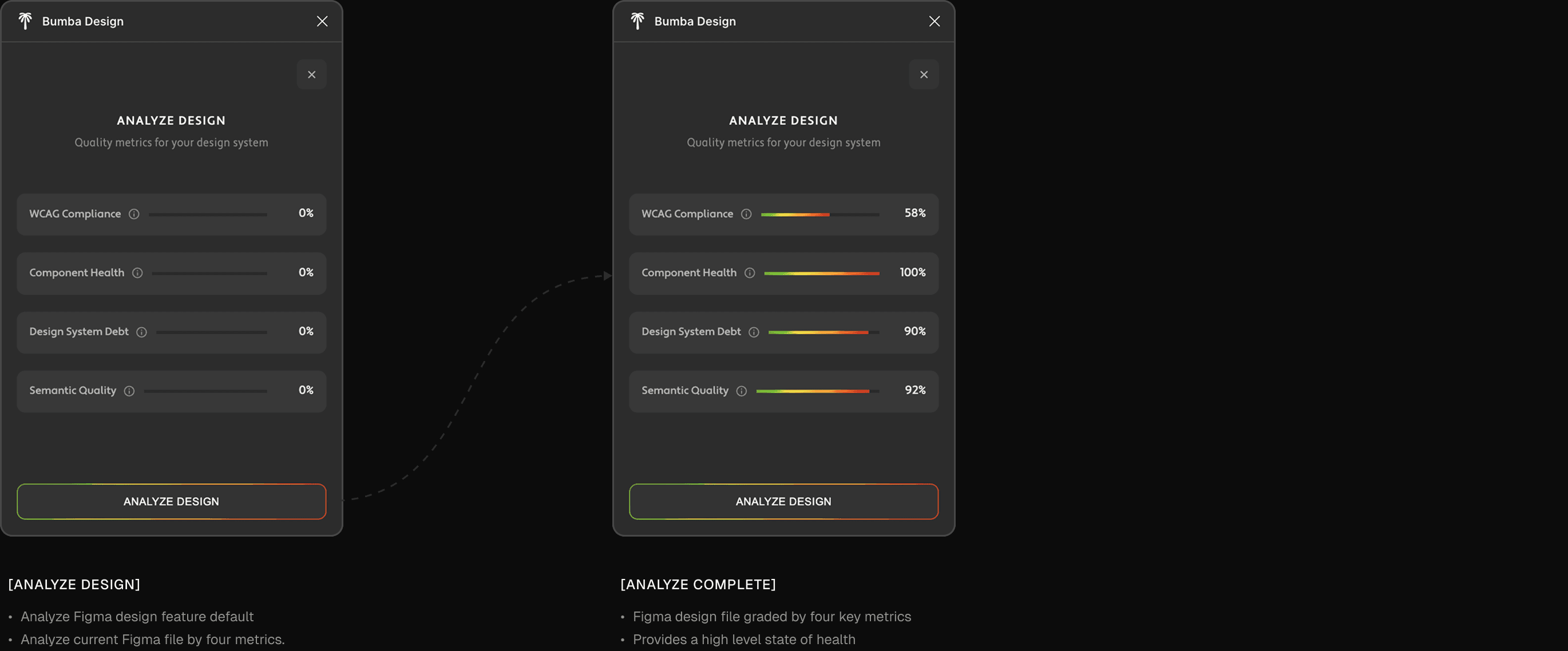
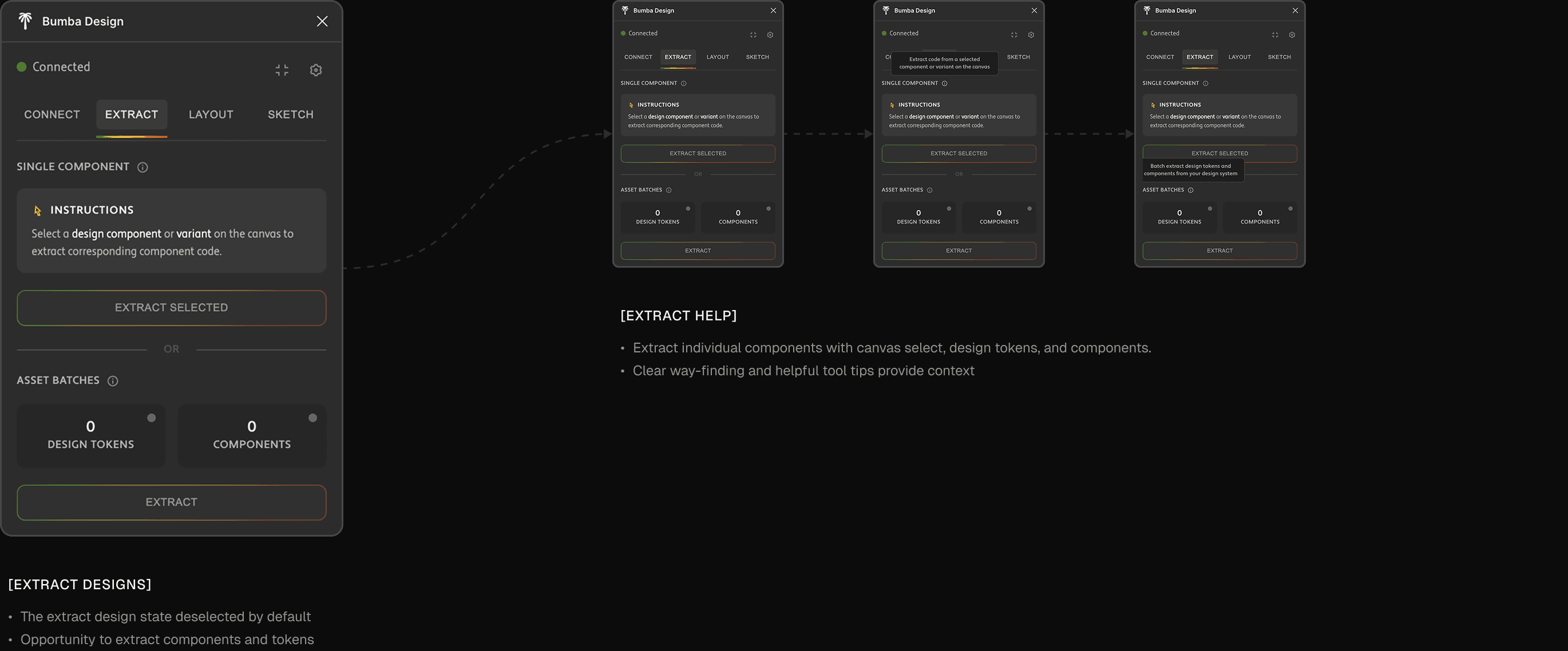
The plugin was the critical first mile of the pipeline — capturing design decisions straight from Figma into machine-readable formats the ecosystem could process. To be clear: this was never meant to compete with Figma's native extraction, Anima, or anything else. I have deep respect for Figma and the Figma MCP server; this was a purpose-built piece tailored to Bumba's workflows, used alongside those tools, not against them. Building it taught me how Figma's plugin architecture really works — code.js in the sandboxed backend with full API access, ui.html as a self-contained interface (Connect / Extract / Catalog / Analyze tabs). Figma's aggressive caching made iteration brutal — manual remove-and-reimport after every change — so I built a versioning build system that injects timestamps to force recognition, keeping editable src/ cleanly separated from generated dist/. It's not a simple exporter. It understands the semantic structure of Figma's styles — paint, text, and effect styles, plus inferred spacing from auto-layout and border radii from instances — and stamps each token with full provenance (file key, node IDs, style IDs, timestamps) so the Registry Manager can resolve conflicts when sources compete. A StyleCache gives O(1) dependency lookups, so the system captures which tokens a component actually uses, not just what exists — letting downstream transforms generate accurate imports.
[FIGMA PLUGIN WALKTHROUGH]
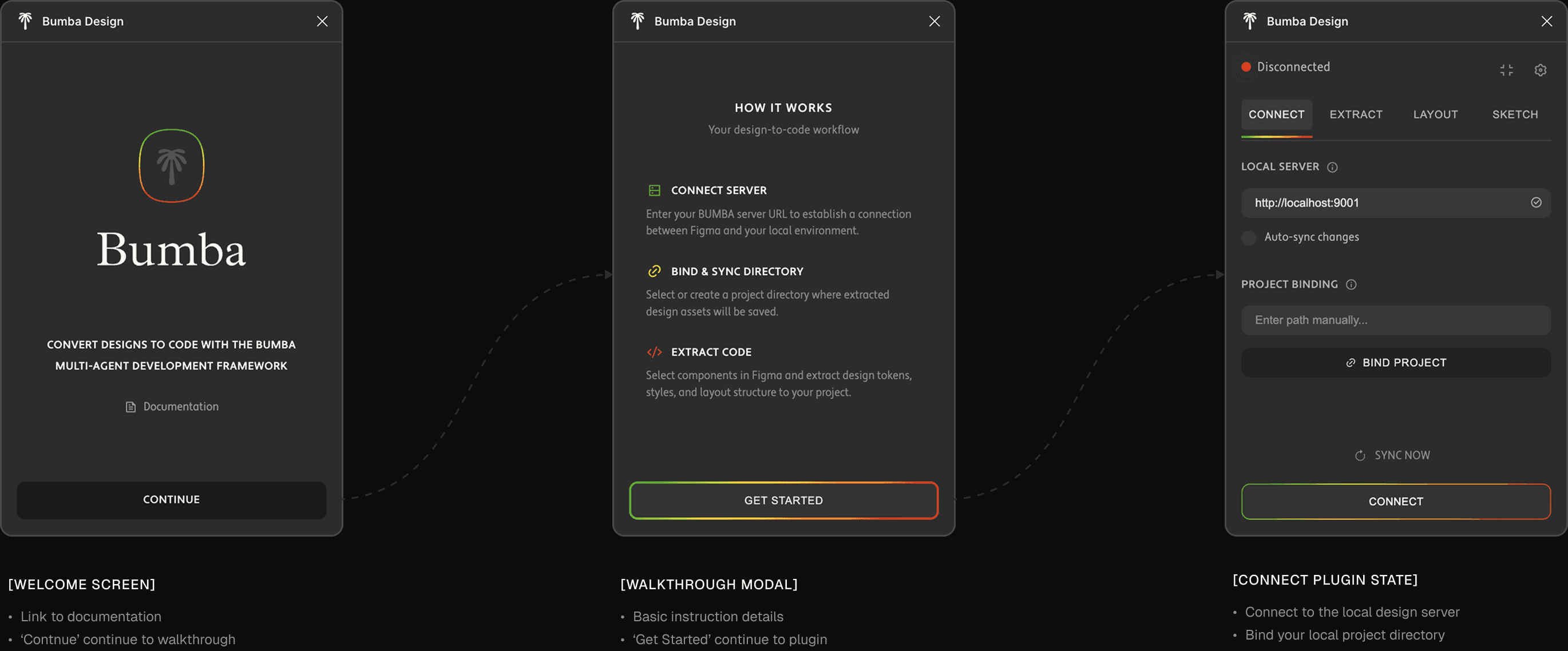
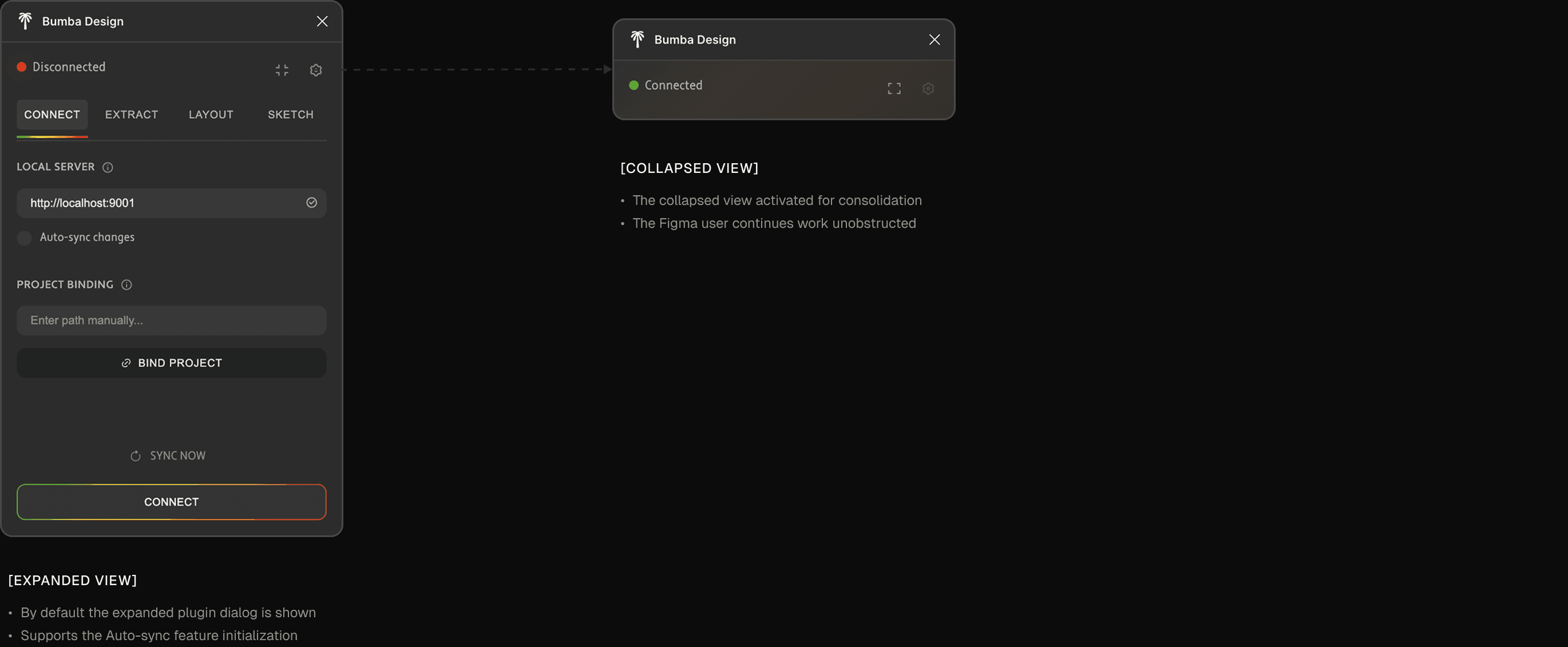
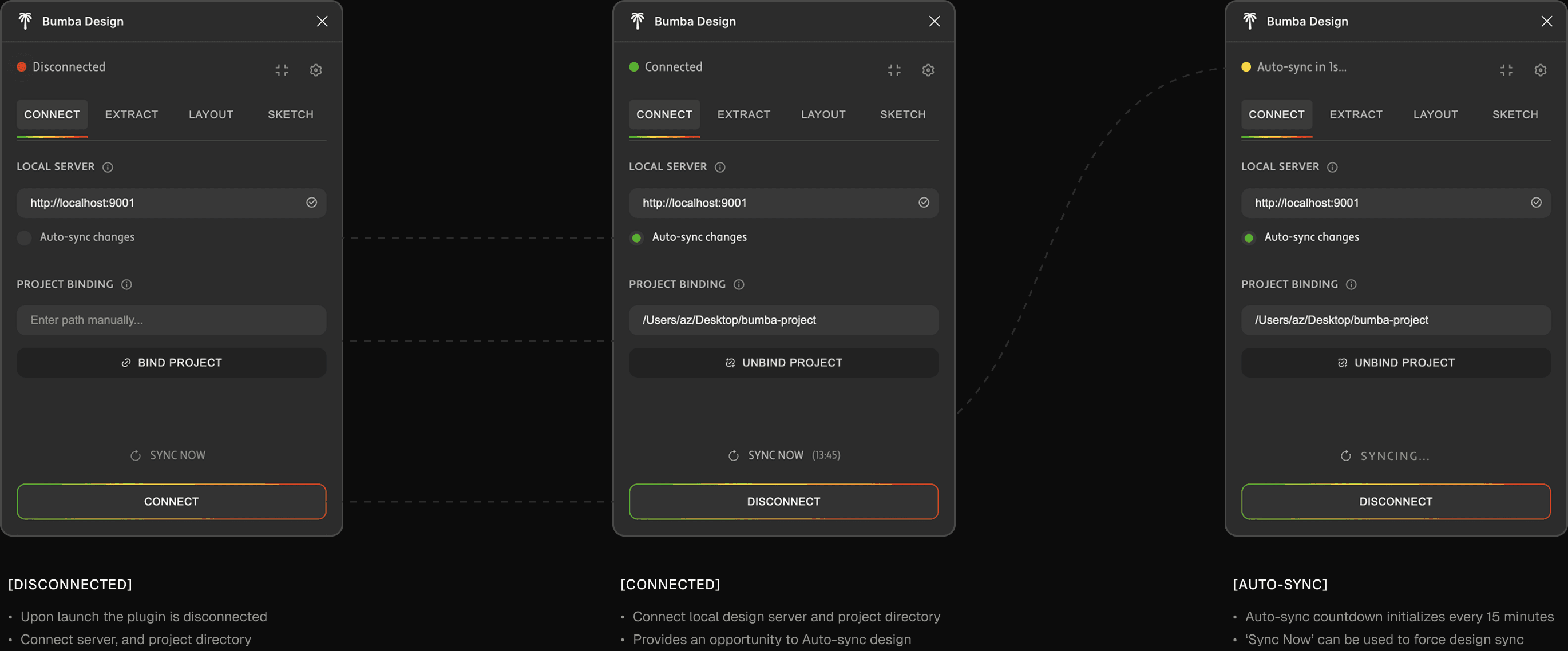
[FIGMA PLUGIN WALKTHROUGH]
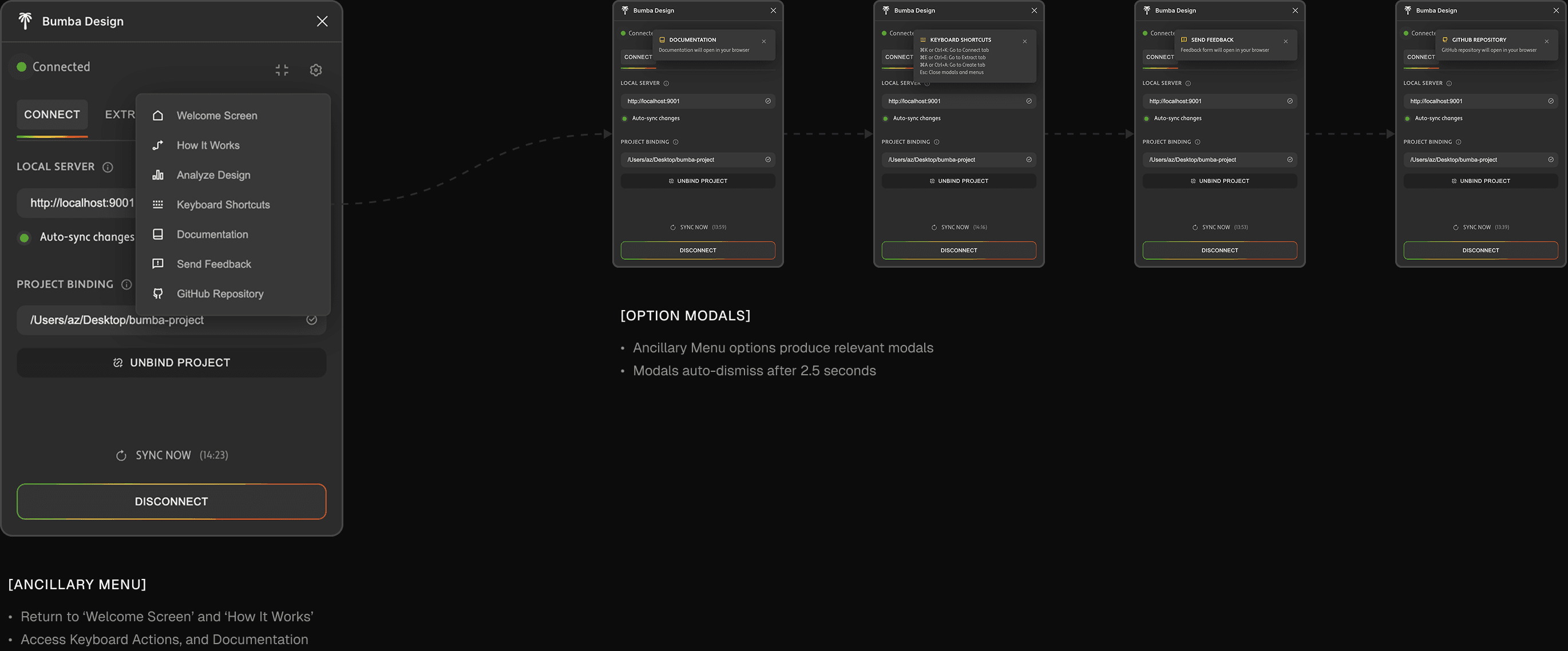
[CODE EXTRACTION]
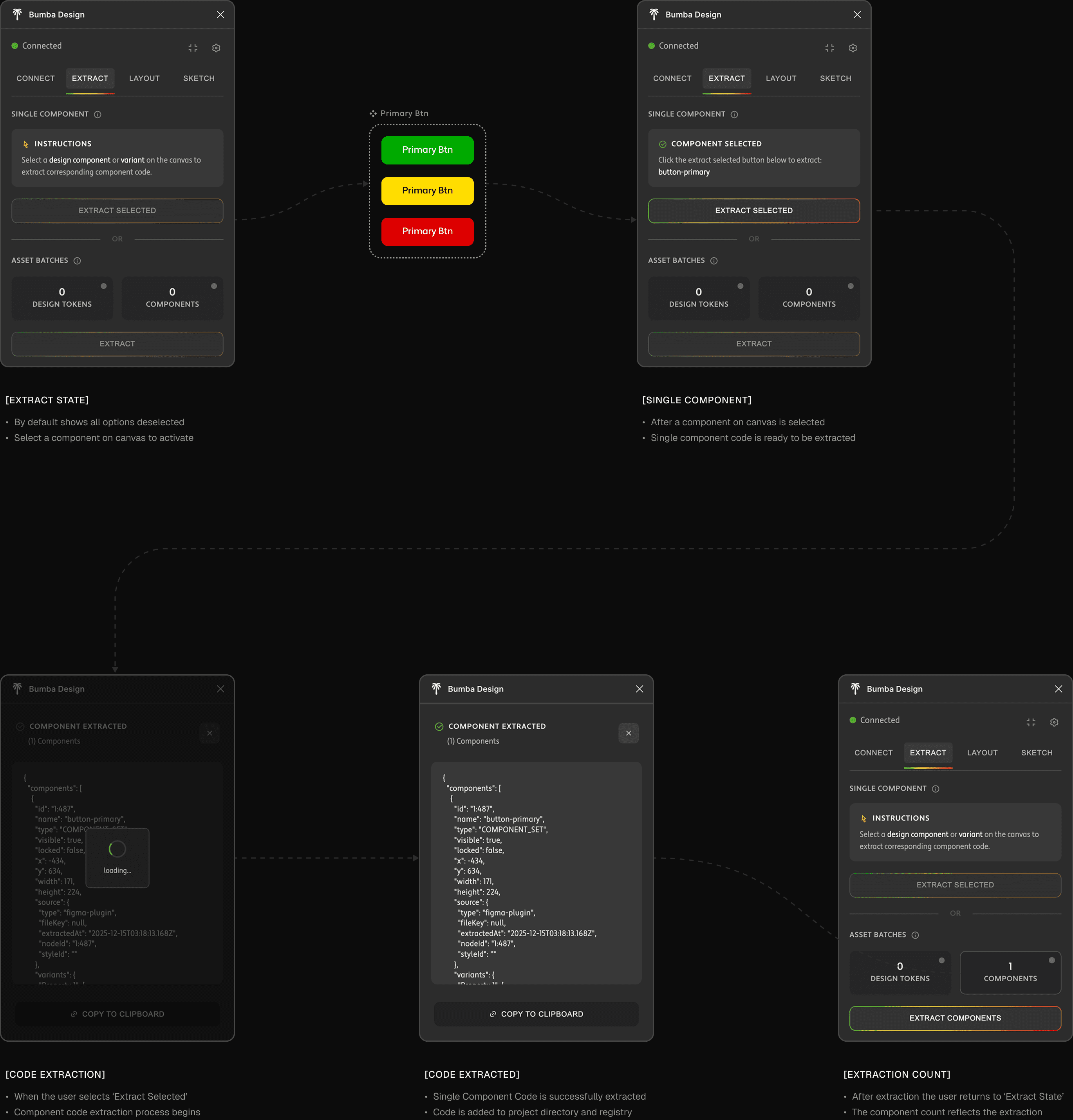
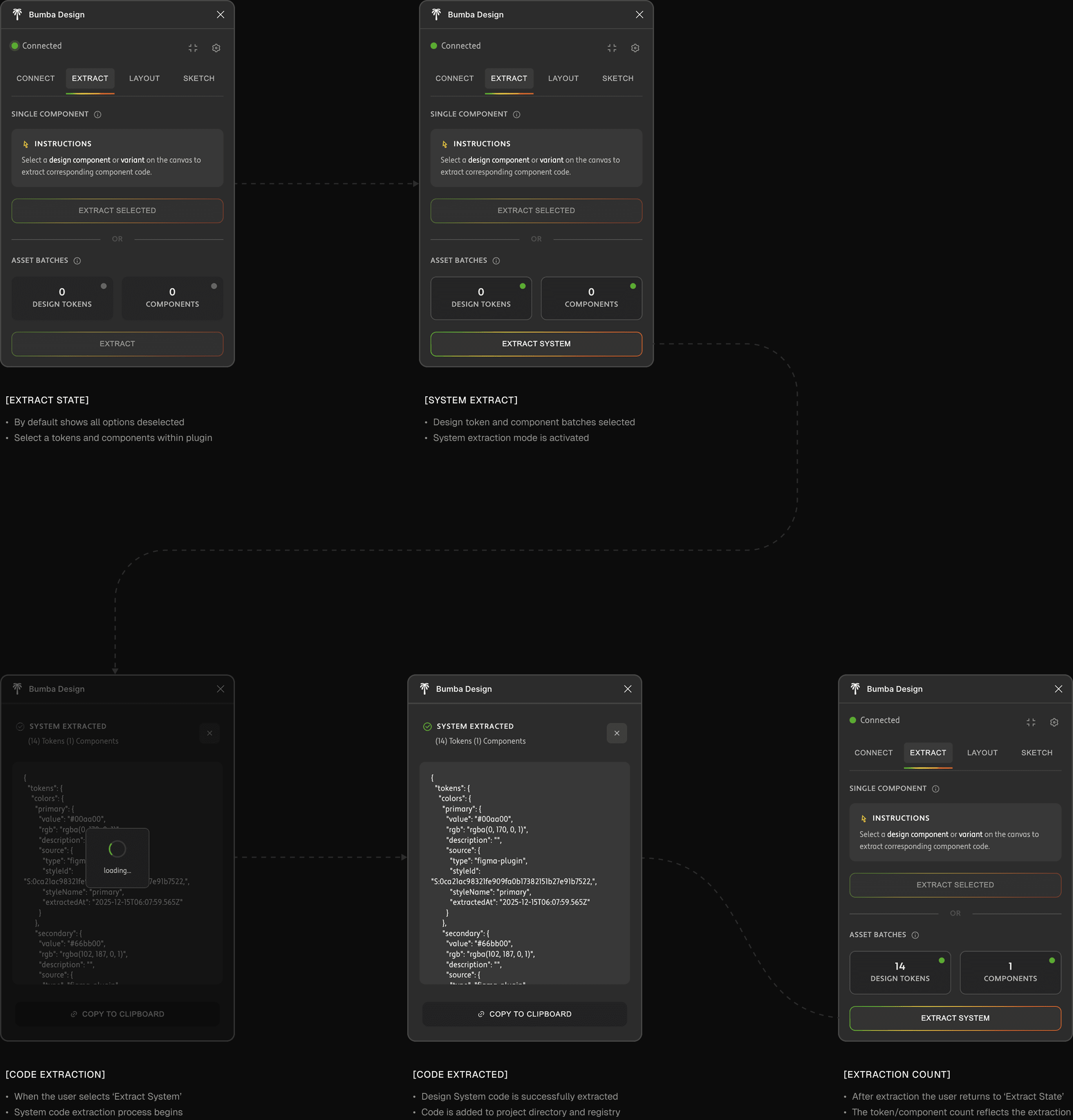
On extract, a TokenExtractor traverses Figma's style collections and nodes: colors via getLocalPaintStylesAsync() (solid fills, RGBA→hex), typography (family, weight, size, line height, letter spacing), spacing (the tricky one — inferred from auto-layout padding and gaps, deduped, sorted, named xs–xl), effects, and border radii. The assembled JSON payload either POSTs to the Bumba server or downloads as a file, then enters the Registry Manager's ingestion pipeline for canonical IDs and indexing.
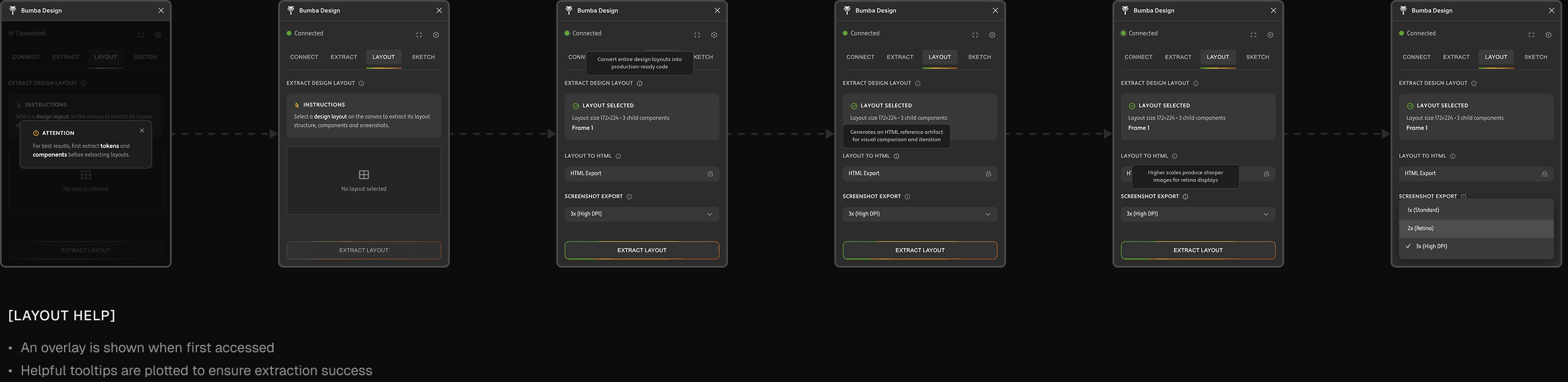
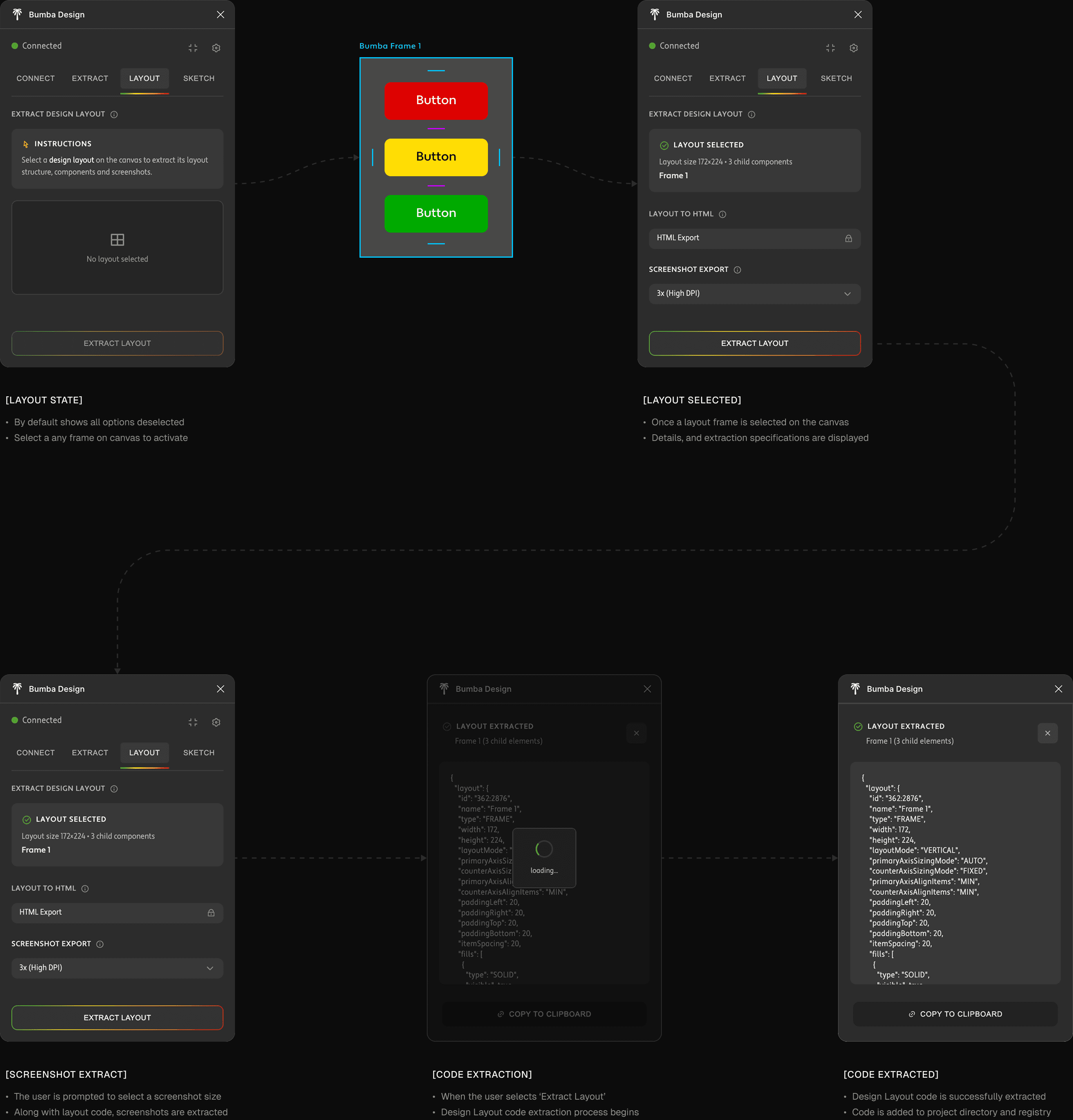
[FIGMA CODE EXTRACTION DEMO]
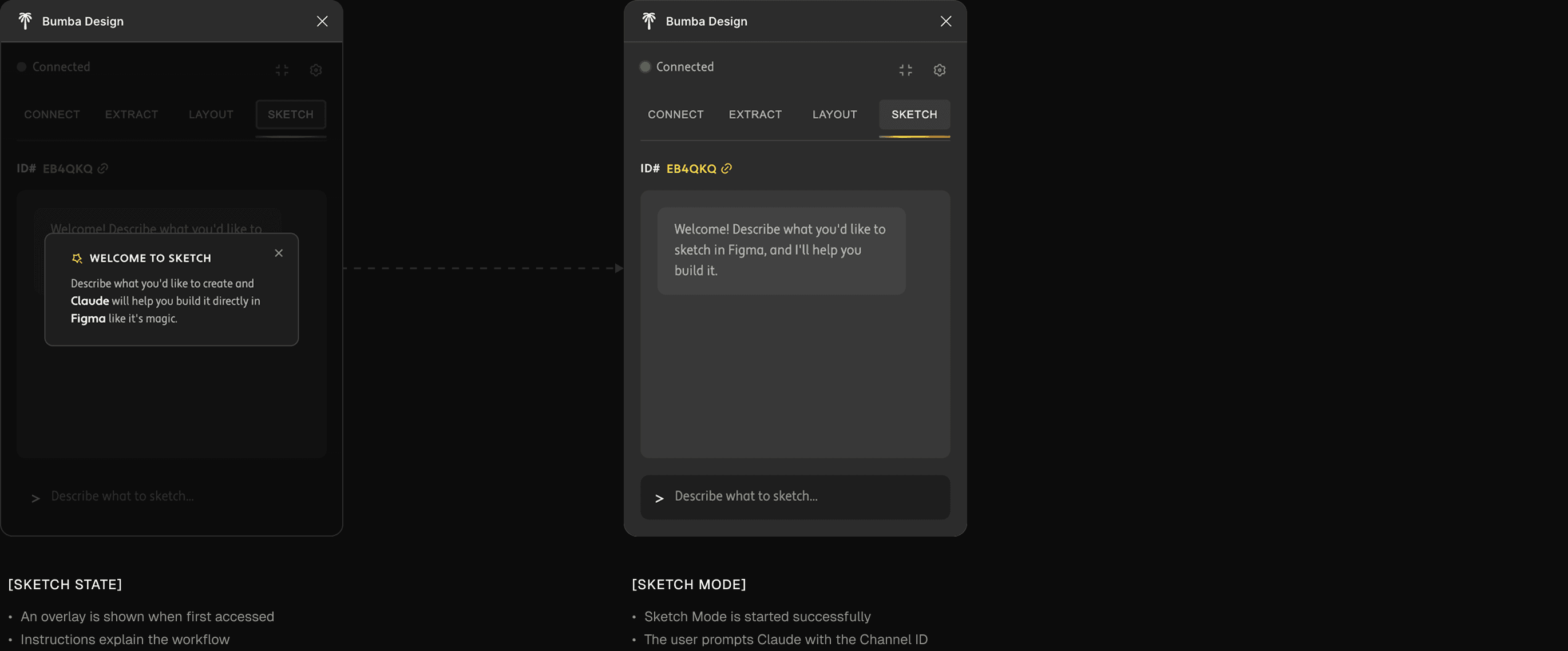
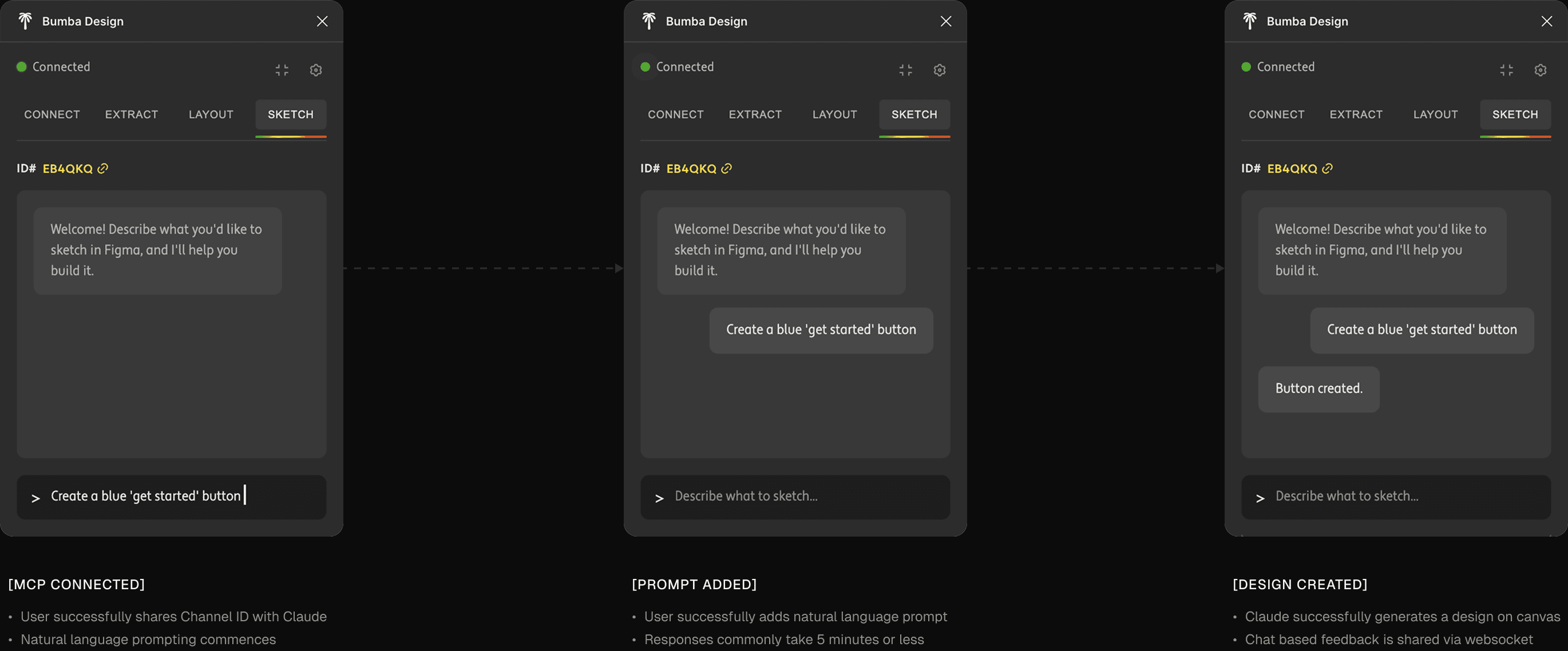
[SKETCH FEATURE]
Conversational design comes via a Claude-Talk-To-Figma MCP server (adapted from Sonny Lazuardi's work). Four layers — Claude Desktop → MCP server → WebSocket (port 3055) → Figma plugin — turn natural language into precise API calls: "create a dashboard with sidebar nav, header, and card metrics" breaks into atomic commands streamed back with live progress. It doesn't replace extraction — designers iterate conversationally with Claude, then extract the finalized result into the registry.
[PLUGIN SKETCH FEATURE]
BUMBA DESIGN CATALOG
[STORYBOOK ALTERNATIVE]
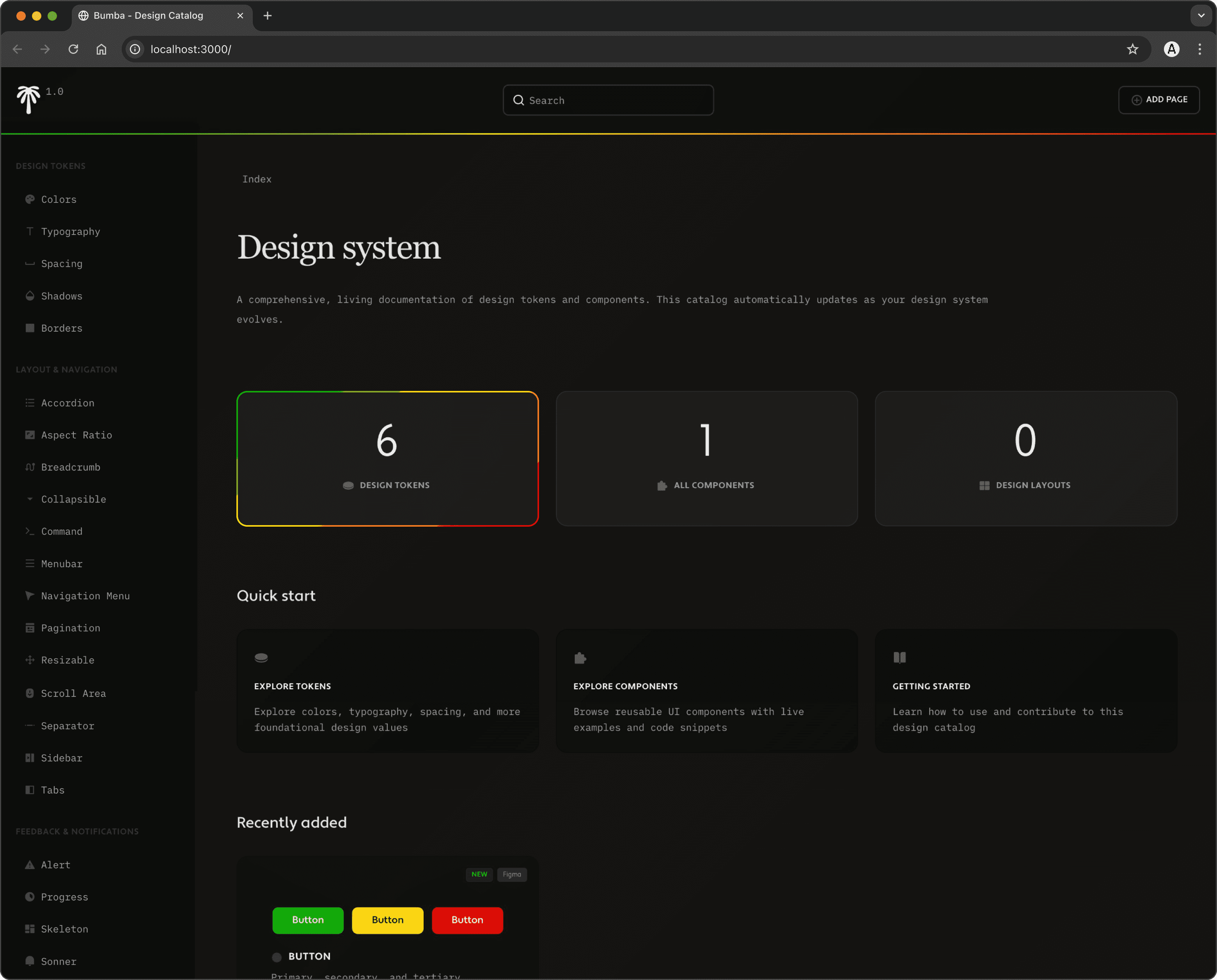
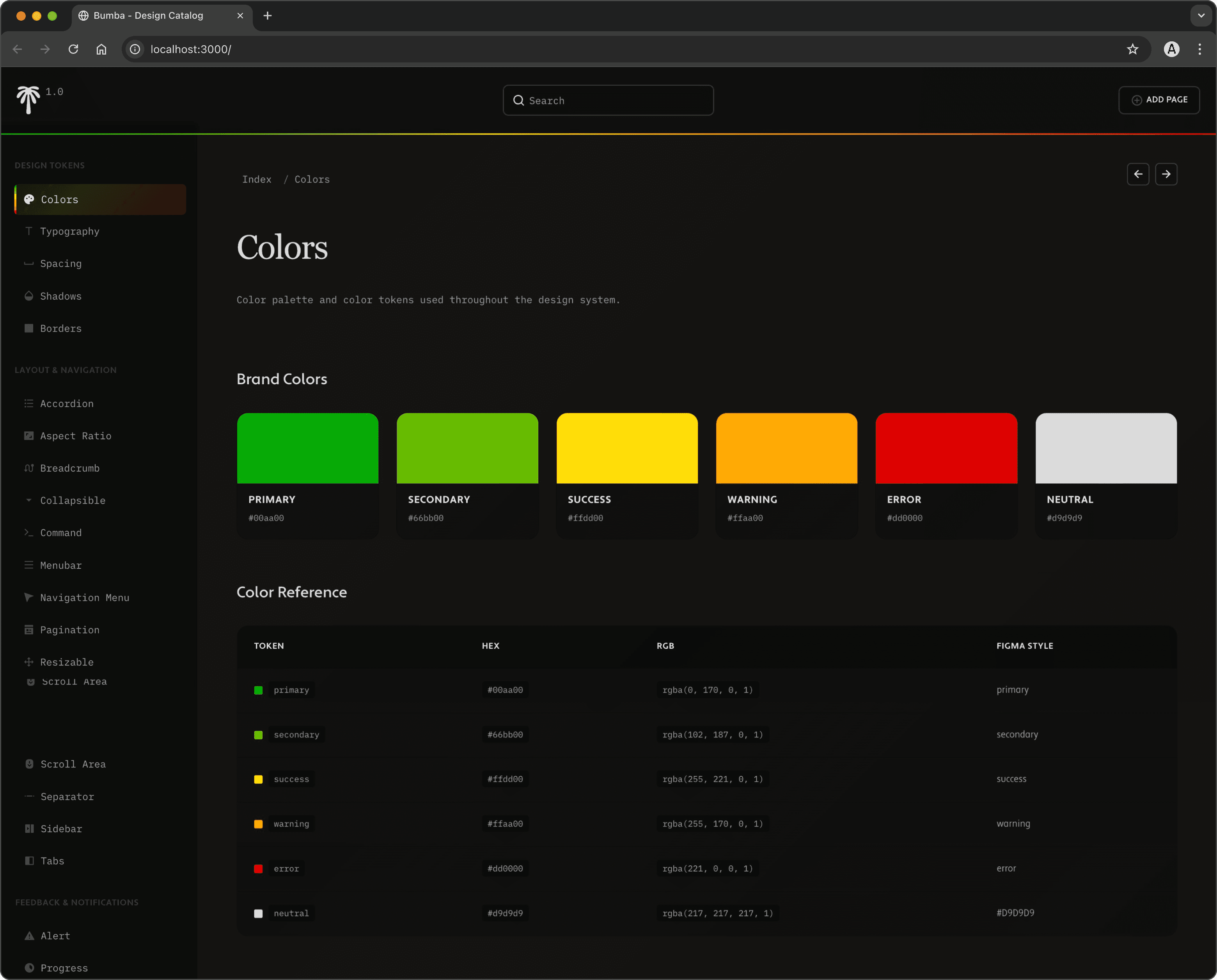
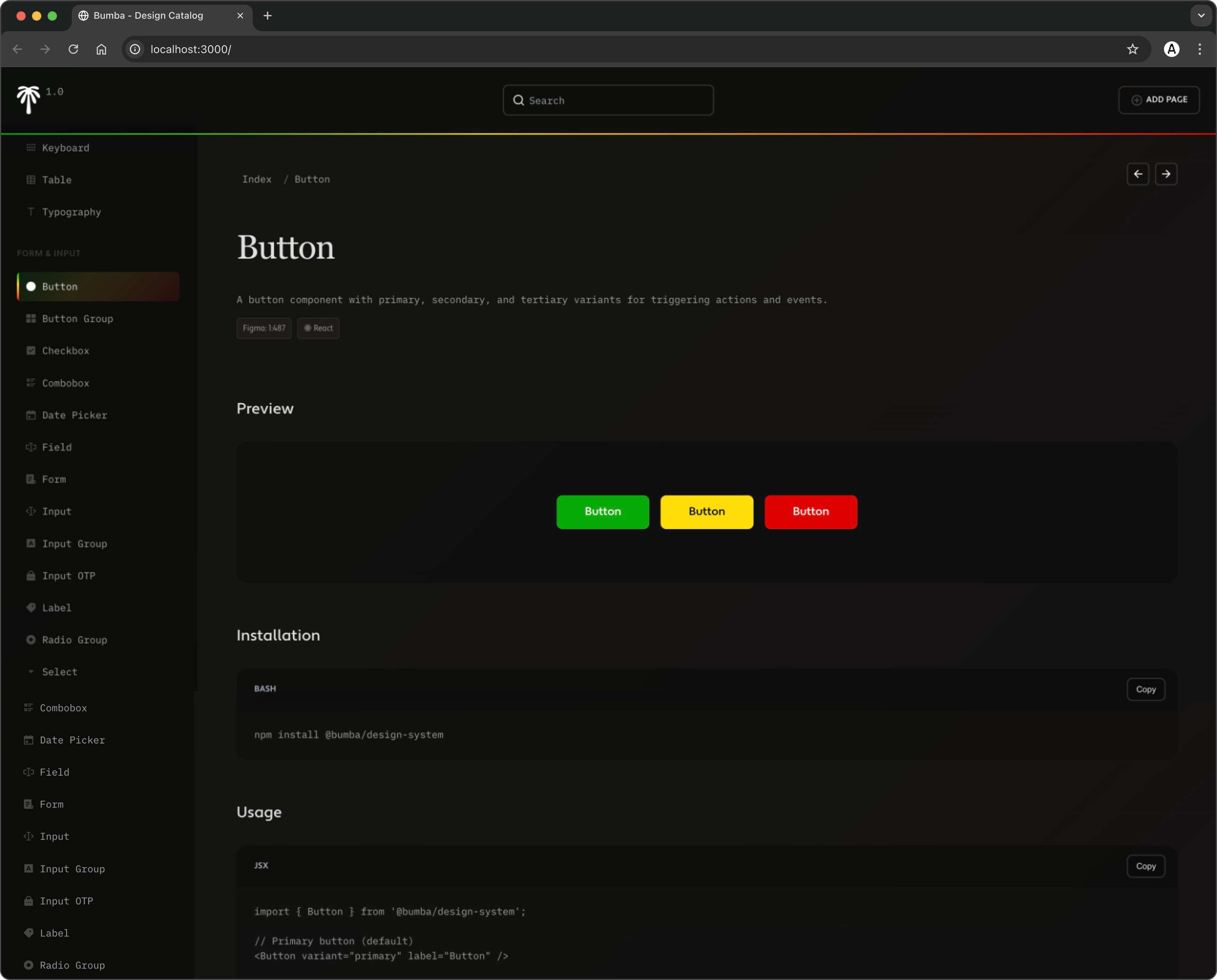
Where Storybook is a workshop, the Design Catalog is an art gallery. Served via npm run catalog, it embraces Bumba's visual identity more fully than even the custom Storybook theme — immersive dark interface, the six-color gradient, warm olive backgrounds, Freight typography. It prioritizes visual discovery over interaction: tokens as elegant swatches, type specimens at real sizes, spacing as graduated bars, shadows on sample cards, components in their natural state. A ComponentPageRouter organizes pages by pattern detection, no manual categorization. It's for the moments Storybook isn't built for — stakeholder presentations, design reviews, onboarding, or just leaving open as an ambient, living mood board. It styles its own interface with the very tokens it documents — the design system demonstrating itself. Storybook answers "how does this component behave?" The Catalog answers "how does our design system feel?" — and sometimes that vibes-first read communicates intent better than any control panel.
[DASHBOARD]
The index view shows design-system status at a glance, with onboarding instructions.
[DESIGN CATALOG WALKTHROUGH]
[TOKENS AND COMPONENTS]
Dedicated pages for each component and token type, with the option to create new ones.
[DESIGN LAYOUTS]
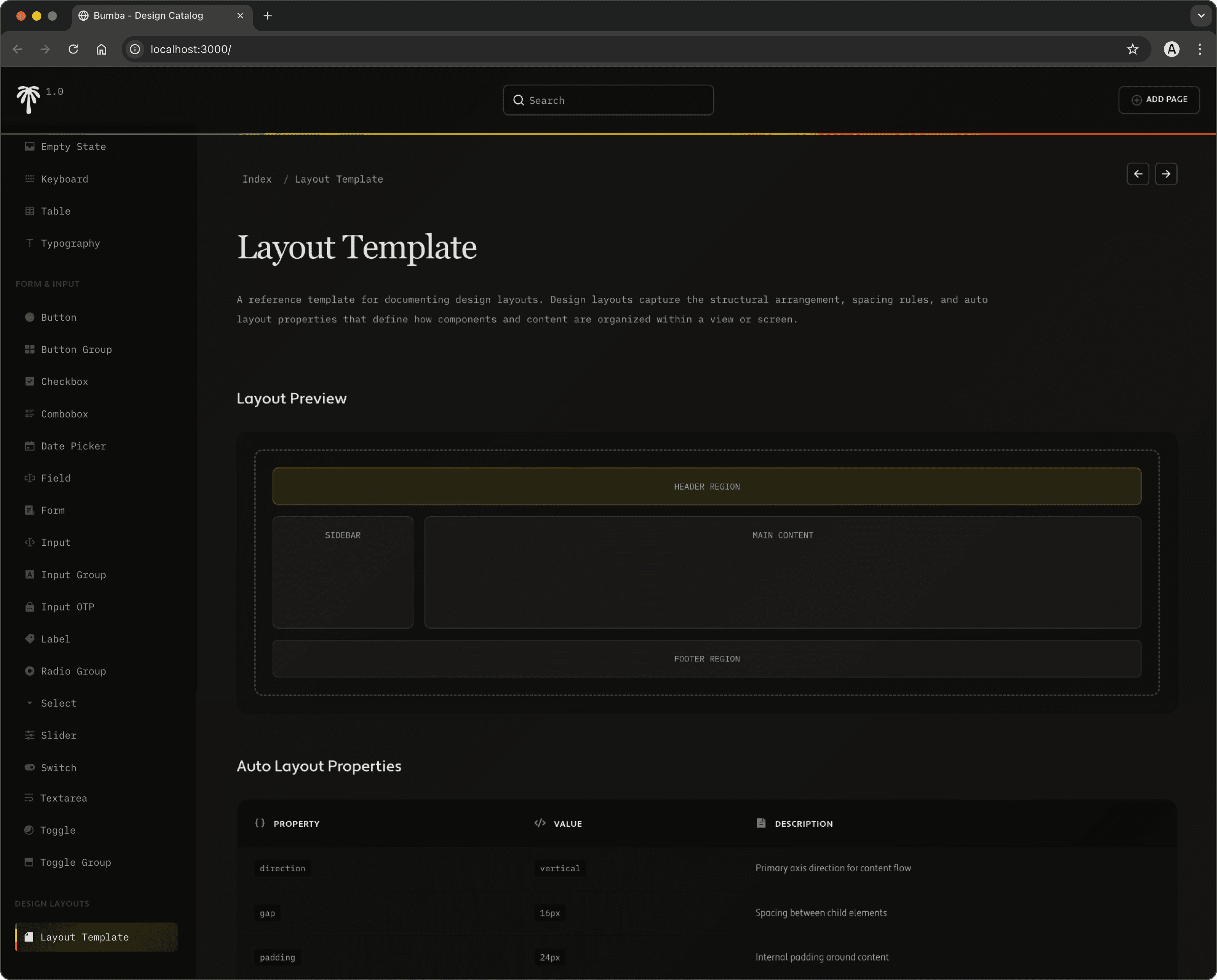
Layouts are treated as their own asset type, since they're composed of atomic design assets.
DESIGN LAYOUT TRANSFORMATION
[PROGRESSIVE CONTEXT]
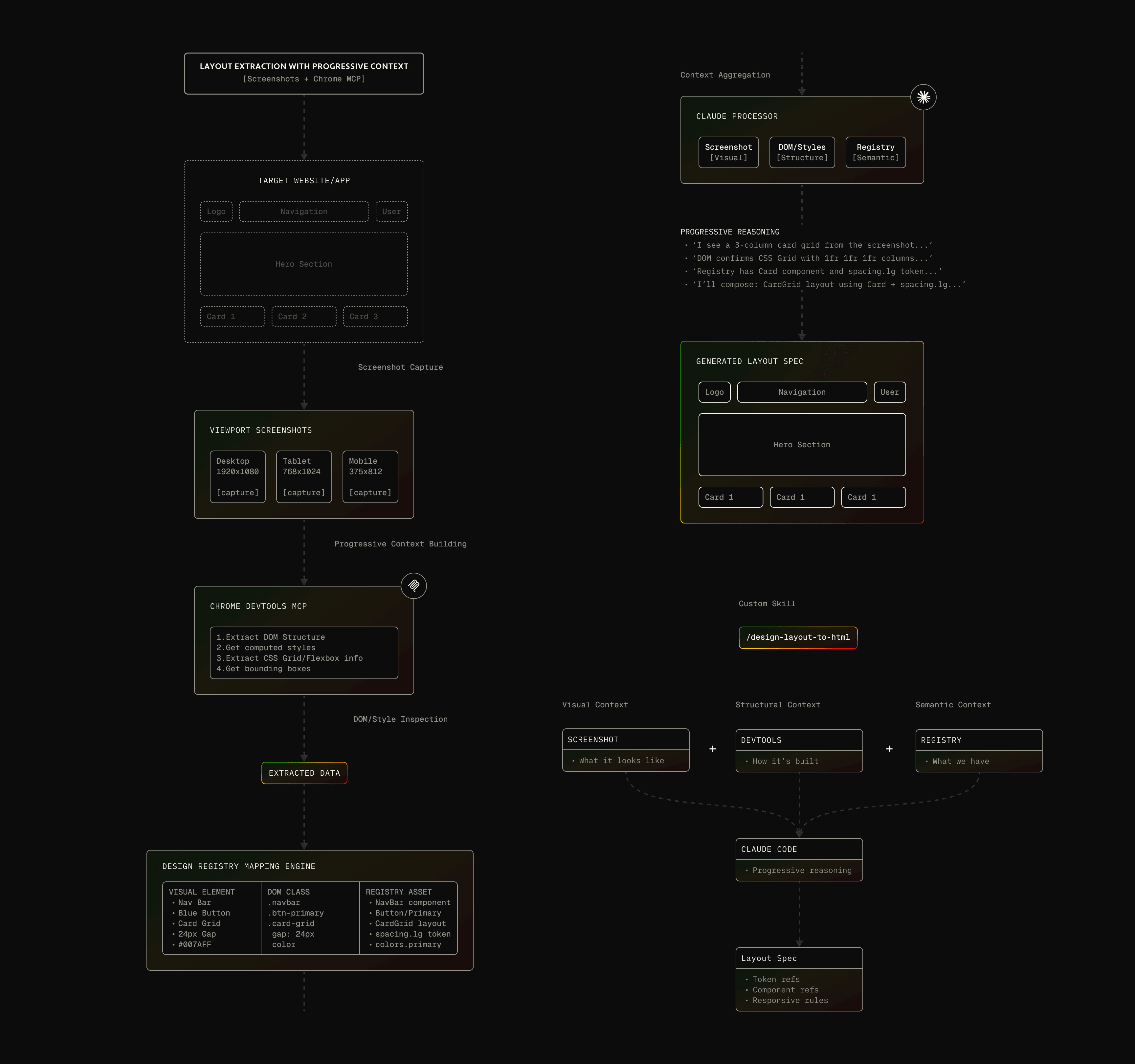
Beyond tokens and isolated components, I built a layout-to-code pipeline that turns whole Figma screens into production framework code through five stages, each adding precision by layering context. It starts with the plugin extracting two things: layout.json (structure — component references, flex properties, spacing, hierarchy) and screenshot.png (visual ground truth). The middle stages generate a reference.html from the JSON, then run a three-pass visual validation loop where Claude — with Chrome DevTools MCP — renders, screenshots, compares against the design, and corrects: a 24px gap rendering at 16px, alignment off by 8px. Parity climbs pass over pass, 85% → 95% → 98%, logged in a validation report. The final stage uses that proven HTML as a reference to generate framework code with correct component imports and validated spatial structure. The philosophy is incremental understanding — structure → visual intermediate → validated intermediate → framework output — each layer feeding the next, so layouts match pixel-for-pixel instead of just structurally approximating. (Built on Chrome MCP; with Claude Code's native browser support I'd likely simplify this while keeping the same progressive approach.)
[DESIGN SYSTEM EXTRACTION]
[LAYOUT TRANSFORMATION]
EXPLORE UI/UX WORKFLOWS
Loading repository...
[MULTI-AGENT DESIGN WORKFLOWS]
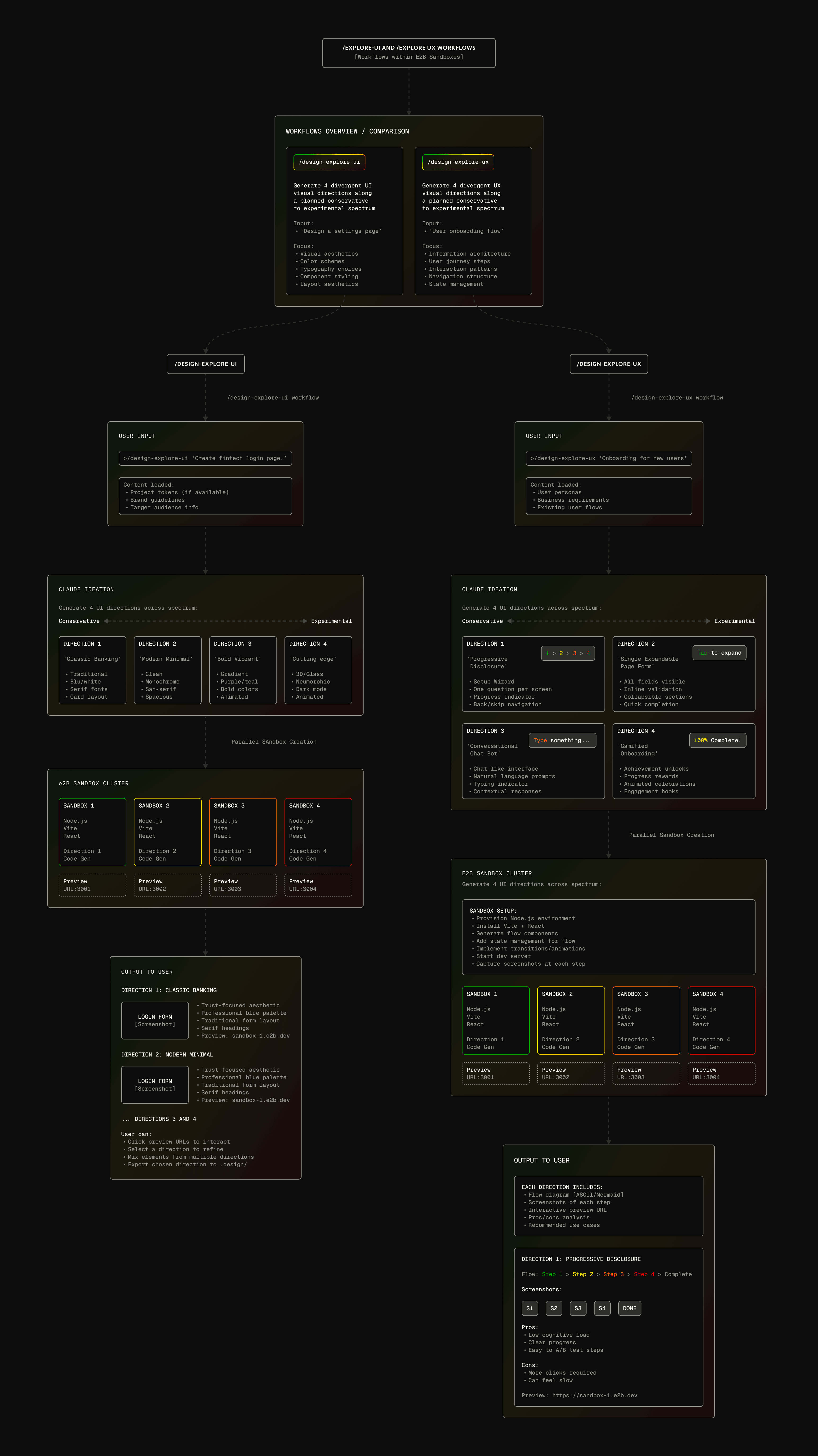
Most design tooling forces linear iteration — create, review, revise, repeat. The /design-explore-ui and /design-explore-ux commands do the opposite: spawn four agents in isolated sandboxes generating divergent directions at once, along a conservative-to-experimental spectrum. "Dashboard layout for an analytics page" launches four independent Claude agents in E2B sandboxes (falling back to Git worktrees), each with identical access to the registry but a different constraint — rigid and conventional, structured with subtle emphasis, expressive with intentional grid breaks, or experimental at the edges. The critical detail: all four use the same components and tokens — they differ only in how assets are applied, so whichever direction wins is already compatible with the design system. Each writes to .design/explorations/, compressing weeks of sequential iteration into one concurrent session. Integration with Bumba Memory MCP closes the loop — capture a winning agent's full reasoning into memory, then query it in natural language later, so exploration accumulates into institutional knowledge instead of evaporating when the session ends.
[EXPLORE UI WORKFLOW]
The system now produces much higher-quality outputs; recutting this video soon.
BUMBA VOICE SYSTEM
Loading repository...
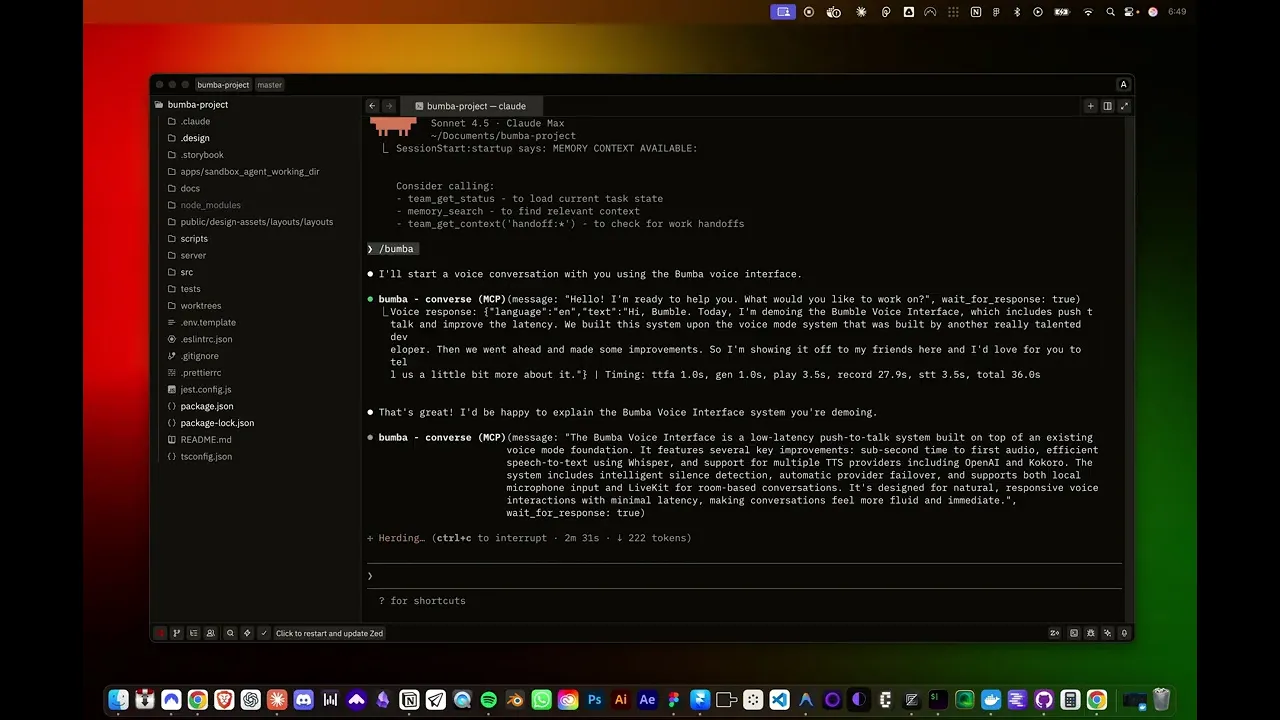
[TALKING DESIGN WITH CLAUDE]
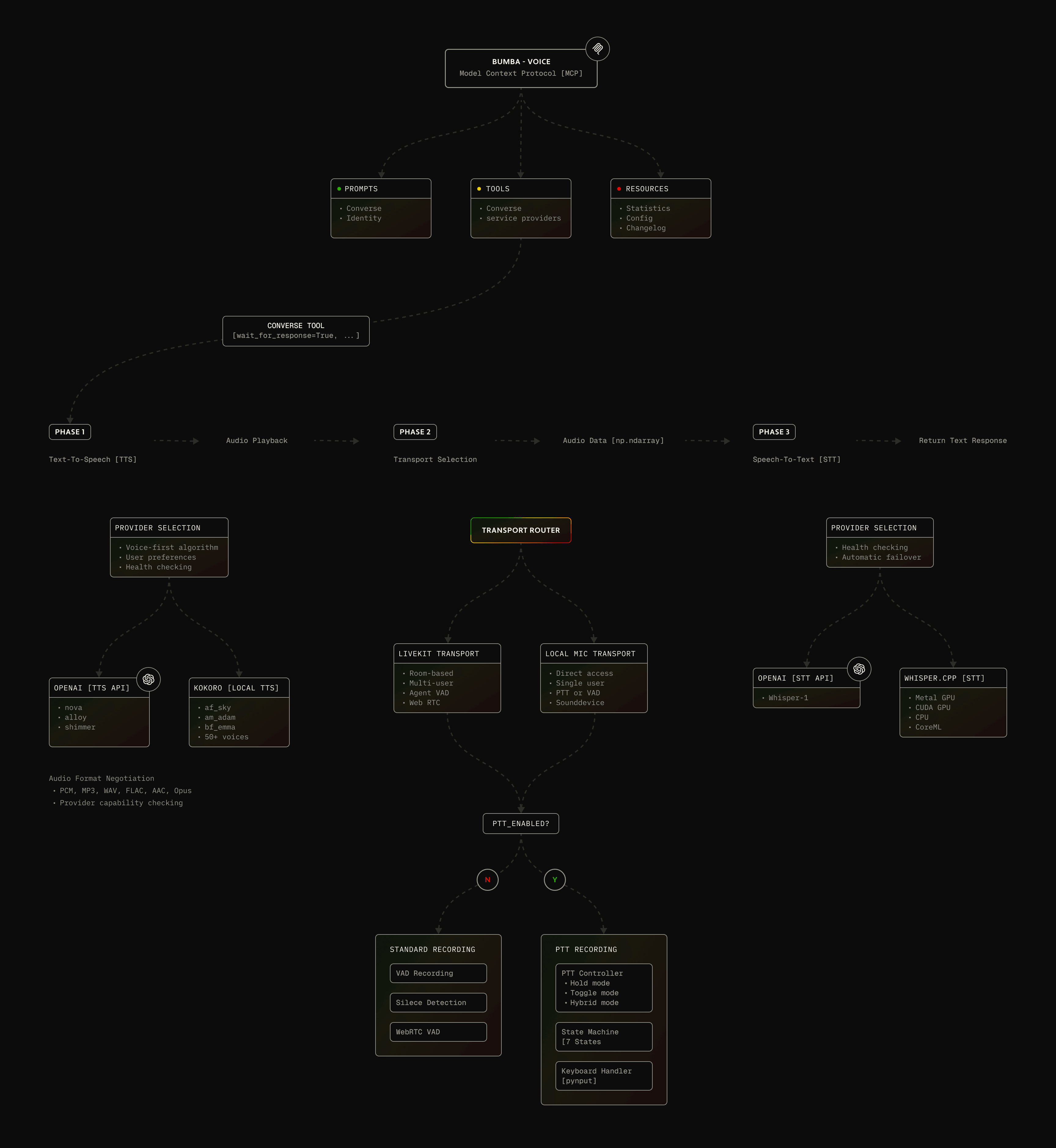
Built on mbailey's VoiceMode over eight intensive weeks into a production MCP server with ~60% faster response times than traditional voice flows. It's multi-provider by design — OpenAI for premium cloud TTS/STT, Whisper.cpp for on-device STT with Metal/CUDA acceleration, Kokoro for 50+ local multilingual voices, LiveKit for real-time rooms — with a deliberate bias toward local models so it can run cost-free. A provider registry handles health-checked O(1) lookups, preference-based voice selection, and automatic failover between local and cloud without interrupting the conversation. Deployment runs native (launchd / systemd), no Docker complexity. (Anthropic has since released Chatterbox; I'd consider rebuilding portions around it while keeping the multi-provider flexibility.)
[DESIGNING PTT SYSTEMS]
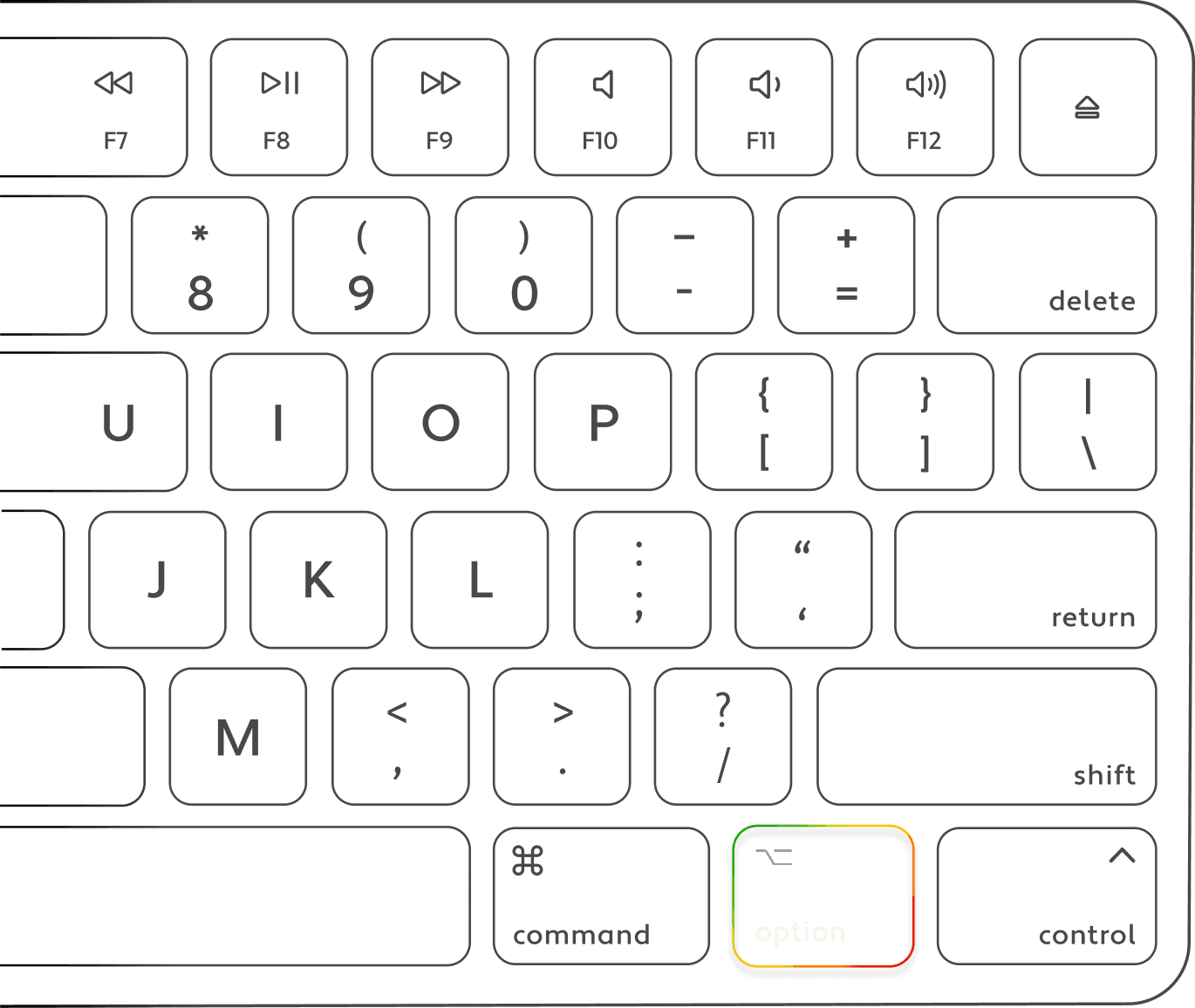
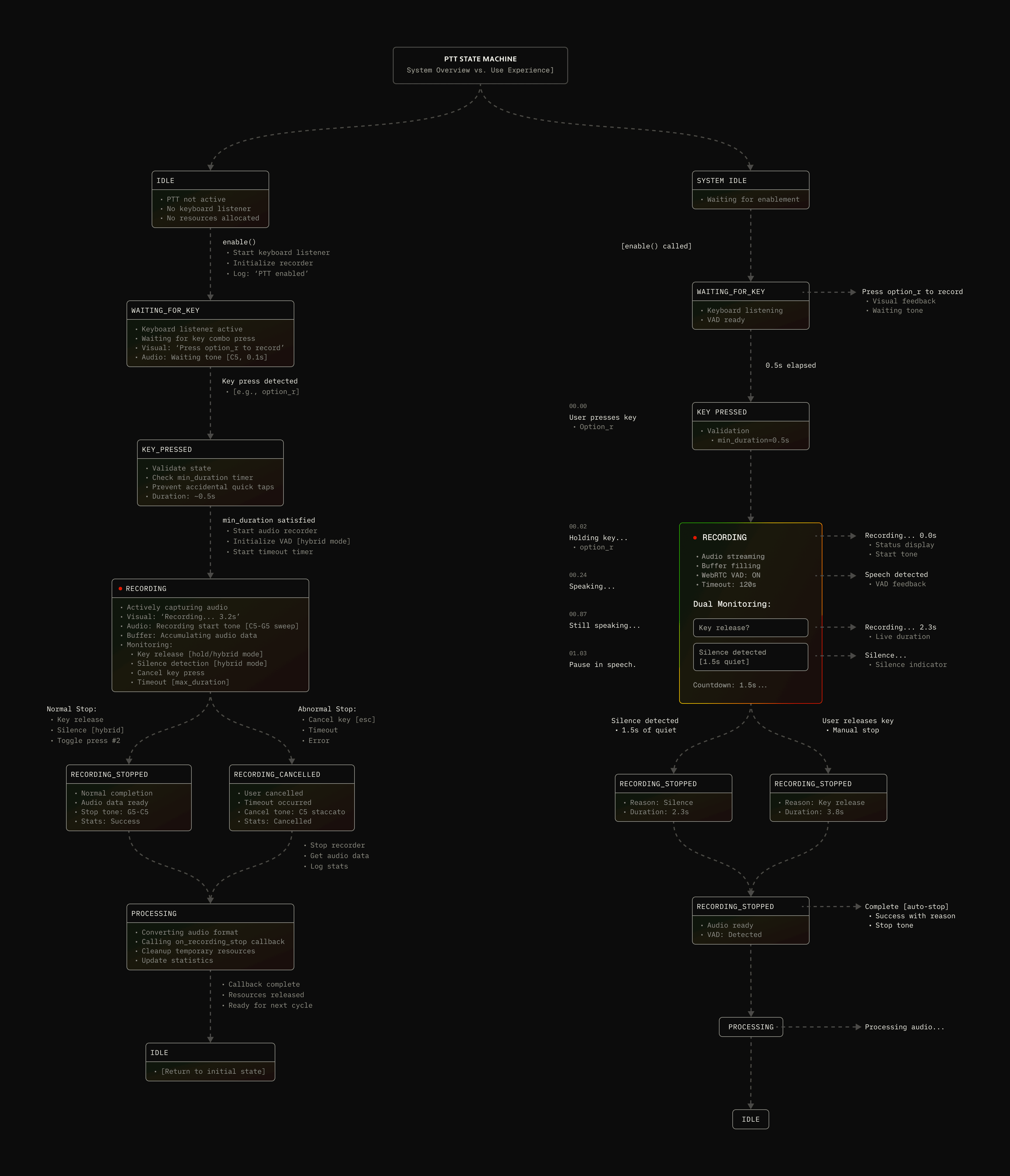
Push-to-talk gives the user control over conversational cadence — press and hold to record, instead of auto-recording the moment the model stops. Moving away from auto-capture meaningfully improved the experience.
[IMPROVING LATENCY]
PTT was the cornerstone, solving the friction where automatic voice detection records before you've finished thinking and captures background noise. A grueling four-phase build turned basic keyboard monitoring into a production state machine with three modes — Hold (walkie-talkie), Toggle (hands-free), and Hybrid (hold to talk, auto-stop on detected silence). The 7-state PTTStateMachine validates transitions, retries with exponential backoff, enforces timeouts, and cleans up resources even on mid-capture cancellation. Cross-platform keyboard monitoring was the real fight — macOS Accessibility, Linux input group, Windows UAC — so it ships with permission-checking utilities and a setup wizard that validates before initializing.
[BUMBA VOICE DEMO]
[IMPROVING LATENCY]
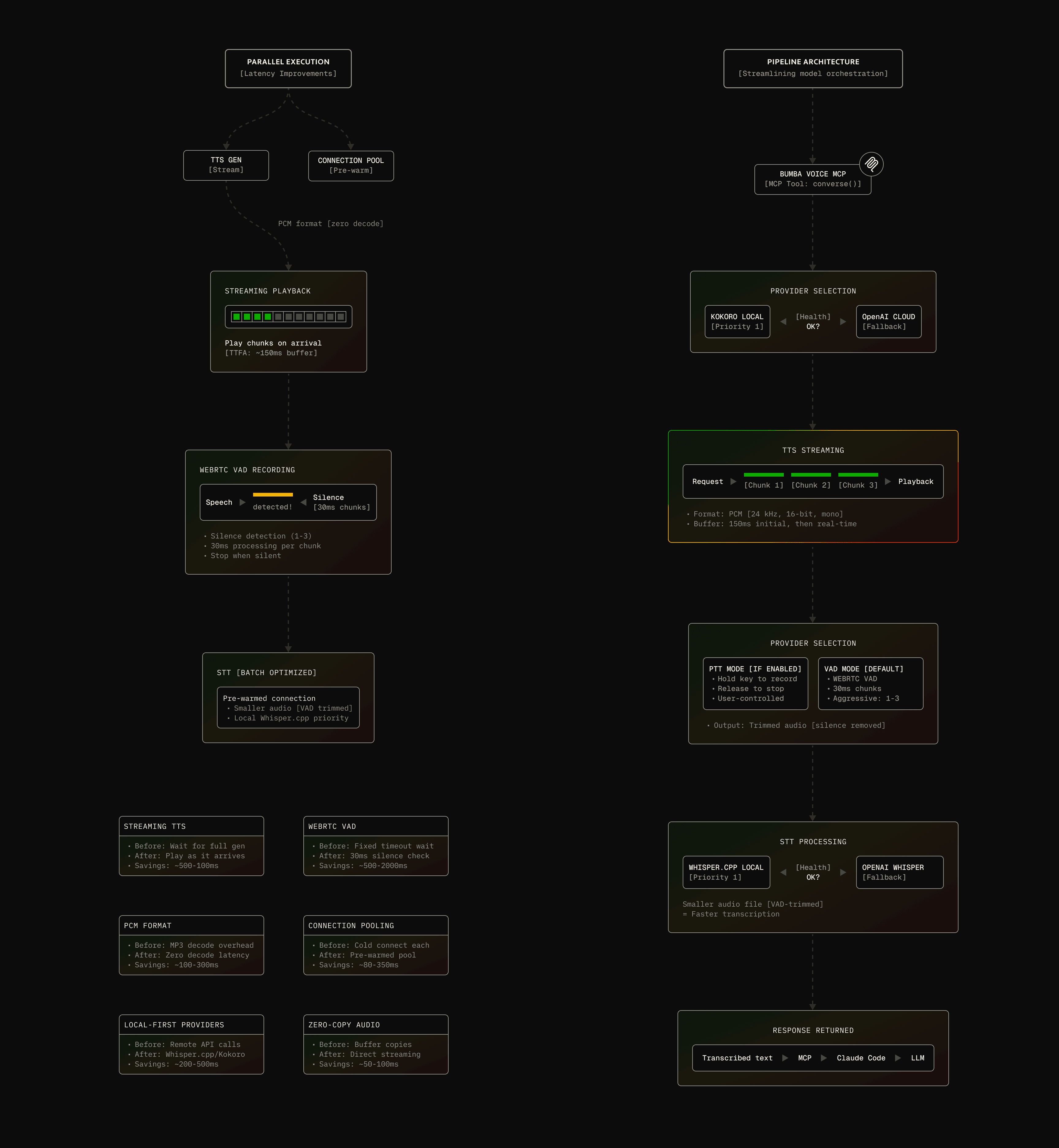
60% faster turnarounds (1.4s avg vs 3.5s) came from re-architecting a sequential flow into a pipelined one: TTS generation and playback run concurrently (streaming PCM chunks rather than buffering), recording preps during playback, and STT starts instantly via zero-copy buffer passing. WebRTC VAD replaced energy-based thresholds for near-instant, noise-robust silence detection (200–400ms faster). With connection pooling and health caching, time-to-first-audio dropped to 0.8s (from 2.1s) and STT to 0.4s — sub-2-second total, which is the threshold where voice stops feeling like a novelty and starts feeling practical.
[COMBINING FEATURES]
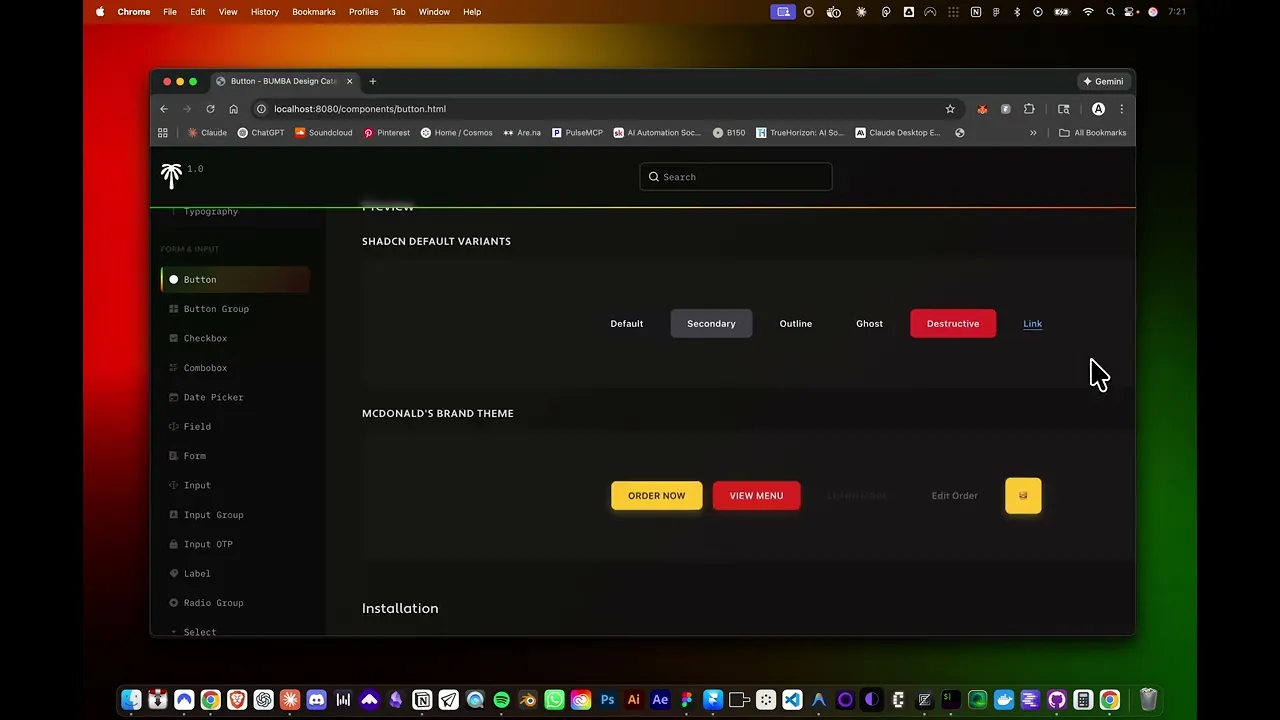
Each feature has standalone value, but the real power is composition. The system was built so one subsystem's output is another's input through standardized formats: the Design Bridge registry is populated by layout extraction, referenced by exploration, queried by voice. Spoken aloud — "use the ShadCN MCP to find all button components and add them to my catalog," then "transform those to React and re-theme with my brand colors" — a multi-stage workflow spanning discovery, transformation, token application, and documentation runs in under 30 seconds, hands-free. Systems that each took weeks to build compose seamlessly because they share JSON registries, the .design/ convention, and MCP interfaces. That emergent capability — not any single feature — is the thing I'm proudest of.
[COMPOSABLE COMPONENTS]
12. OUTRO
[HORIZONS AND REFLECTIONS]
Eight months building Bumba with Claude taught me how to architect AI-assisted systems — and it taught me by failing first. The lessons were earned debugging state machines, rewriting orchestration when clean theory met messy reality, iterating through dead ends until the patterns showed themselves. The throughline: good AI tooling doesn't replace human judgment with automation; it builds composable infrastructure that amplifies intent through clean data flows, standardized interfaces, and intelligent orchestration. Every subsystem came from real friction — the Figma plugin from design tokens drifting as developers hand-copied hex codes; the layout pipeline from screenshots becoming structurally-close-but-visually-wrong code; push-to-talk from VAD recording before I'd finished a thought; Design Director from product strategy that lived in people's heads and never became spec. A few patterns transcended the specific tech: standardized formats enable composition, stateful orchestration beats stateless one-shots, visual verification catches what structural checks miss, multi-modal inputs compound understanding.
"I WANTED TO TRULY UNDERSTAND HOW AI 'WORKS' AND SO I PRIORITIZED DEEP RESEARCH OVER ONE-SHOTTING. I ALSO THINK I BECAME A BIT OBSESSED WITH THE TECH THAT MIGHT CAUSE MY SLOW, EVENTUAL, POTENTIALLY INEVITABLE DESIGN CAREER DEATH."
There's an honest irony to where this landed. In late 2025, Anthropic's Claude Code team shipped native agent systems, stronger MCP, better context management — much of it overlapping with what I'd built alone. That convergence doesn't sting; it validates the patterns I'd explored. The difference is purpose: Claude Code is production-grade infrastructure for broad adoption; Bumba was my research lab, deliberately pushed past the point of reasonable engineering in service of learning. This case study covers maybe 30–40% of what got built — the rest is too experimental or too coupled to my own workflows to document. So: the framework failed and the bet paid off. I wanted to genuinely understand how this technology works, so I chose deep research over one-shotting — and I'll admit I got a little obsessed with the tech that might one day automate my own profession. Bumba was the graduate education that made everything I've built since possible. That's not the consolation-prize version of the story. That's the whole point of it.
NEXT PROJECT
SIGNAL DESK TERMINAL APP
& MULTI-AGENT HARNESS
[THE CHALLENGE]
As a design engineer with 20 years of product development experience but no formal software training, I wondered: could I transform decades of knowledge about orchestrating human teams into a framework that orchestrates AI agents instead? This wasn't about claiming mastery—it was about genuine curiosity and a willingness to spend eight months learning through building. The question that drove me was deeply personal: if the future economy favors individuals who can wield AI to become their own businesses, could I develop both the technical capability and systematic approach to make that real? Building Bumba became my research project, knowing I'd make mistakes, over-engineer parts, and need to course-correct as both the technology and my own knowledge matured.
[FIRST IMPRESSION]
Installer screen sets expectations that Bumba is a professional orchestration framework, not a simple command wrapper.
[BRAND IDENTITY]
Signature gradient and typography establish visual consistency that carries through the entire CLI experience, from installation through daily use.
[INSTALL DISPLAY]
Feature categories highlighted upfront: Multi-Agent Intelligence, 60+ Commands, Enterprise Quality, Advanced Integrations.
[VISUAL CLARITY]
Six-color gradient (green to red) communicates system status and department affiliations at a glance.
[ENTERPRISE-GRADE]
ASCII art, bordered boxes, and emoji indicators signal enterprise-grade tooling, not a hobby project.
[ARCHITECTURE]
Essential onboarding info in digestible chunks: tagline, version, features by category, and integrations.
[HIERARCHICAL]
Five operational departments displayed with color-coded badges establish clear mental models before users interact with any commands.
[COGNITIVE LOAD]
Progressive disclosure strategy presents core capabilities without overwhelming newcomers with 60+ command options immediately.
[AGENT ORCHESTRATION]
I structured Bumba around five department chiefs (Engineering, Product Strategy, QA, Operations, Design), each commanding seven specialized agents, creating a 40-agent ecosystem mirroring real design studios I'd worked in over 20 years. The orchestration layer implements six task distribution strategies: round-robin, capability-matched, performance-based, priority-first, dependency-aware, and load-balanced. Resource management uses dynamic pooling—chiefs stay persistent while specialists spawn on-demand and retire after completion.
[BUMBA CHAT INTERFACE]
The `bumba chat` command became my attempt to create a conversational interface similar to Claude Code and Gemini CLI while respecting terminal constraints—no graphical distractions, no unnecessary chrome, just clean interaction that keeps users in flow. I quickly learned that terminal responsiveness is deceptively hard: unlike web interfaces where CSS handles layout automatically, terminal elements like divider lines and ASCII tables must be manually redrawn when users resize windows, requiring careful event handling I initially underestimated. An even bigger struggle was managing logging output—multi-agent systems generate enormous diagnostic information, and early chat versions drowned in noise, making the interface unusable.
[MULTI AGENT]
When a text prompt is added the task is routed to an appropriate department chief that spawns sub-agents.
[OVER-ENGINEERING AS RESEARCH]
As the codebase grew, reality became undeniable: completing this vision to production quality was impossible alone. The scope was too vast, technical debt accumulating, maintenance burden unsustainable. But rather than viewing this as failure, I recognized it as the natural conclusion of a successful research phase—I had achieved what I set out to do, gaining deep expertise in multi-agent orchestration. The question became: what do I do with this knowledge? Continuing to build a standalone framework made less sense than extracting the most valuable patterns and reimagining them for Claude Code, where they could benefit a broader community without requiring adoption of yet another CLI tool. This pivot wasn't abandoning Bumba; it was evolving the insights into something more sustainable, accessible, and ultimately more impactful—transforming eight months of solo research into reusable components for the broader Claude Code ecosystem.
The extraction process required honest assessment about what actually mattered in Bumba's massive codebase—separating genuine innovations worth preserving from over-engineered complexity I'd built while learning. I approached this systematically, auditing each of the 150+ core modules with a simple question: does this solve a fundamental problem in multi-agent orchestration that others will face, or did I just build it because I could? The goal was creating a library of reusable primitives—building blocks that could be repurposed for future multi-agent systems or integrated into Claude Code as native skills, plugins, and agents.
BUMBA
BUMBA
BUMBA
BUMBA
BUMBA
BUMBA
BUMBA
BUMBA
BUMBA
BUMBA
BUMBA
BUMBA
[HALF-WAY MARK]
Catch a vibe
0:000:00
[A NOTE ABOUT THE ZED IDE]
After experimenting with popular AI-enabled IDEs like Cursor, VS Code, and Windsurf, I found myself gravitating toward Zed for reasons that traced back to how I learned to work with AI agents—through the terminal first, spending months in command-line interfaces before ever using a graphical editor. Zed felt like a natural middle ground between the terminal comfort I'd developed and the practical benefits of an IDE: lightweight, terminal-native in philosophy, and designed for developers who value speed over feature bloat. The Rust-based architecture delivering near-instant project loading, built-in collaboration that felt native rather than bolted-on, and a minimalist interface keeping focus on code rather than chrome.
ZED GRAPHICAL EDITOR
1.0
BUMBA FEATURE
EXTRACTION
[AGENT TEAM EXTRACTION]
One of the most significant extractions was the agent team architecture—the Forty Thieves. The original Bumba framework modeled agents after professional product studios: five departments, each with a chief overseeing seven specialists. Building these for Claude Code required fundamentally rethinking my approach—complex JavaScript orchestration gave way to pure markdown files Claude interprets directly. Working with Claude through countless iterations, we developed a consistent markdown structure: YAML frontmatter defining identity, followed by sections establishing core expertise, methodology frameworks, output templates, and language-specific implementations. The methodology frameworks represent the real knowledge transfer—20 years of product development experience made explicit and accessible. This extraction transformed what took eight months to build into something anyone using Claude Code can invoke without installing frameworks—the agents simply exist as markdown files in `.claude/agents/`.
FORTY THIEVES AGENT TEAM
Loading repository...
BUMBA CLI
Loading repository...
Through experimentation, I learned that each of the 40 agent markdown files needed a repeatable structure to work effectively: YAML frontmatter establishing identity (name, description, department color), followed by sections encoding core expertise, methodology frameworks with actionable checklists, output templates, language-specific implementations, and situational boundaries defining when to use versus escalate.
PROJECT-INIT & GITHUB-TO-NOTION
Loading repository...
[PROJECT INITIALIZATION]
The project-init feature provides a streamlined onboarding flow for setting up GitHub-backed projects with integrated Notion dashboards. When invoked, it leverages the global `/project-init` command architecture, detecting the BUMBA-Notion plugin through hooks and automatically scaffolding a complete project workspace. The system creates a hierarchical structure in Notion (Projects → Epics → Sprints → Tasks) with bidirectional GitHub synchronization, storing project metadata locally in `~/.claude/plugins/bumba-notion/state/` and optionally in bumba-memory MCP for cross-session persistence. This one-time setup establishes the foundation for continuous GitHub issue tracking, milestone management, and dependency-aware task orchestration without requiring manual Notion database configuration.
[PROJECT-INIT WALKTHROUGH]
[GITHUB-TO-NOTION SYNC WITH
DEPENDENCY TRACKING]
The `/gh/sync-notion` command implements intelligent two-pass synchronization that transforms GitHub issues into structured Notion tasks while preserving dependency relationships. The system parses issue body text for dependency syntax ("Depends on #N", "Blocked by #N", "Requires #N"), creates all tasks in a first pass, then links dependencies in a second pass using self-referencing Notion relations. This enables a formula-driven "Ready Queue" that automatically surfaces only unblocked work—tasks with no dependencies or all dependencies completed—preventing premature assignment of blocked tasks. The sync includes pre-execution status display (last sync time, and freshness indicators), post-execution summaries (created/skipped/error counts), retry logic for API rate limits, and complete sync history tracking, creating a production-ready workflow bridge between GitHub's issue tracking and Notion's project management capabilities.
One of the most powerful extractions from Bumba became the `design-init` command—a sophisticated initialization system I built after watching developers struggle with the tedious setup required for design-to-code workflows. Rather than forcing developers to manually create directories, configure build tools, or wire up complex toolchains, design-init implements an intelligent two-phase architecture: an interactive configuration phase where Claude gathers project context (framework choice, TypeScript usage, output paths, Storybook preferences, layout extraction settings), followed by an automated execution phase handled entirely by hooks. The command detects existing project patterns—identifying Next.js configurations, TypeScript setups, or prior design structures—and adapts its recommendations accordingly, creating a personalized onboarding experience that respects what already exists.
[DESIGN ORGANIZATION]
DESIGN-INIT COMMAND
[DESIGN INIT WALKTHROUGH]
While building the BUMBA Design ecosystem, I discovered [Design OS] Brian Casel's brilliant product planning framework that bridges the gap between product vision and codebase implementation. His system provides a React-based application where teams work through structured planning phases: defining product vision, modeling data entities, choosing design tokens, and creating screen designs before exporting a complete handoff package for developers. I was impressed by how Design OS formalized the messy early planning work that often gets skipped, but I wanted something more aligned with the CLI-first, Claude Code-native philosophy I'd been building with BUMBA. The workflow systematically guides you through seven distinct phases.
[BUILDING DESIGN SPECIFICATIONS]
DESIGN DIRECTOR WORKFLOW
Loading repository...
[DESIGN DIRECTOR CONTD]
Design Director generates design-focused specifications that work alongside traditional engineering specifications like PRDs (Product Requirements Documents). What I learned building this was that product development actually needs two complementary specification sets: engineering-focused specs covering backend architecture, APIs, and data flow (typically derived from PRDs), and design-focused specs covering user flows, interface requirements, and visual implementation (what Design Director generates). The outputs include markdown specifications capturing product vision and section requirements, auto-generated TypeScript type definitions from data models, JSON sample data files, and a complete export package containing ready-to-use prompts for coding agents alongside milestone-by-milestone implementation instructions. When BUMBA Design System assets are available (extracted tokens and components), Design Director seamlessly references them throughout specifications; when unavailable, it gracefully provides placeholders and guidance for future extraction, accommodating workflows at any stage of design maturity from early concepting to complete design system implementation. The key insight is that Design Director captures *what* you're building from a design perspective (features, data structures, user flows, interface compositions) while assuming you've already determined *why* through market research, competitive analysis, and business case development—likely documented in traditional PRDs and engineering specs. In practice, you'd use both specification types together: engineering specs guide backend implementation and API design, design specs guide frontend implementation and user experience, and where they meet—data contracts, API responses, state management—is where you as the developer reconcile the two sets of specifications to ensure the full system works coherently. This dual-specification approach reflects how real product teams actually work, with product managers defining business requirements, engineers architecting technical solutions, and designers specifying user experiences, all contributing complementary documentation that coding agents can execute against with confidence.
While each BUMBA feature has standalone value, the real power emerges when these capabilities combine into cohesive workflows impossible through manual processes. I deliberately designed the architecture with compositional thinking at its core, ensuring outputs from one subsystem become inputs to another through standardized formats. Consider the workflow: using BUMBA Voice, the designer speaks "Use the ShadCN MCP server to find all button components and add them to my design catalog"—Claude activates ShadCN MCP, queries components, then invokes the Design Catalog generator. The designer continues: "Now transform those components to React and re-theme them using my brand colors"—Claude reads extracted components, invokes the React transformer with design token registry, generates files with imported tokens, updates component registry, auto-generates Storybook stories, and applies custom theming. This multi-stage workflow executes in under 30 seconds through voice commands alone.
[DESIGN SYSTEM AUTOMATION]
BUMBA STORYBOOK THEME
[COMPONENT DETAIL]
Lorem ipsum dolor sit amet, consectetur adipiscing elit. Proin rhoncus est sed neque pulvinar, in posuere tellus pellentesque.
[STORYBOOK AUTOMATION]
The Storybook integration represents the final stage in BUMBA Design's extraction-to-documentation pipeline, a system I built iteratively as I discovered what actually needed to happen for design assets to flow from diverse sources through standardized transformation before appearing in branded Storybook documentation. The pipeline begins with multi-source extraction: the Figma Plugin captures tokens and components directly from design files, the Figma MCP enables Claude to extract assets through conversational commands, the ShadCN MCP imports pre-built component libraries, manual JSON files provide custom token definitions, and CLI installations bring in design systems from package registries—all converging into `.design/tokens/` as source-agnostic JSON. From there, the Registry Manager (V4.0.0) orchestrates the workflow, assigning canonical IDs for O(1) lookups, tracking dependencies through a graph structure, mapping source identifiers (Figma node IDs, ShadCN component names) to internal references, and maintaining the component registry at `.design/components/registry.json` serving as single source of truth. When transformation occurs via commands like `/design-transform-react`, framework-specific optimizers process tokens into production code (CSS-in-JS, Tailwind classes, styled-components), generate component files with proper imports and prop types, and critically—invoke the Story Generator to create Storybook stories automatically. The Story Generator analyzes component props to auto-generate interactive controls, creates variant stories for different prop combinations, includes Figma URLs linking back to source designs, and writes CSF3-format stories to `.design/extracted-code/{framework}/stories/`. These stories get discovered by Storybook through its auto-configuration, rendered within the custom BUMBA theme, and presented to developers as polished, branded component documentation—completing the journey from design file to interactive documentation without manual intervention while maintaining visual consistency with the broader BUMBA ecosystem.
The BUMBA Figma Plugin became the critical first mile in the design-to-code pipeline I was building, serving as the extraction mechanism that captures design decisions directly from Figma files and transforms them into machine-readable formats the BUMBA ecosystem could process. It's important to note: building this plugin was never intended to compete with Figma's native code extraction features, Anima, or other established code generation tools. Rather, it's a purpose-built solution tailored specifically to integrate with BUMBA's larger ecosystem and Claude Code workflows. I have tremendous respect and admiration for Figma, the Figma team, and what they've accomplished with both the Figma platform and the Figma MCP server. In fact, the workflows I've developed leverage multiple extraction methods—the BUMBA plugin for specific design token and component extraction, the Figma MCP server for conversational design manipulation, and various other approaches—demonstrating that these tools complement rather than replace each other within a sophisticated design-to-code pipeline. Building this through iterative collaboration with Claude taught me how Figma's plugin architecture actually works—the message-based communication pattern where `code.js` runs in Figma's sandboxed backend with full access to the Plugin API, while `ui.html` provides a 1,894-line self-contained interface featuring inline CSS and JavaScript, tab-based navigation (Connect, Extract, Catalog, Analyze), and modal systems guiding users through complex extraction workflows.
[FIGMA DESIGN PLUGIN]
BUMBA / FIGMA DESIGN PLUGIN
Loading repository...
[CODE EXTRACTION]
When a designer triggers extraction, the plugin transforms Figma's proprietary design data into BUMBA's standardized JSON format through a sequence I refined over many iterations. The UI sends an `extract-tokens` message triggering the `TokenExtractor` class to traverse Figma's local style collections and page nodes. Color extraction calls `figma.getLocalPaintStylesAsync()`, filters for solid types, converts RGBA to hex, and packages each with style ID, kebab-case name, and source metadata. Typography extraction captures font family, weight, size, line height, letter spacing, and text case. Spacing extraction proved trickier—since Figma doesn't maintain explicit spacing tokens, I search for auto-layout frames, collect padding and gap values, eliminate duplicates, sort numerically, and generate semantic names (`xs`, `sm`, `md`, `lg`, `xl`) based on position. Effects extraction captures drop shadows and inner shadows with offset, blur, spread, and color values. Border radius extraction scans components and frames for `cornerRadius` properties. The complete payload—colors, typography, spacing, effects, border radius, component metadata, plus document-level metadata—gets serialized to JSON and either sent to the BUMBA server via HTTP POST or downloaded as a file, entering the Registry Manager's ingestion pipeline to receive canonical IDs, get indexed for O(1) lookups, have dependencies tracked, and become available for transformation commands generating framework-specific code and Storybook stories.
[FIGMA CODE EXTRACTION DEMO]
[FIGMA PLUGIN WALKTHROUGH]
[FIGMA AUTO-SYNC]
[SKETCH FEATURE]
Beyond static extraction, I integrated conversational design capability through the Claude-Talk-To-Figma MCP server—adapting Sonny Lazuardi's cursor-talk-to-figma-mcp for Claude Desktop to enable real-time Figma manipulation through natural language. This establishes a four-layer architecture: Claude Desktop communicates with an MCP server translating design intentions into Figma Plugin API commands, flowing through a WebSocket server (port 3055) to a lightweight Figma plugin executing commands directly within the document. The WebSocket layer maintains persistent bidirectional connections enabling real-time progress updates—when Claude initiates "create a dashboard with sidebar navigation, header, and card-based metrics," the MCP server breaks this into atomic Figma commands, the WebSocket routes each to the correct channel (supporting multiple concurrent Claude sessions), and the plugin executes sequentially while streaming progress updates.
While Storybook excels at interactive documentation, I built the BUMBA Design Catalog as a visually refined alternative focused on aesthetic presentation—think art gallery versus workshop. Generated via `npm run catalog` and served at `.design/catalog/index.html`, the catalog embraces BUMBA's signature visual identity more thoroughly than even the custom Storybook theme: immersive dark interface dominated by the six-color gradient, warm olive backgrounds, and Adobe Fonts typography (Freight Text, Freight Sans, SF Mono). Where Storybook prioritizes interaction through controls and state testing, the Design Catalog prioritizes visual discovery—presenting tokens as elegant swatches, typography specimens at actual sizes, spacing scales as graduated bars, shadow effects on sample cards, and components in their natural state without control panels that make Storybook feel like a development environment.
[DESIGN CATALOG ALTERNATE]
BUMBA DESIGN CATALOG
[DESIGN CATALOG WALKTHROUGH]
Beyond extracting tokens and isolated components, I built a layout-to-code pipeline transforming complete Figma screens into production-ready framework code through five stages, each adding precision through progressive context layering. The journey starts with Figma plugin extraction generating `layout.json` (structured data capturing component references, flex properties, spacing, alignment, hierarchy) and `screenshot.png` (visual ground truth showing designer intent), establishing dual-format context providing both machine-readable structure and human-verifiable appearance. Stage two validates screenshot presence, stage three generates `reference.html` translating layout JSON into browser-renderable HTML with embedded Figma screenshot for side-by-side comparison, and stage four executes the critical three-pass visual validation loop where Claude, equipped with Chrome DevTools MCP integration, iteratively refines HTML to achieve pixel-perfect parity. (Note: This feature was originally built leveraging the Chrome MCP server for browser automation. With Claude Code's late 2025 release of native browser capabilities, I'm considering transitioning to Claude's built-in browser features, which could simplify the architecture while maintaining the same progressive validation approach.)
[PROGRESSIVE CONTEXT]
DESIGN LAYOUT TRANSFORMATION
Loading repository...
Where most design tools force linear iteration, I built `/design-explore-ui` and `/design-explore-ux` commands spawning four parallel agents in isolated sandboxes generating divergent design directions simultaneously along a conservative-to-experimental spectrum. The system uses E2B cloud sandboxes (with Claude Code's late 2025 native sandboxes also supported, though E2B's 24-hour sessions versus Claude Code's 5-hour limit offers advantages for sustained operations). The critical insight: all four use the same components and tokens—they differ only in how assets are applied, ensuring whatever direction wins is already compatible with existing infrastructure.
[MULTI-AGENT DESIGN WORKFLOWS]
. EXPLORE UI/UX WORKFLOWS
BUMBA Voice emerged from building upon mbailey's VoiceMode project through 8 weeks of intensive development, delivering 60% faster response times. I implemented a multi-provider ecosystem supporting cloud and local-first approaches: OpenAI API for cloud TTS/STT, Whisper.cpp for on-device speech-to-text, Kokoro TTS providing 50+ multilingual voices locally, and LiveKit for room-based communication. The cornerstone innovation is the Push-to-Talk (PTT) system providing three modes: Hold Mode (walkie-talkie behavior), Toggle Mode (press once to start/stop), and Hybrid Mode (combining manual keyboard control with automatic silence detection). Since building this, Anthropic released Chatterbox, a free and more robust model I'd consider leveraging in future iterations.
[TALKING DESIGN WITH CLAUDE]
11. BUMBA VOICE SYSTEM
Loading repository...
[DESIGNING PTT SYSTEMS]
Lorem ipsum dolor sit amet, consectetur adipiscing elit. Proin rhoncus est sed neque pulvinar, in posuere tellus pellentesque.
[IMPROVING LATENCY]
The cornerstone innovation I built for BUMBA Voice is its Push-to-Talk (PTT) system, addressing a fundamental friction where automatic Voice Activity Detection forces immediate recording after AI responses, giving developers no time to think or avoid capturing background noise. Built through a grueling 4-phase process evolving from basic keyboard monitoring to a production-grade state machine, the PTT implementation provides three modes: Hold Mode (classic walkie-talkie behavior where pressing and holding the Right Option key records, releasing stops), Toggle Mode (press once to start recording hands-free, press again to stop—ideal for longer dictation or accessibility needs), and Hybrid Mode (the innovative sweet spot combining manual keyboard control with automatic silence detection, letting developers hold the PTT key while speaking then automatically stopping on detected silence, preventing accidental continued recording while maintaining user agency). The architecture implements a 7-state lifecycle managed through `PTTStateMachine` (IDLE → WAITING_FOR_KEY → KEY_PRESSED → RECORDING → RECORDING_STOPPED/CANCELLED → PROCESSING → IDLE) with validation preventing invalid state transitions, exponential backoff retry logic recovering from keyboard monitoring failures, configurable timeout protection (default 120 seconds max), and comprehensive resource cleanup ensuring microphone access releases properly even when recordings cancel mid-capture. Cross-platform keyboard monitoring proved exceptionally challenging—macOS requires Accessibility permissions, Linux demands either root or adding the user to the `input` group, Windows needs UAC elevation—leading me to develop platform-specific permission checking utilities, detailed error messages guiding users through OS-specific authorization, and an interactive setup wizard validating permissions before PTT initialization. The implementation uses pynput for keyboard event capture, sounddevice for low-latency audio recording, webrtcvad for robust voice activity detection in Hybrid mode, and asyncio for coordinating the event-driven workflow maintaining thread safety.
[IMPROVING LATENCY]
Achieving 60% faster response times (1.4s average vs 3.5s) required systematic latency reduction through parallel processing, intelligent caching, and zero-copy audio handling. The original VoiceMode processed TTS and STT sequentially—generate speech, play fully, wait for silence, record, upload audio file, wait for transcription—introducing compounding delays. I reimagined this as pipelined architecture where TTS generation and playback happen concurrently (streaming PCM audio chunks as they arrive rather than buffering), recording preparation occurs during TTS playback (initializing sounddevice streams, validating microphone access, pre-warming VAD instances), and STT processing begins instantly after recording through zero-copy buffer passing. WebRTC VAD integration dramatically improved silence detection responsiveness—the original used energy-based thresholds frequently mis-triggering on background noise, while WebRTC VAD's neural network approach with configurable aggressiveness (0-3 scale) provides near-instant speech boundary detection, stopping recording 200-400ms faster by accurately identifying silence even in moderately noisy environments. HTTP connection pooling eliminated TCP handshake overhead (maintaining persistent connections reducing per-request latency by 50-150ms), provider health caching prevented redundant availability checks, and intelligent buffering for streaming TTS balanced responsiveness with playback stability (150ms initial buffer prevents choppy audio while maintaining sub-second time-to-first-audio). The result: Time to First Audio averages 0.8s (down from 2.1s), Speech-to-Text processing completes in 0.4s average (down from 1.2s), and entire turn-around achieves sub-2-second target making voice interaction feel natural—transforming voice mode from novelty into genuinely practical development tool for rapid iteration and hands-free coding workflows.
[COMBINING FEATURES]
While each BUMBA feature has standalone value—voice interaction for hands-free control, design token extraction for systematic theming, layout transformation for pixel-perfect code, parallel exploration for divergent thinking—the real power I discovered emerges when these capabilities combine into cohesive workflows impossible through manual processes. I deliberately designed the architecture with compositional thinking at its core, ensuring outputs from one subsystem become inputs to another through standardized formats: the Design Bridge registry serves as the universal component catalog that layout extraction populates, design exploration references, and voice commands query; design tokens flow from Figma extraction through registry storage to framework transformation and Storybook theming; sandbox exploration outputs feed into memory systems informing main-branch decisions; voice transcriptions trigger MCP tool chains orchestrating multi-step design operations without touching a keyboard. Consider the workflow demonstrated in the accompanying video coordinating three distinct BUMBA subsystems through natural language voice commands: using BUMBA Voice via push-to-talk, the designer speaks "Use the ShadCN MCP server to find all button components and add them to my design catalog"—Claude activates ShadCN MCP integration, queries available components, retrieves definitions and variants, then invokes the Design Catalog generator creating HTML pages with live previews, automatically routing components through ComponentPageRouter's pattern detection. The designer continues: "Now transform those components to React and re-theme them using my brand colors"—Claude reads extracted ShadCN components, invokes the React transformer with the project's design token registry (custom color palette, typography scales, spacing values from Figma), generates React component files with imported design tokens as CSS-in-JS variables, updates the component registry, auto-generates Storybook stories, and applies the custom BUMBA Storybook theme reflecting the designer's visual identity immediately. This multi-stage workflow—component discovery via external MCP → catalog aggregation → framework transformation → token application → documentation generation—executes in under 30 seconds through voice commands alone, orchestrating systems that individually took weeks to build but compose seamlessly because they share common data formats (JSON registries), unified storage conventions (`.design/` directory), and coordinated APIs (MCP tool interfaces). The video captures what makes BUMBA transformative: not any single feature in isolation, but emergent capability arising when voice control, design extraction, component transformation, catalog generation, and branded documentation work as a unified system—enabling designers to think at the level of intent while composed infrastructure handles mechanical orchestration traditionally requiring dozens of manual steps across disconnected tools.
12. OUTRO
[HORIZONS AND REFLECTIONS]
Building BUMBA across 8 months taught me fundamental lessons about architecting AI-assisted development systems—lessons earned through countless late nights debugging state machines, rewriting orchestration logic when elegant theories met messy reality, and persistently iterating through failures until patterns emerged. The most critical insight: successful AI tooling isn't about replacing human judgment with automation—it's about building composable infrastructure amplifying human intent through systematic data flows, standardized interfaces, and intelligent orchestration. The dedication this required—treating BUMBA as my graduate-level education in AI orchestration, trading evenings and weekends for hands-on learning impossible to gain any other way—fundamentally shaped how I understand what's possible when creative professionals gain sophisticated AI tooling matched to their workflows.
The knowledge accumulated reveals patterns transcending specific technologies: standardized data formats enable composition, stateful orchestration beats stateless one-shots, visual verification catches what structural validation misses, and multi-modal inputs compound understanding. These insights—learned through building systems that initially failed, identifying why they failed, then architecting solutions addressing root causes—directly inform how BUMBA evolves as models improve.
[BUMBA VOICE DEMO]
[EXPLORE UI WORKFLOW]
[EXPLORE UI WORKFLOW CONTD]
[DESIGN SYSTEM EXTRACTION]
[LAYOUT TRANSFORMATION]
[COMPOSABLE COMPONENTS]
[PLUGIN SKETCH FEATURE]
CONTD'