ALLSHIPS AUTOMATION
This case study demonstrates how to automate a business of one — in this case, an automation consultancy. The businesses with the most to gain from smart automation are consistently the ones with the least access to it. Enterprise organizations have entire departments dedicated to optimizing their workflows. Small and midsize businesses get generic SaaS tools and YouTube tutorials. That gap has always bothered me, and after twenty years building at the intersection of design, technology, and business strategy, I decided to close it. AllShips grew out of that frustration and out of a curiosity about what would happen if I tried. I wanted to build a consultancy that brings the same caliber of systems thinking to a ten-person construction company or a growing law practice that a Fortune 500 gets from its internal ops team. Not a watered-down version — the real thing, designed around how each client's business actually works. The automation consultancy space is crowded. What I was less sure about was whether someone with a design engineering background could build something meaningfully different — where the systems don't just work, they feel right. AllShips became my way of answering that question. I built the company itself as the first proof of concept. Every automation that powers AllShips' operations — from newsletter signups to prospect pipelines to outbound voice calls — is a living example of what I'd build for a client.
[YEAR]
2025-2026
[CLIENT]
Owned Product
[TOOLS]
Figma, Claude Code,
Notion, N8N, Mongo DB
THE PRODUCT IS THE PORTFOLIO PIECE. THE COMPANY IS THE CASE STUDY. THE WHOLE POINT WAS TO BUILD A BUSINESS THAT RUNS ITSELF — AND PROVE IT WAS POSSIBLE BY BEING THE ONE IT RUNS FOR.
This case study walks through the full arc: brand strategy, website design, a custom voice agent, the backend automation suite, and the platform I built for observability and client management. It's all my work, built with Claude Code as my development partner.
[NAVIGATE CHAPTERS]
[THE CHALLENGE]
What made AllShips interesting as a design problem wasn't any single piece — it was the fact that everything had to come together at once. The brand had to speak to business owners who are stretched thin, skeptical of hype, and tired of being sold tools they don't understand. The website had to make a complex service offering feel approachable and human. The technical infrastructure had to be production-grade from day one, because this isn't a demo — it's the system I actually run my business on. And the whole thing had to come together on a compressed timeline, mostly solo, with AI as my development partner. The pieces of a system either reinforce or undermine each other. A website that promises simplicity but requires a ten-minute onboarding call is a broken promise. An automation that works perfectly but can't be observed or understood by the person who owns it is a liability. A client portal that looks polished but can't surface the data that actually matters is theater. Everything had to be honest — the marketing, the engineering, and the experience had to tell the same story. There was also a strategic dimension. Hyper-niche automation products tend to outperform generalist offerings in sellability, but I chose to build AllShips as a generalist consultancy on purpose. Positioning it to serve any industry created an avenue to get close to different business types, learn their specific problems firsthand, and discover which verticals are worth going deeper on. The underlying infrastructure — lead pipelines, prospect tracking, content engines, voice agents — is intentionally industry-agnostic. AllShips is both a business and a research vehicle for finding what comes next.
[WEBSITE WALKTHROUGH]
RAPID BRAND / WEBSITE DESIGN
[WEBSITE DESIGN]
I designed and built the AllShips website in Framer, which let me move at the speed of a solo operator while keeping the design fidelity I'd hold myself to on any client project. It gave me the component architecture, responsive breakpoints, and CMS integration I needed without the overhead of a custom frontend build for what is fundamentally a marketing site.
The design language came from a constraint I set early: AllShips needed to feel like a premium technology brand without feeling like an enterprise consultancy. My audience — small business owners, operators, founders — responds to confidence and clarity, not corporate jargon or dense feature matrices. I landed on a dark-mode foundation with a signature green accent that cuts through with energy and warmth. Sora pairs with Inter for a typographic system that's clean and legible at every scale, with generous space and deliberate hierarchy letting content breathe instead of compete.
IF A SECTION COULDN'T BE UNDERSTOOD WHEN SPOKEN ALOUD BY A VOICE AGENT, IT WAS TOO COMPLEX FOR THE PAGE. DESIGNING FOR TWO AUDIENCES AT ONCE FORCED A CLARITY I MIGHT NOT HAVE REACHED OTHERWISE.
One decision I'm particularly glad I made early: I structured the site as a single-page narrative and wrote every section to do double duty — compelling marketing copy on the page, and source material for the voice agent's knowledge base.

[INTRODUCTION]
The hero opens with a clear value proposition and dual CTAs that let visitors self-select. The mission section reframes pain points into four problem cards — repetitive tasks, system failure, limited growth, limited visibility — designed to create recognition rather than anxiety.
[CASE STUDIES]
Interactive project cards ground the abstract promise of "automation" in tangible outcomes — smarter lead generation, social media auto-pilot — that a business owner can immediately picture.
[INTEGRATIONS]
A visual grid of integration logos — Slack, Gmail, Sheets, HubSpot, and more — demonstrates breadth at a glance. Keep the tools you love; we'll make them talk to each other.
[SERVICES]
Two tiers of capability cards unpack what AllShips builds: the technical layer (AI models, agent orchestration, platform support) and the experience layer (custom solutions, client dashboard). The bridge text — "The tech is only half the story" — signals that AllShips thinks about the human side, not just the engineering.
[BUSINESS LOGISTICS]
The three-step process (Audit, Build, Deploy) is visualized as a timeline with week markers, alongside three fixed pricing tiers in a comparison table. Fixed pricing based on scope rather than hours was deliberate — SMB buyers are allergic to billable-hour anxiety.
[ALLSHIPS TEAM]
A team section featuring a custom Framer component and voice assistant trained to answer basic questions about the company, guide visitors to schedule a meeting, and collect data shared during the interaction. The section also surfaces open roles, with applications tracked in the operations platform.
[NEWSLETTER]
Newsletter signup and testimonial cards close the page with ongoing engagement and social proof — brief, specific, and outcome-focused, designed to sound like the target buyer.
[MOBILE WALKTHROUGH]
VOICE AGENT
The voice agent — Aria — might be the part of this project I'm most proud of, because it sits at the intersection of design engineering, user experience, and useful AI. Aria is a fully custom voice assistant embedded in the Framer site as a React component, backed by a Cloudflare Workers API that orchestrates Claude AI, OpenAI text-to-speech, Whisper speech-to-text, and Cal.com booking in real time.
I built her from scratch because the off-the-shelf voice platforms I evaluated all had the same problem: perceptible latency between the user finishing their sentence and the agent responding. Even half a second too long breaks the conversational rhythm and makes the experience feel robotic instead of natural. The solution was sentence-level TTS chunking. As Claude streams its response, a custom SentenceSplitter buffers incoming text and yields complete sentences the moment they end. Each sentence dispatches to the TTS API immediately while Claude keeps generating the next one. Aria starts speaking within one to two seconds of the user finishing their question — fast enough to feel like a conversation.
THE LATENCY ISN'T A PERFORMANCE METRIC. IT'S THE DIFFERENCE BETWEEN AN INTERFACE THAT FEELS ALIVE AND ONE THAT FEELS LIKE A LOADING SCREEN.
The frontend is 1,300 lines of React/TypeScript managing three systems: audio playback with buffer queuing, microphone input that routes to the browser's native Web Speech API on desktop or Whisper on mobile, and a canvas-based dot waveform visualization that responds to audio frequency data in real time. Those visual cues matter more than they might seem — when Aria is listening, the dots pulse with your voice. When she's thinking, concentric rings sweep outward. When she's speaking, the dots dance with her output. They replace the uncomfortable silence that makes most voice interfaces feel broken.
On the backend, Claude is configured with tools that let Aria check availability and book discovery calls directly during the conversation. The system prompt positions her as a knowledgeable colleague — warm, helpful, never salesy. Getting that tone right took iteration. I ended up treating the system prompt more like copywriting than engineering, which felt like the right instinct.
[VOICE AGENT WALKTHROUGH]
[VOICE COMPONENT MODES]
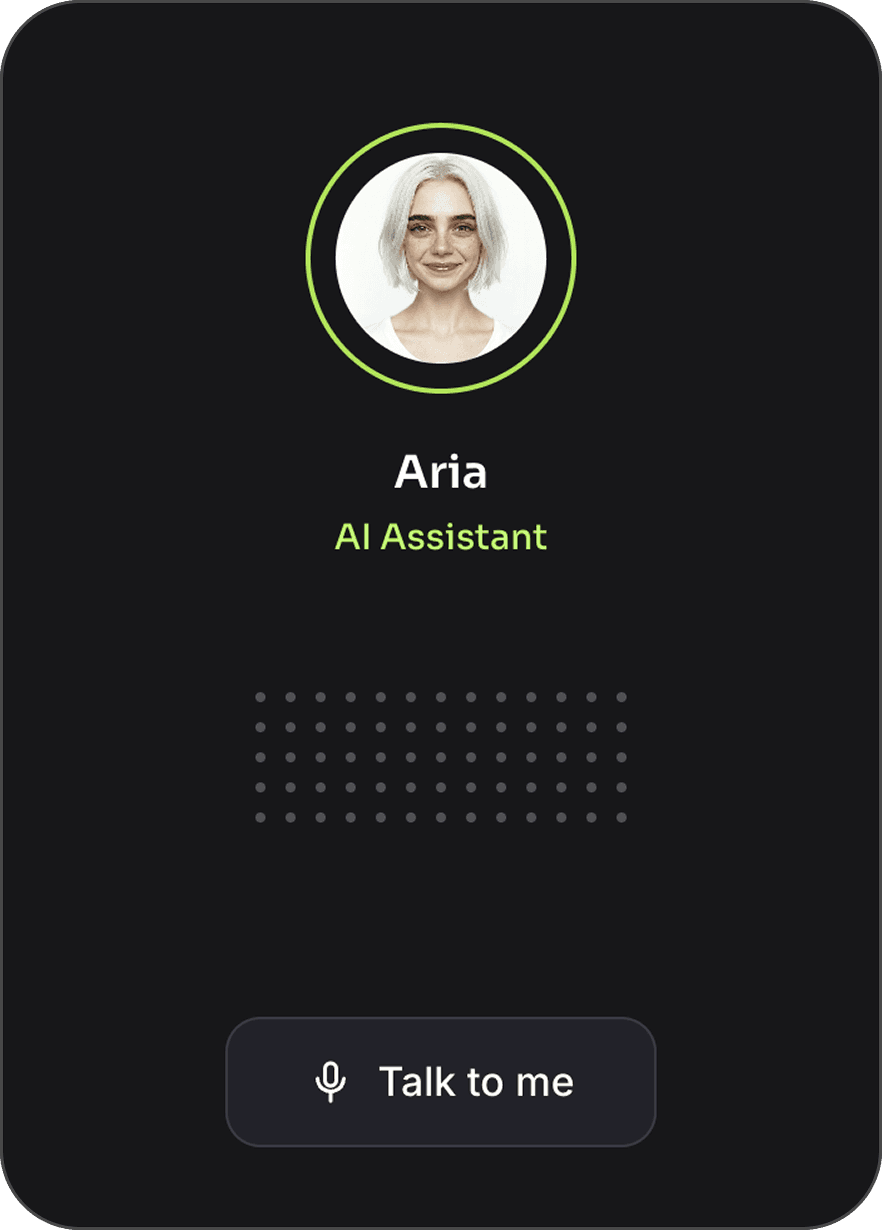
[IDLE STATE]
Custom Framer/React component inactive state.
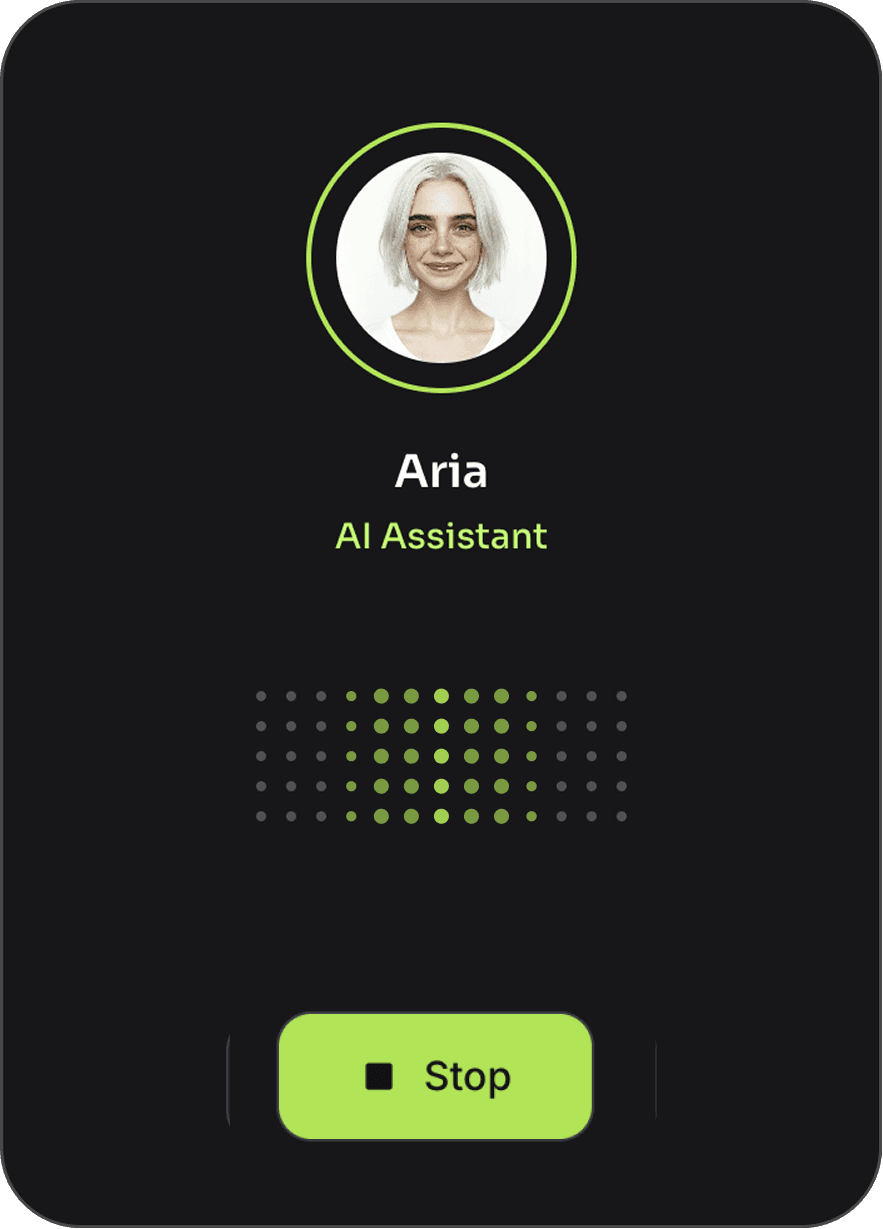
[SPEAKING]
Pattern animates when the voice agent speaks.
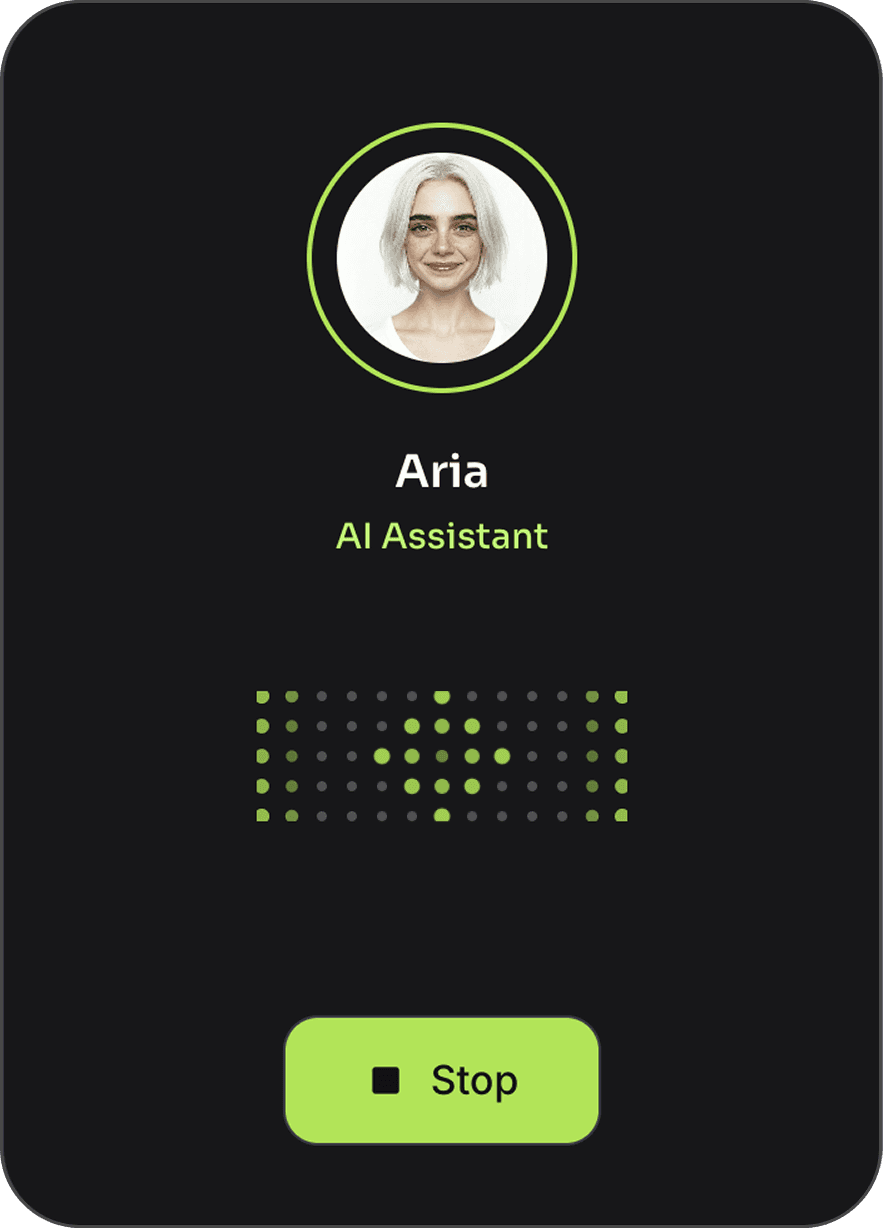
[LISTENING]
A pulsing animation signals when listening.
[CONTACT OPPORTUNITIES]
The contact and booking systems are where the website stops being a brochure and starts being infrastructure. I designed them as the first touchpoints in a fully automated prospect pipeline — every form submission and booking triggers a coordinated sequence of routing, deduplication, enrichment, and follow-up.
The contact form handles two fundamentally different submission types through a single endpoint. The subject field determines the path: prospect inquiries flow into the sales pipeline, while job applications route to a separate recruitment workflow. Routing happens cleanly at the validation layer — no conditional spaghetti, just type-safe model definitions. Every submission gets deduplicated against a master email database, written to the appropriate pipeline, and surfaced via Discord within seconds. If someone includes a phone number, the system schedules an outbound voice call automatically, respecting their timezone.
[CONTACT FORM]
Webhook submissions verified with cryptographic signatures, routed to the right handler, and processed through five sequential operations — notification, dedup, database write, follow-up email, and optional voice call scheduling. Each step is independent, so a failure in one never blocks the others.
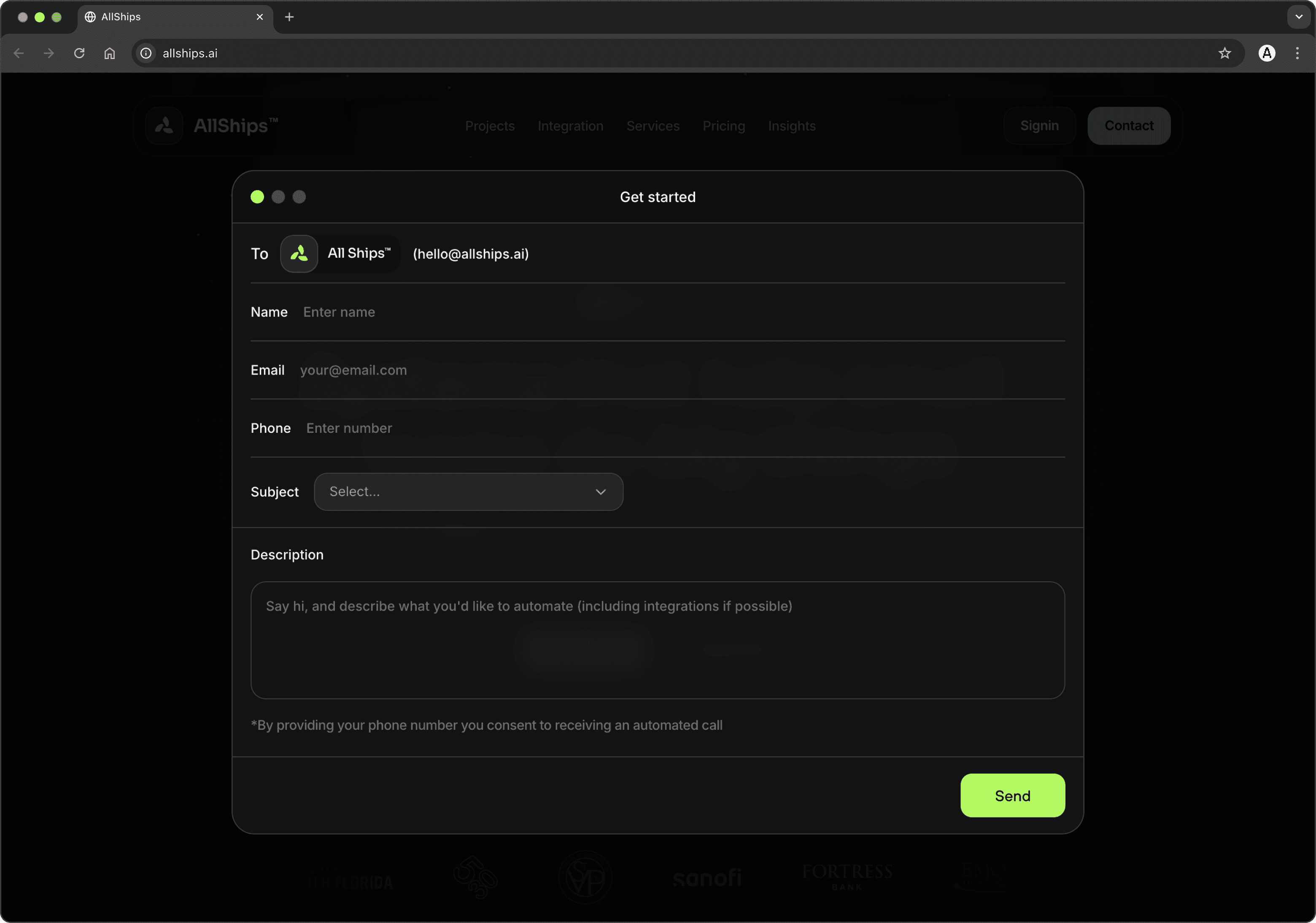
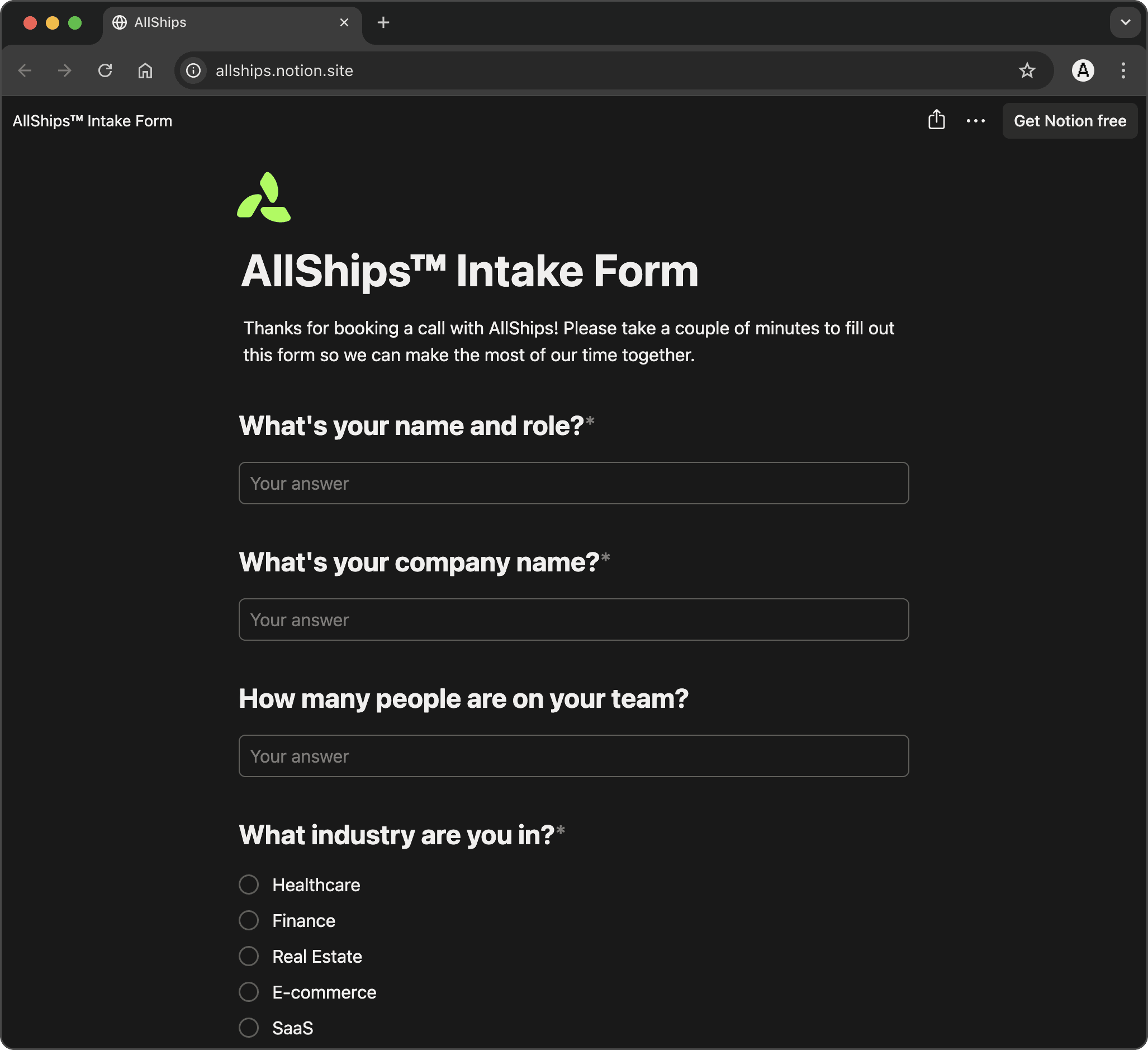
[INTAKE FORM]
If a visitor schedules a meeting instead of using the contact form, they receive an intake form soliciting inquiry details, which route to the platform database for team review ahead of the scheduled meeting.
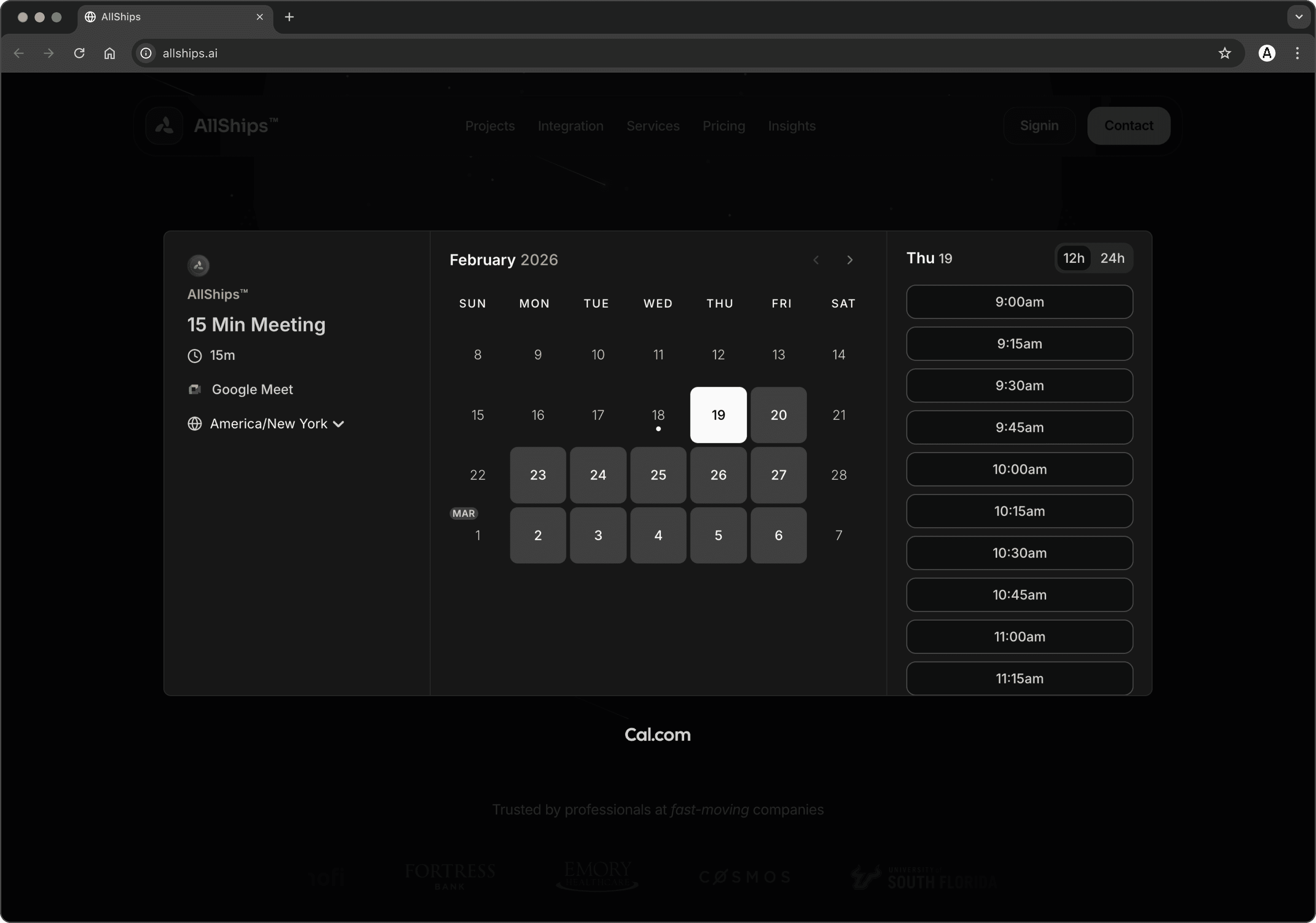
[CALENDAR]
Cal.com bookings flow through a similar pipeline with idempotency protection — each event is hashed to prevent duplicate processing from webhook retries. A background poller closes the loop by watching for completed intake questionnaires.
[COMMUNICATION AUTOMATIONS]
This is where the individual automations start working as a coordinated system, and where I learned the most about what "production-grade" actually means when you're the one running it.
When a prospect submits the contact form with a phone number, the call scheduler resolves their timezone from the number itself, checks whether it's within calling hours in their local time, and either initiates the call or queues it for the next available window. I store all scheduled times in UTC — a lesson I learned the hard way when EST timestamps compared against UTC strings produced wrong results in every edge case. Those are the moments where you develop respect for the complexity hiding inside "simple" scheduling logic.
Outbound calls use Vapi's API with the prospect's name, subject, and message injected as template variables. Aria conducts the call, answers questions, and gauges interest. After each call, structured processing routes by outcome: interested prospects get a booking link, callback requests go to Follow Up, and no-answer cases trigger timezone-aware retry scheduling. Every call generates structured notes — duration, outcome, key points, transcript — written back to the prospect record.
THE OPT-OUT SYSTEM AND CALLING-HOUR CAPS AREN'T FEATURES YOU'D LIST ON A MARKETING PAGE. BUT THEY'RE THE DIFFERENCE BETWEEN AUTOMATION THAT RESPECTS PEOPLE AND AUTOMATION THAT ANNOYS THEM.
What ties it all together is Discord as the observability layer. Rather than building a monitoring dashboard for the automation server, I wired every significant event — form submissions, database writes, voice calls, pipeline transitions, errors — to fire structured Discord notifications. Over 50 event types, all formatted consistently. It's not Grafana, but for a system at this scale, it gives me exactly the visibility I need while I'm building the more sophisticated platform alongside it.
[CLIENT CONTACT AUTOMATIONS]




[SOCIAL MEDIA]
The contact and booking systems are where the website stops being a brochure and starts being infrastructure. I designed them as the first touchpoints in a fully automated prospect pipeline — every form submission and booking triggers a coordinated sequence of routing, deduplication, enrichment, and follow-up. The contact form handles two fundamentally different submission types through a single endpoint. The subject field determines the path: prospect inquiries flow into the sales pipeline, while job applications route to a separate recruitment workflow. That routing happens cleanly at the validation layer — no conditional spaghetti, just type-safe model definitions that make the right thing happen automatically. Every submission gets deduplicated against a master email database, written to the appropriate pipeline, and surfaced via Discord within seconds. If someone includes a phone number, the system schedules an outbound voice call automatically, respecting their timezone.
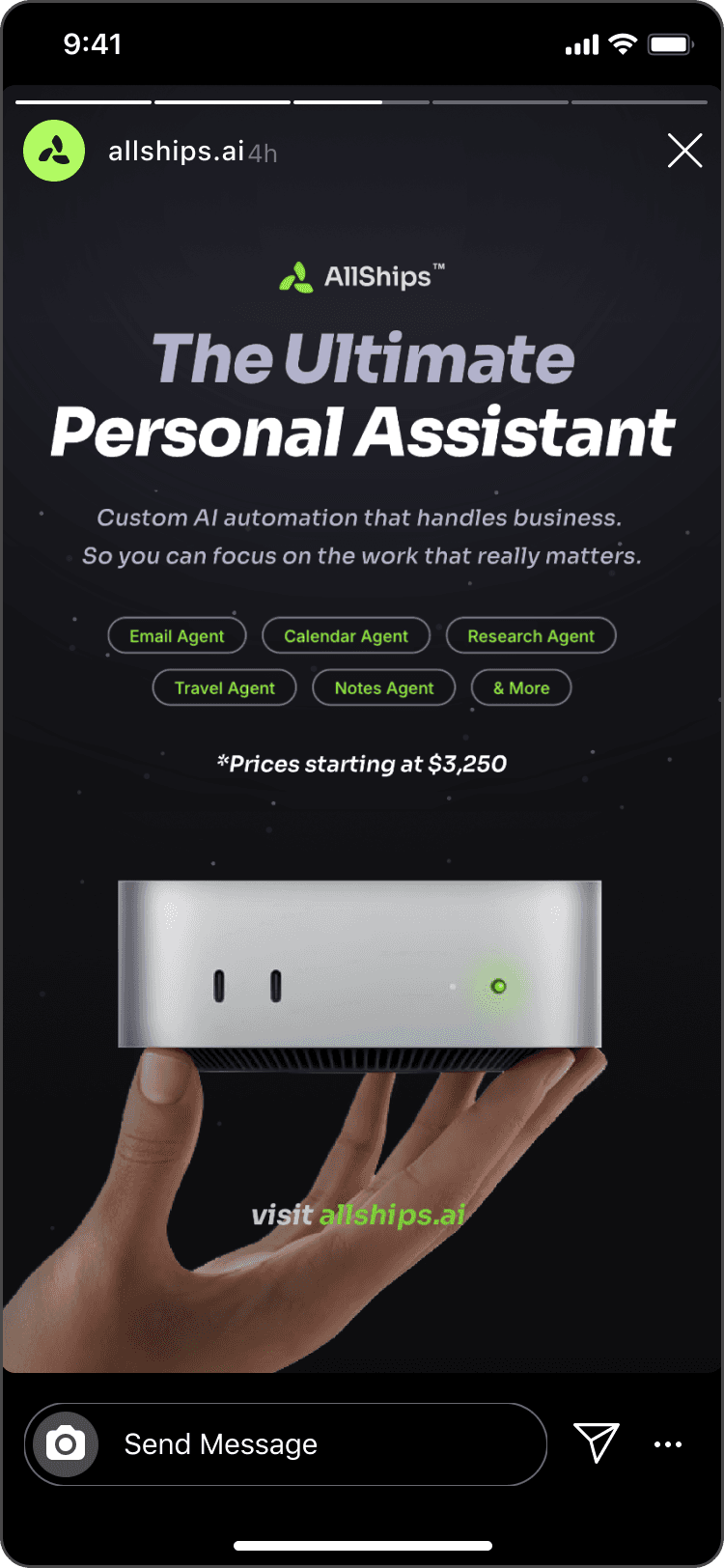
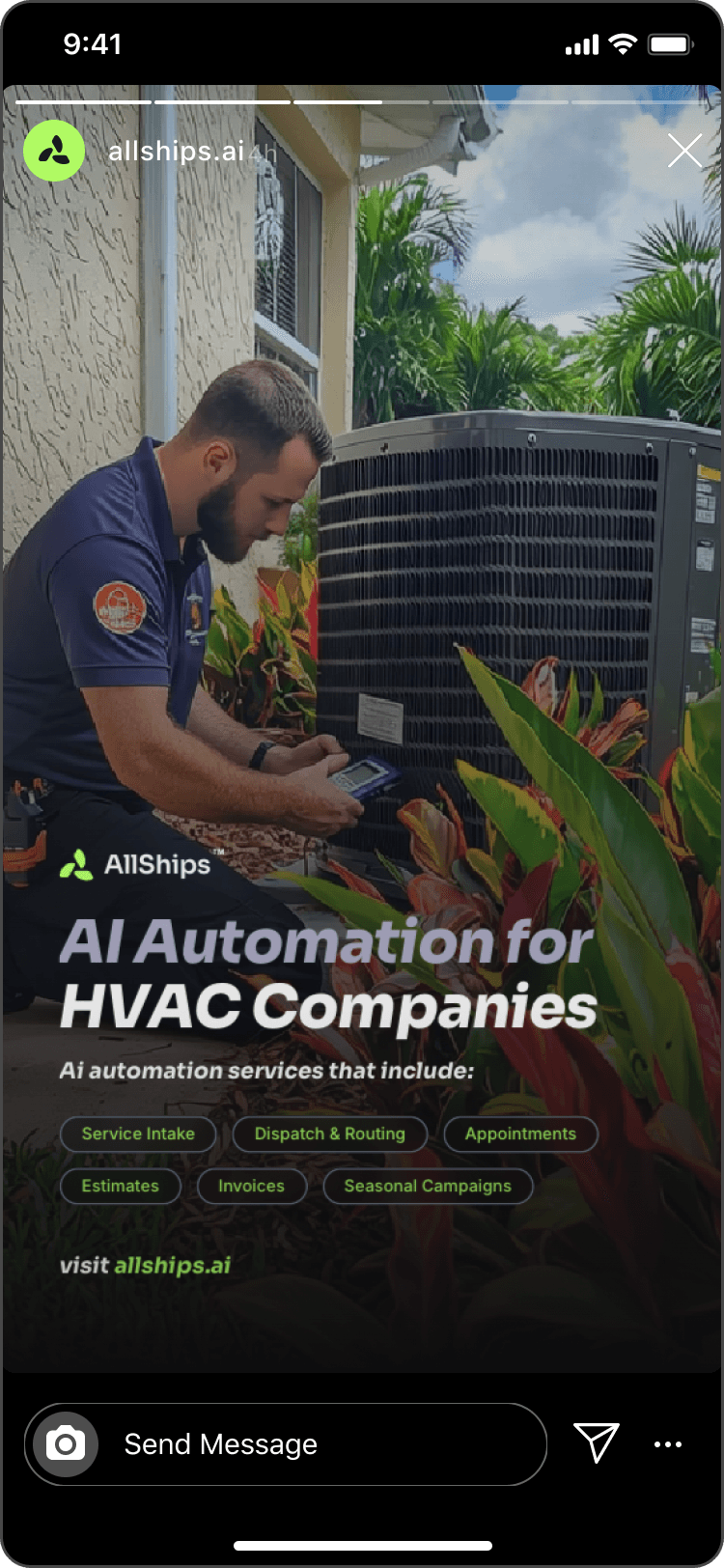
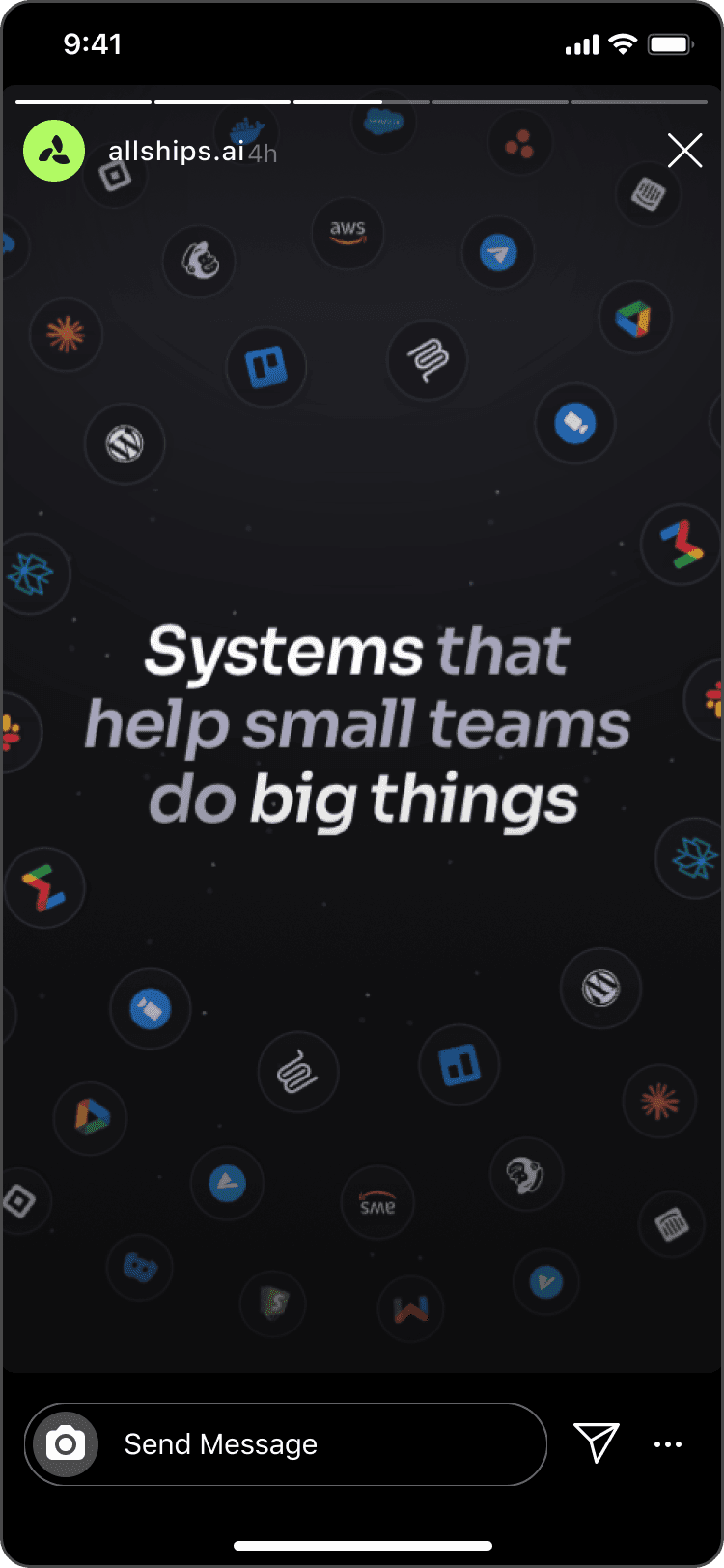
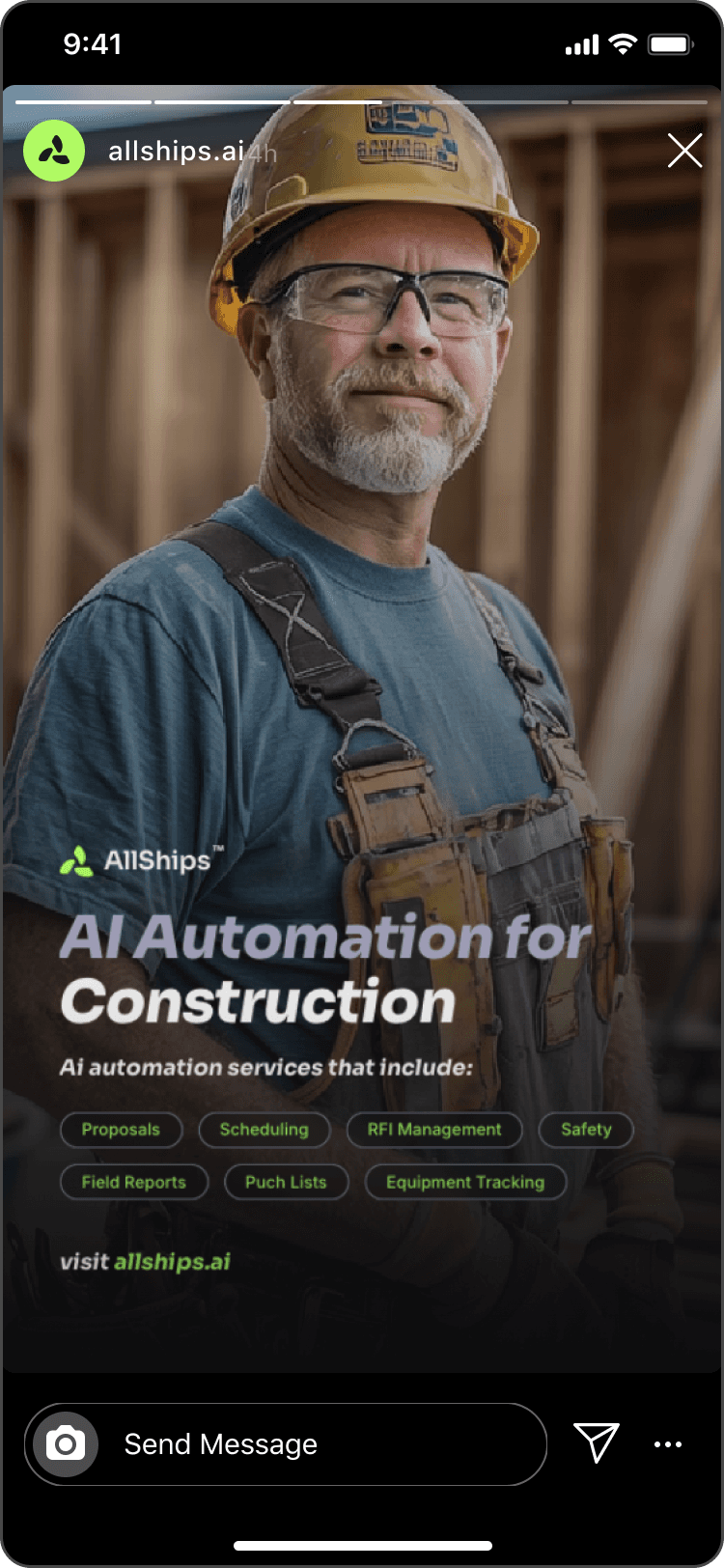
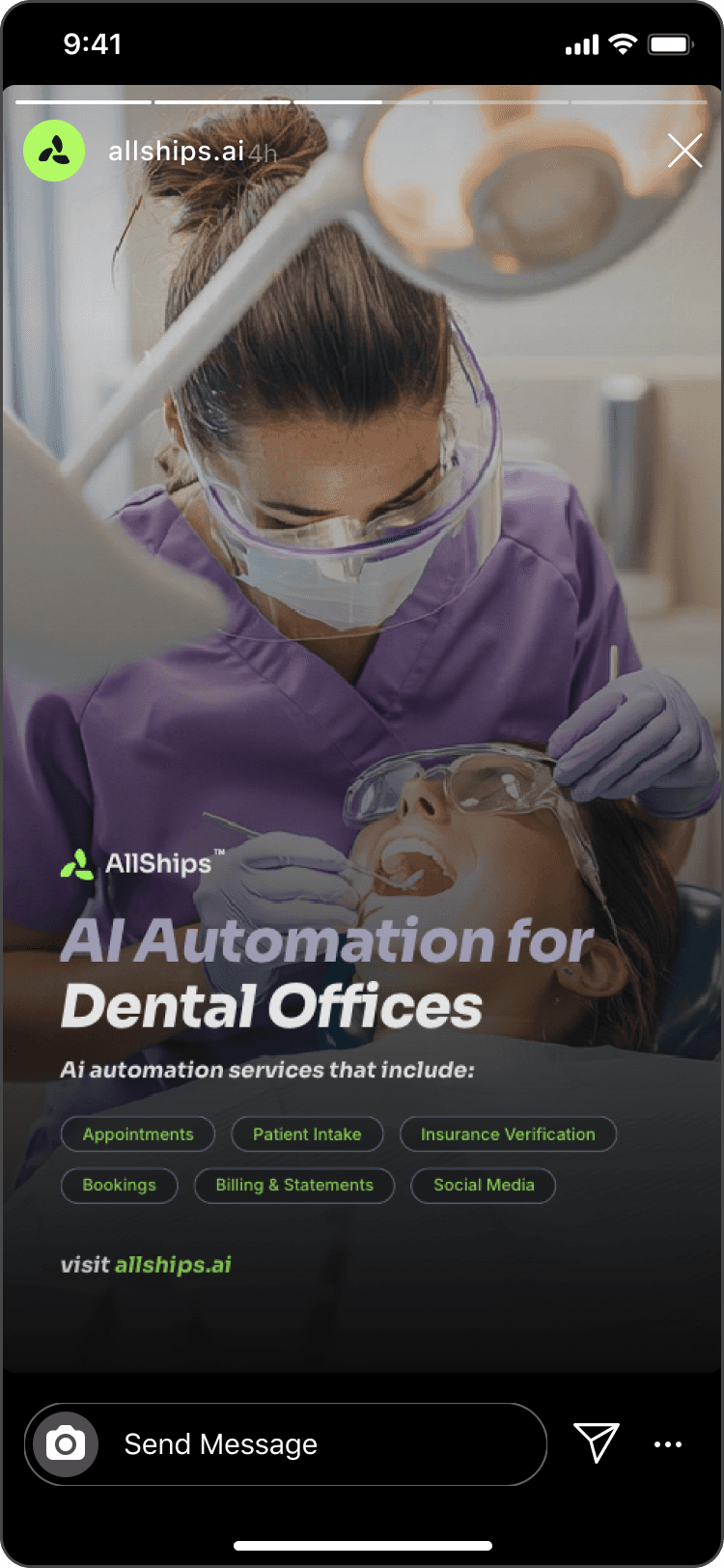
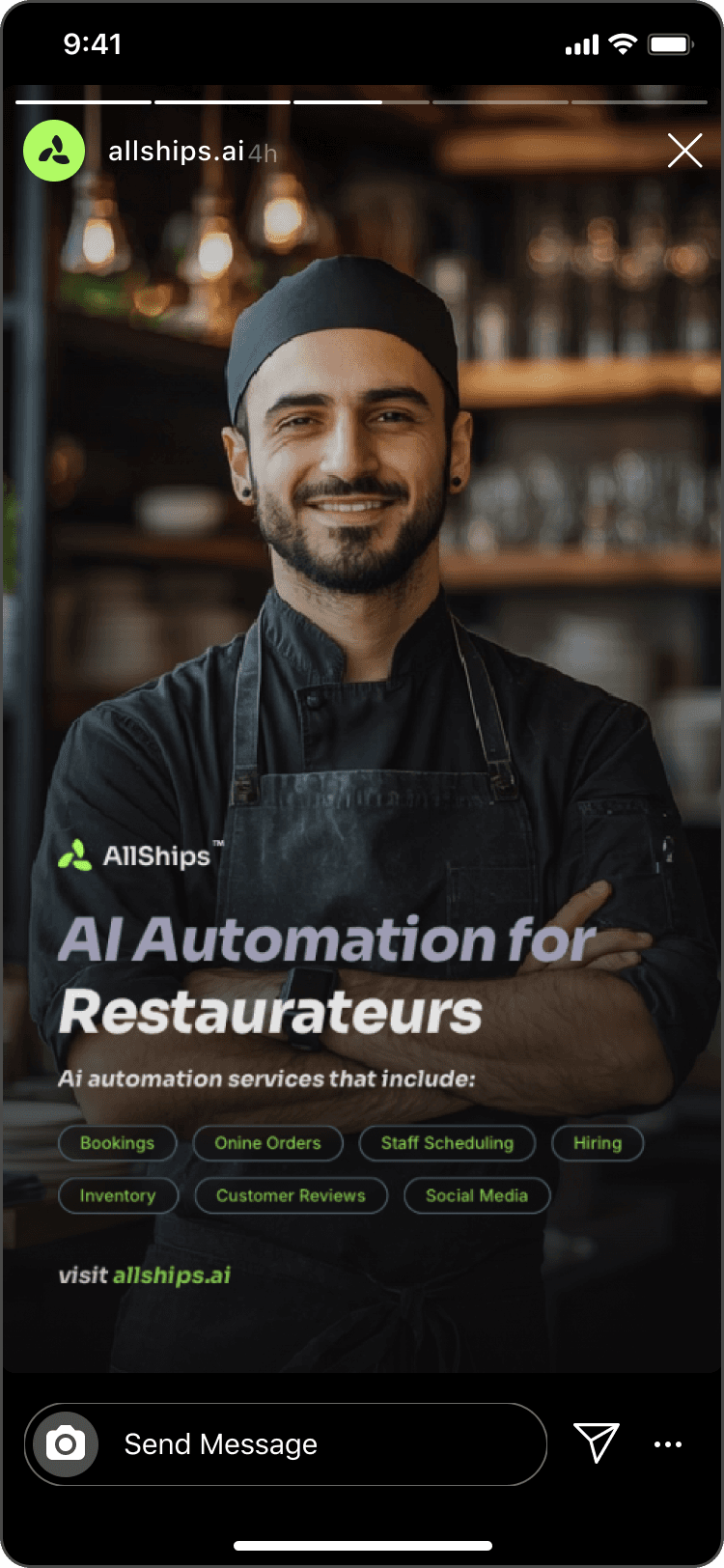
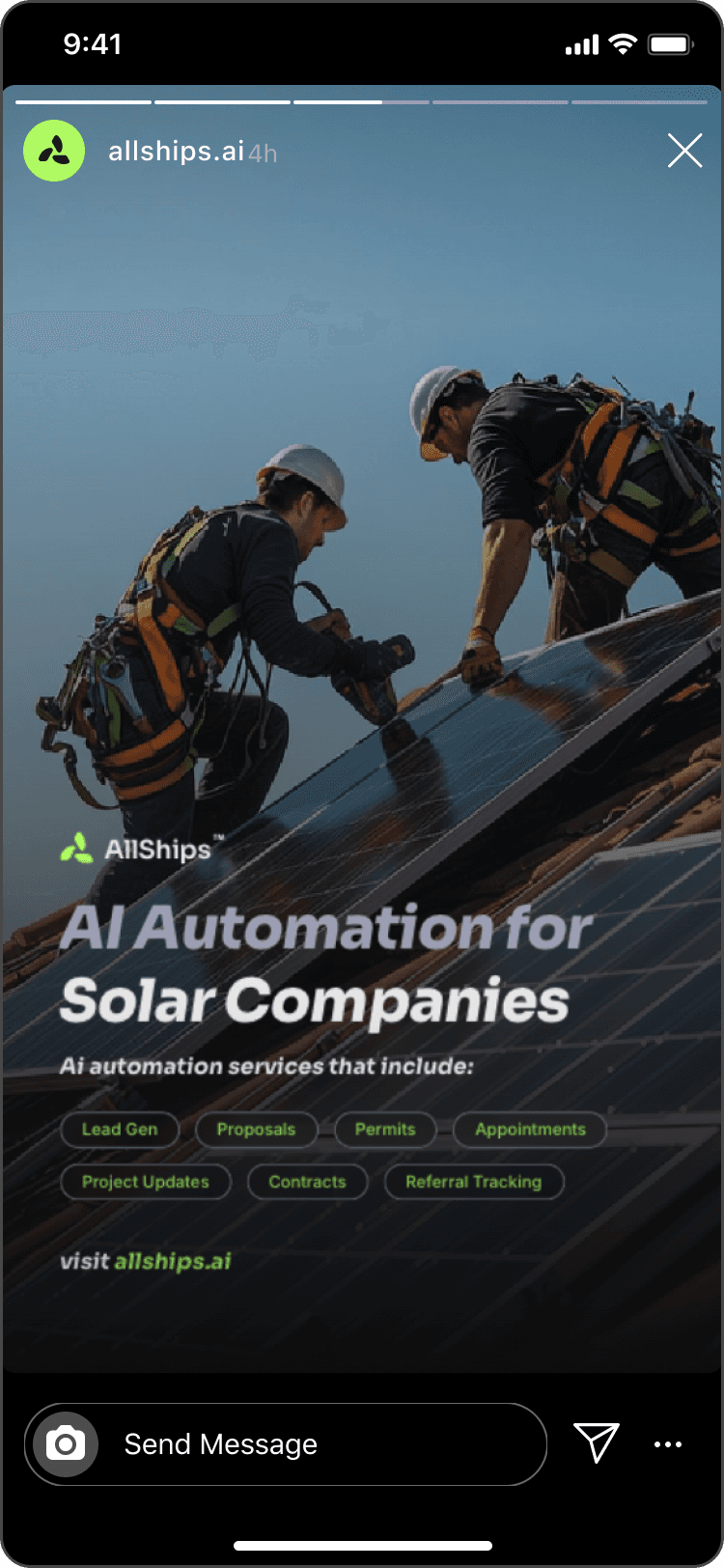
[TARGETED INSTAGRAM ADVERTISEMENTS]
[KEY LEARNINGS]
Building AllShips with AI-assisted development taught me things I couldn't have picked up from reading about it. Not about AI as a concept — about what it actually feels like to use it as an engineering partner on something real.
The workflow with Claude Code was conversational. I'd describe a spec — often verbally through voice mode — and we'd work through the architecture together before writing any code. Claude would generate implementation, I'd review it, we'd iterate on edge cases, and move to testing. That cycle compressed what would normally be weeks of solo development into days. The codebase grew to 420 passing tests across 10 automation packages with consistent patterns and production-grade error handling — on a timeline that would have been aggressive even for a small team.
The debugging stories are where the learning happened. The voice agent was saying literal "name" and "subject" instead of the prospect's actual data — Vapi uses LiquidJS double-brace syntax, not Python f-strings. The call scheduler was firing calls immediately instead of waiting — scheduled times were stored in EST but compared against UTC via string comparison. Gmail API tokens failed with "Permission denied" on the production server — rsync from macOS preserved the source user ID, but the service runs as a different user. Each bug sounds obvious in one sentence. Each one took detective work to find. And each one got resolved in the same session — symptom to root cause to fix to deployment in minutes.
AI COMPRESSES THE DISTANCE BETWEEN DECIDING AND DOING. THE DECISION MAKING PROCESS IS STILL AND WILL ALWAYS BE MINE.
What ties it all together is Discord as the observability layer. Rather than building a monitoring dashboard for the automation server, I wired every significant event — form submissions, database writes, voice calls, pipeline transitions, errors — to fire structured Discord notifications. Over 50 event types, all formatted consistently. It's not Grafana, but for a system at this scale, it gives me exactly the visibility I need while I'm building the more sophisticated platform alongside it.
AUTOMATION PLATFORM
[INTRO TO ALLSHIPS PLATFORM]
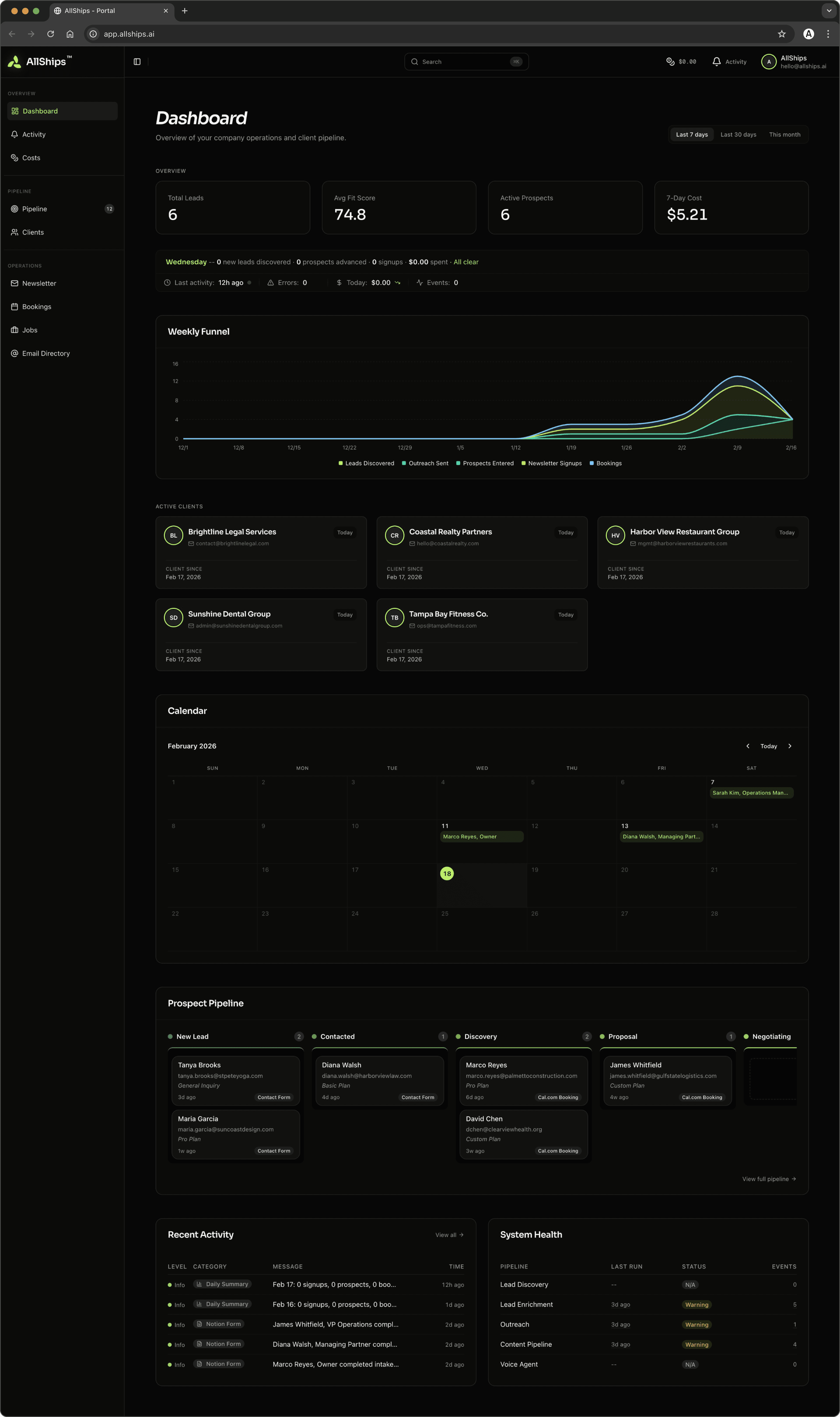
Once the website was live, the voice agent was operational, and the automation server was handling real traffic, I found myself switching between database views and Discord channels to piece together what was happening across the business. The data was all there — just fragmented across tools that weren't designed to give you a unified picture. So I built one. The AllShips Platform is a Next.js 15 application that serves two purposes: an internal dashboard where I can see the state of every prospect, lead, subscriber, booking, and client at a glance — and a white-labeled client portal where active clients access their project information. The architecture reflects a core principle: the platform reads from the same databases the automation server writes to, with no direct coupling between the two systems. The database is the single source of truth. Either system can evolve independently without breaking the other. I carried the AllShips visual identity into the dashboard — the same signature green, the same dark-first aesthetic, the same typography — because I wanted it to feel like a natural extension of the brand, not a generic admin panel bolted on. I started with shadcn/ui as a component foundation and extended it into 38 custom component directories: Kanban boards with drag-and-drop, radial gauge charts, data tables, status editors, timeline views.
INTERNAL TOOLS DESERVE THE SAME DESIGN CARE AS CUSTOMER-FACING PRODUCTS. IF I'M GOING TO LIVE IN THIS DASHBOARD EVERY DAY, IT SHOULD BE SOMETHING I ENJOY.
[PLATFORM DASHBOARD]
[ALLSHIPS PLATFORM WALKTHROUGH]
[PLATFORM FEATURES OVERVIEW]
The main dashboard aggregates everything into a single operational view: eight core metrics, a daily briefing, an attention feed surfacing priority items, a drag-and-drop pipeline Kanban, a bookings calendar, an activity timeline, and charts covering funnel progression, lead distribution, source attribution, and cost tracking. Every visualization pulls from live data with caching and on-demand revalidation. The platform organizes the business into seven territories — Leads, Prospects, Clients, Newsletter, Bookings, Jobs, and Email Directory — each with consistent UX: list views, filters, detail pages with inline editing, and cross-references between related records. Kanban boards support drag-and-drop status updates with optimistic UI and automatic rollback on failure. Authentication is lightweight and intentional: admin credentials validated against environment variables, client credentials against the database, JWT sessions in HTTP-only cookies, rate limiting on login. No external auth service — just the right amount of security for the threat model.
[CLIENTS]
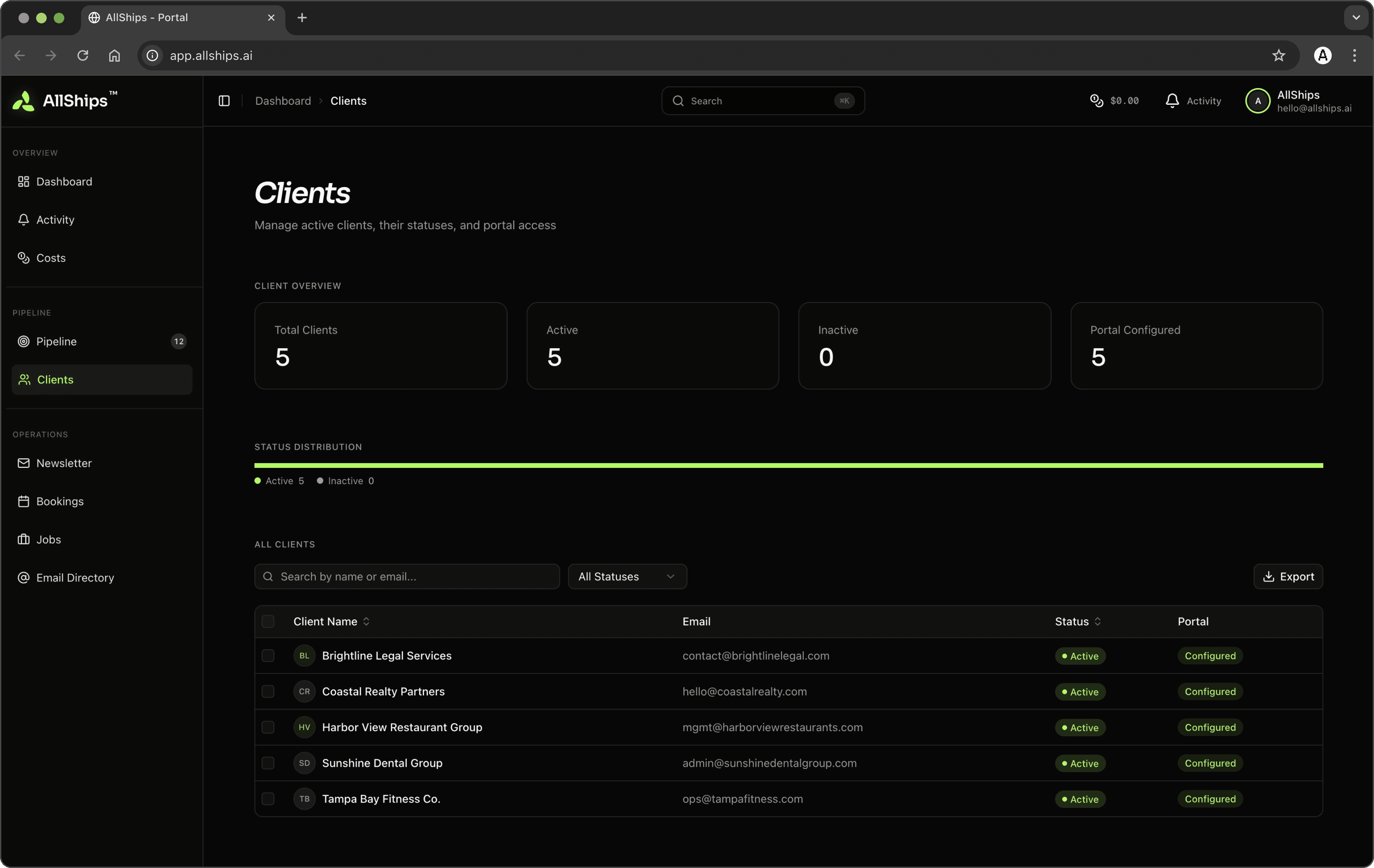
Card and table views of active accounts, a creation dialog with server-side password hashing, and admin impersonation for QA.
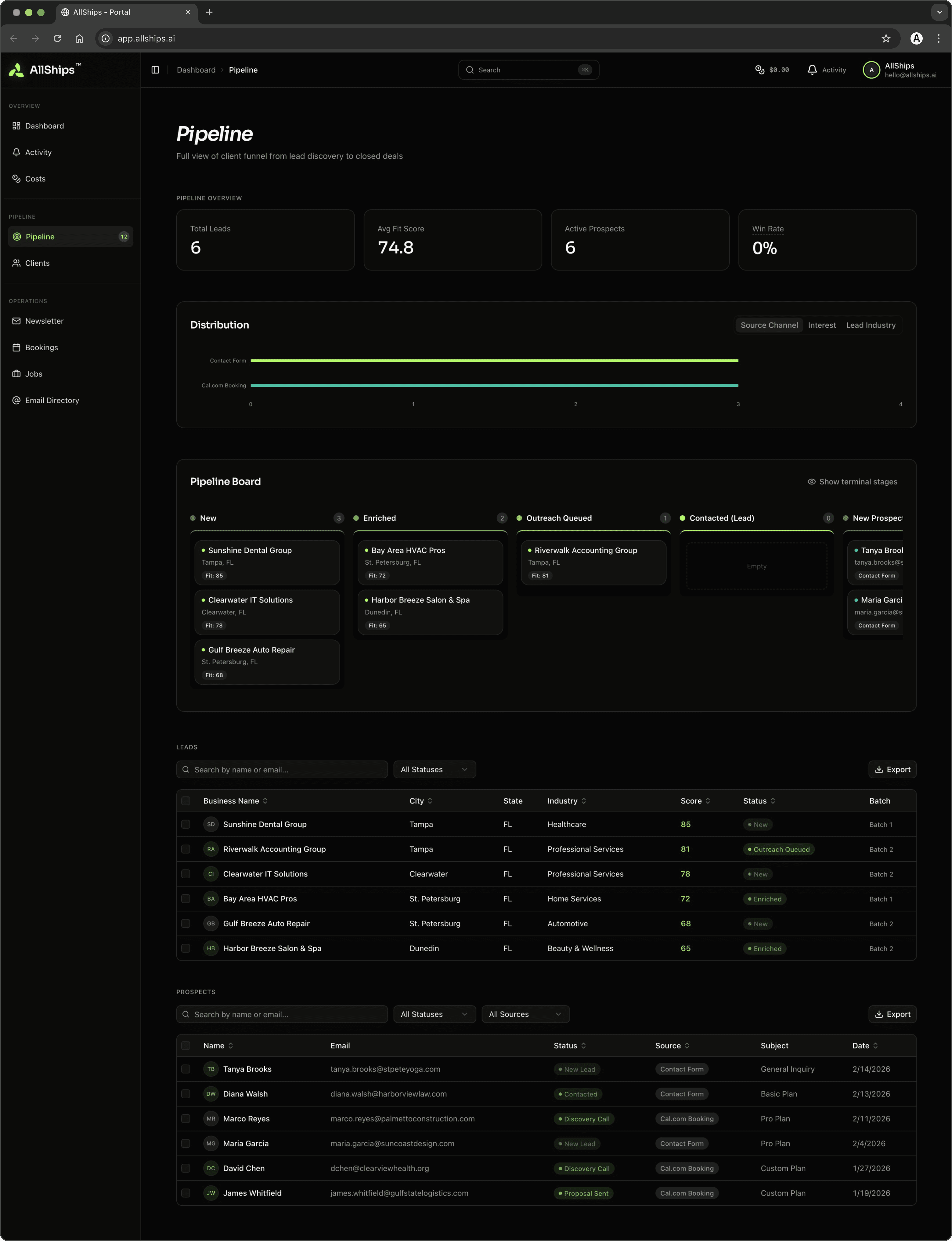
[PIPELINE]
The prospect pipeline visualized as an eight-stage Kanban and sortable table. Detail pages show stage progression, voice call history, intake responses, and notes.
[LEAD ENRICHMENT AND REACHOUT]
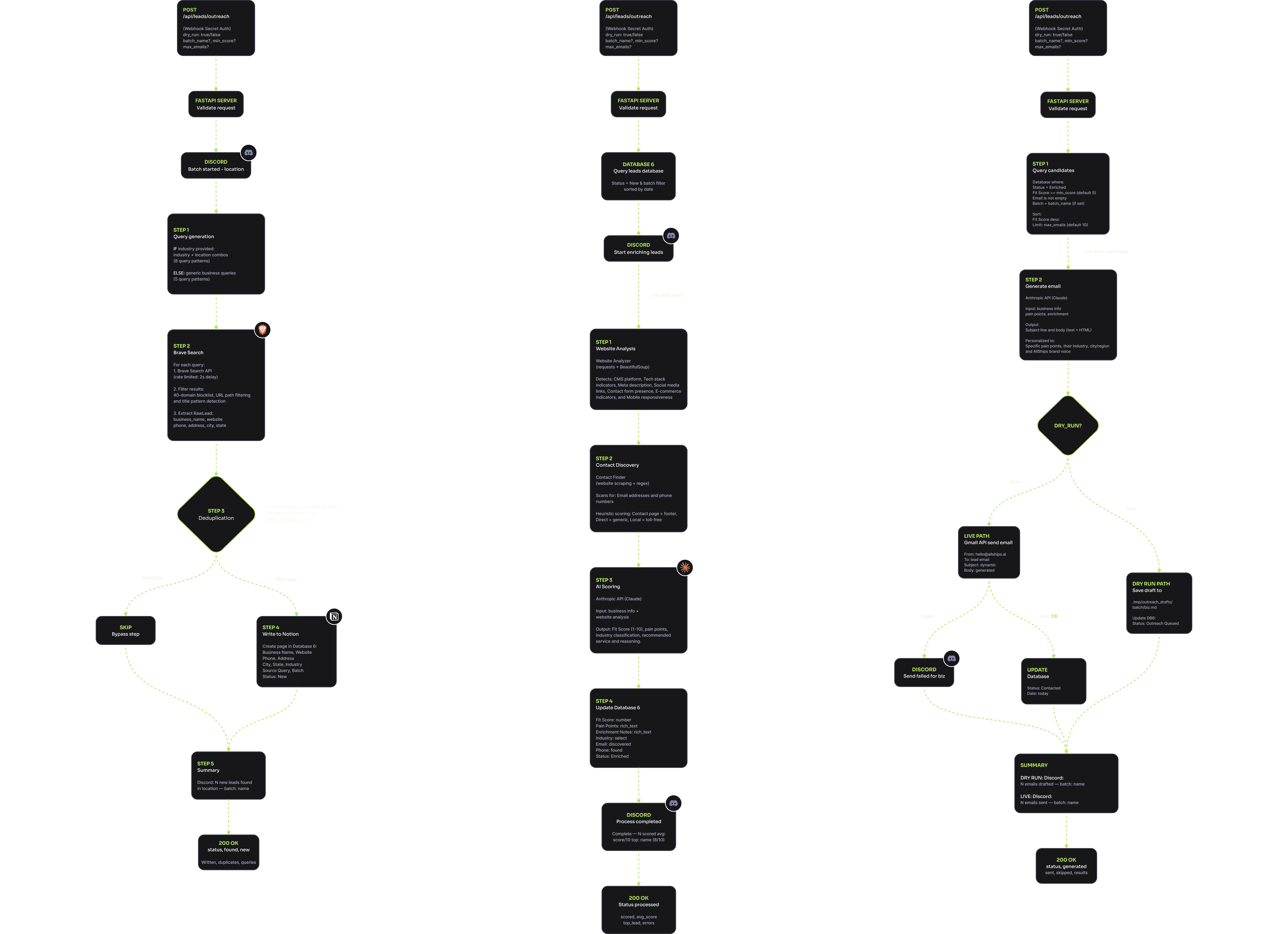
The lead generation suite is where automation does work that would be impossible to do manually at any reasonable scale. Discovery takes a location, industry, and batch name, generates targeted search queries, runs them against Brave Search, and filters through a 40-domain blocklist and URL-path pattern matching to strip out aggregator pages. The platform displays leads as a Kanban with color-coded fit scores; each detail page shows the full enrichment profile: CMS detection, tech stack, social links, AI-generated pain point analysis, and a fit score visualized as a radial gauge. Enrichment is where it gets interesting. The system analyzes each lead's website, extracts contact information with heuristic scoring, and sends the collected data to Claude for an automation readiness assessment — pain points, industry classification, service tier recommendation, and a fit score from 1 to 10. Outreach generates personalized emails referencing each business's specific pain points, with dry-run mode for review before sending.
WATCHING THE FIRST ENRICHMENT BATCH COME BACK WITH INSIGHTFUL ANALYSIS — THE AI IDENTIFYING THAT AN AUTO REPAIR SHOP'S OUTDATED WORDPRESS SITE REPRESENTED SPECIFIC AUTOMATION OPPORTUNITIES — A MOMENT THE WHOLE SYSTEM CLICKED.
[KEY LEARNINGS]
[BOOKINGS]
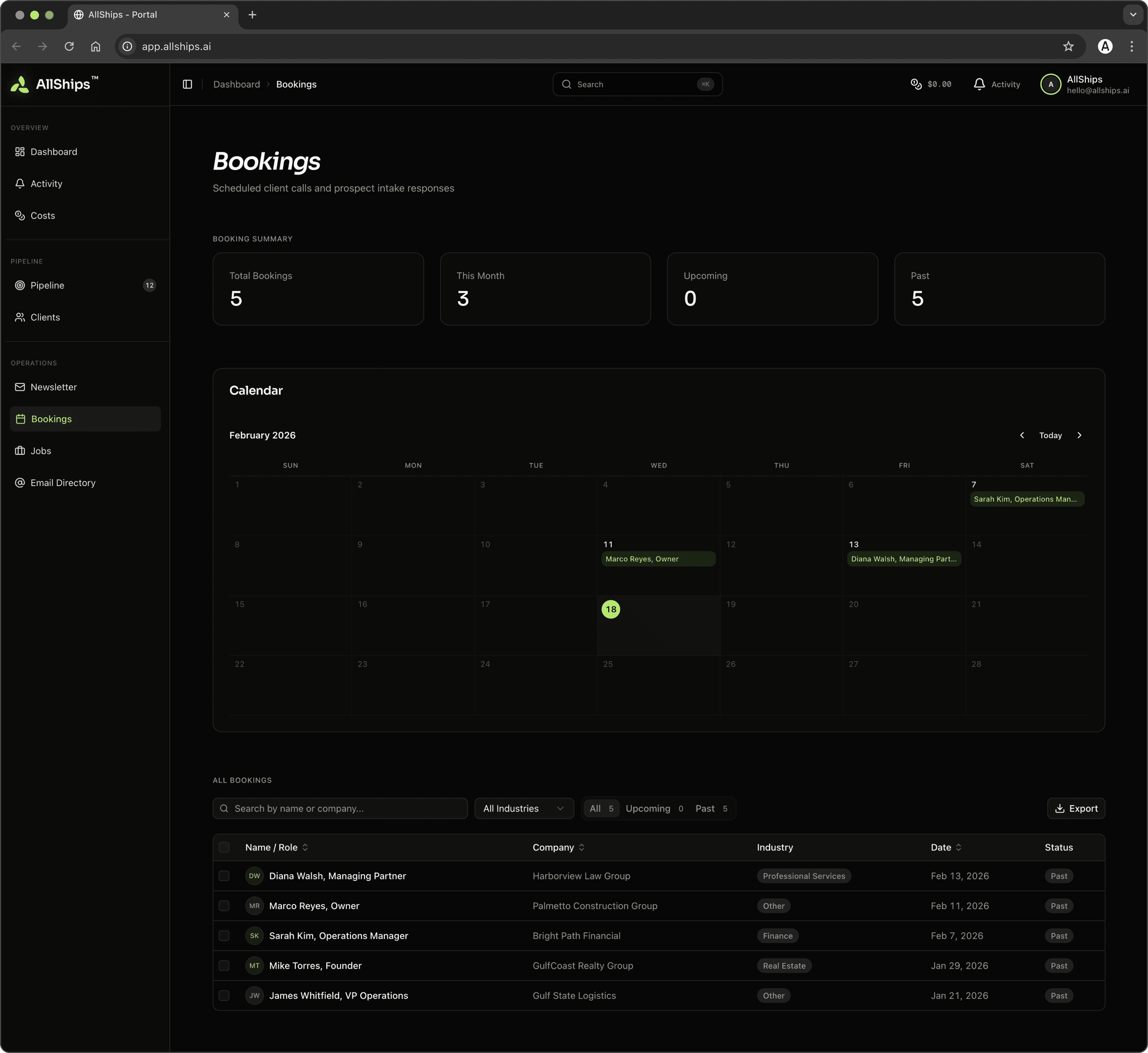
Upcoming and past discovery calls with 48-hour accent highlighting, attendee info, and linked intake responses.
[JOB OPENINGS]
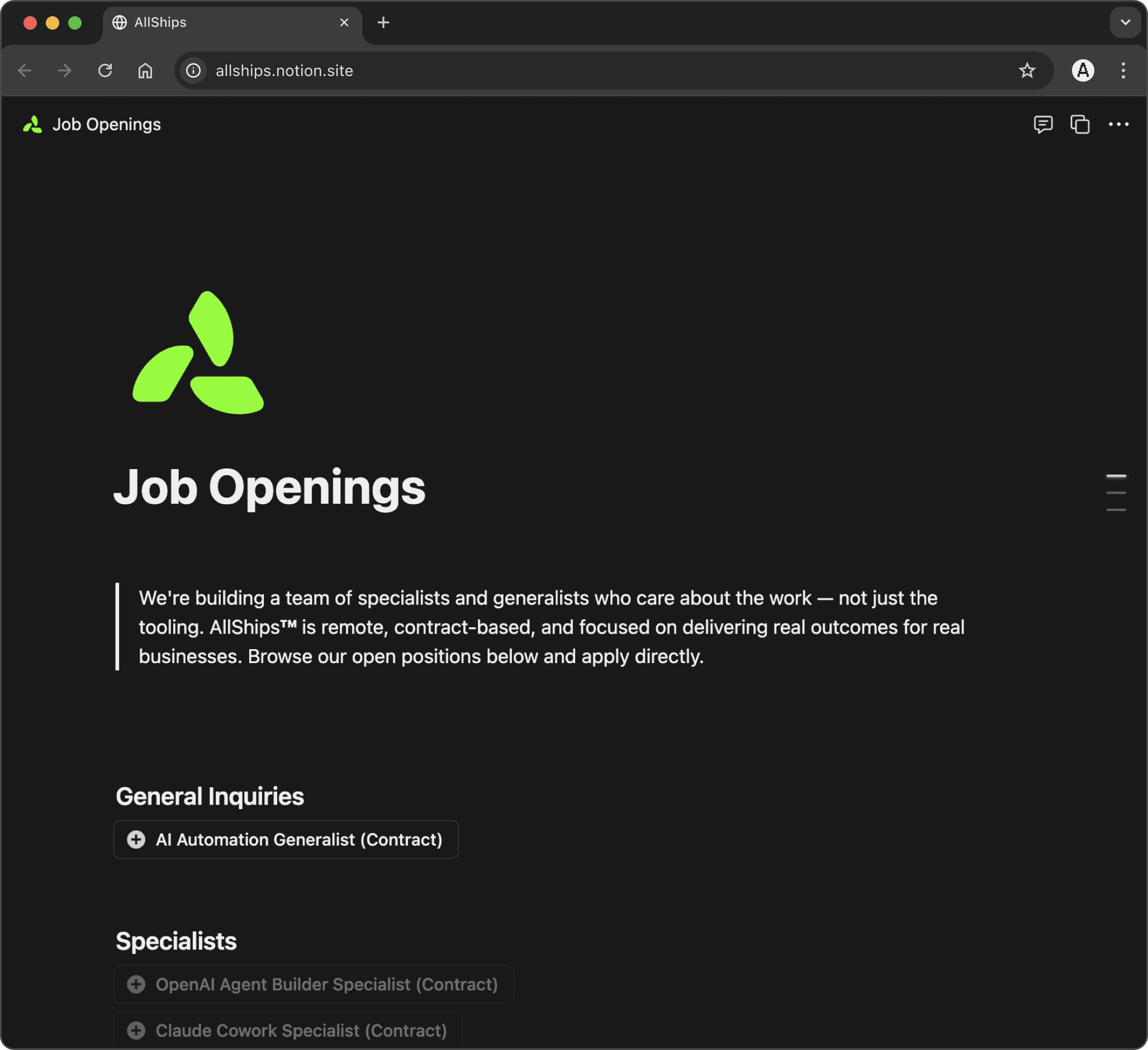
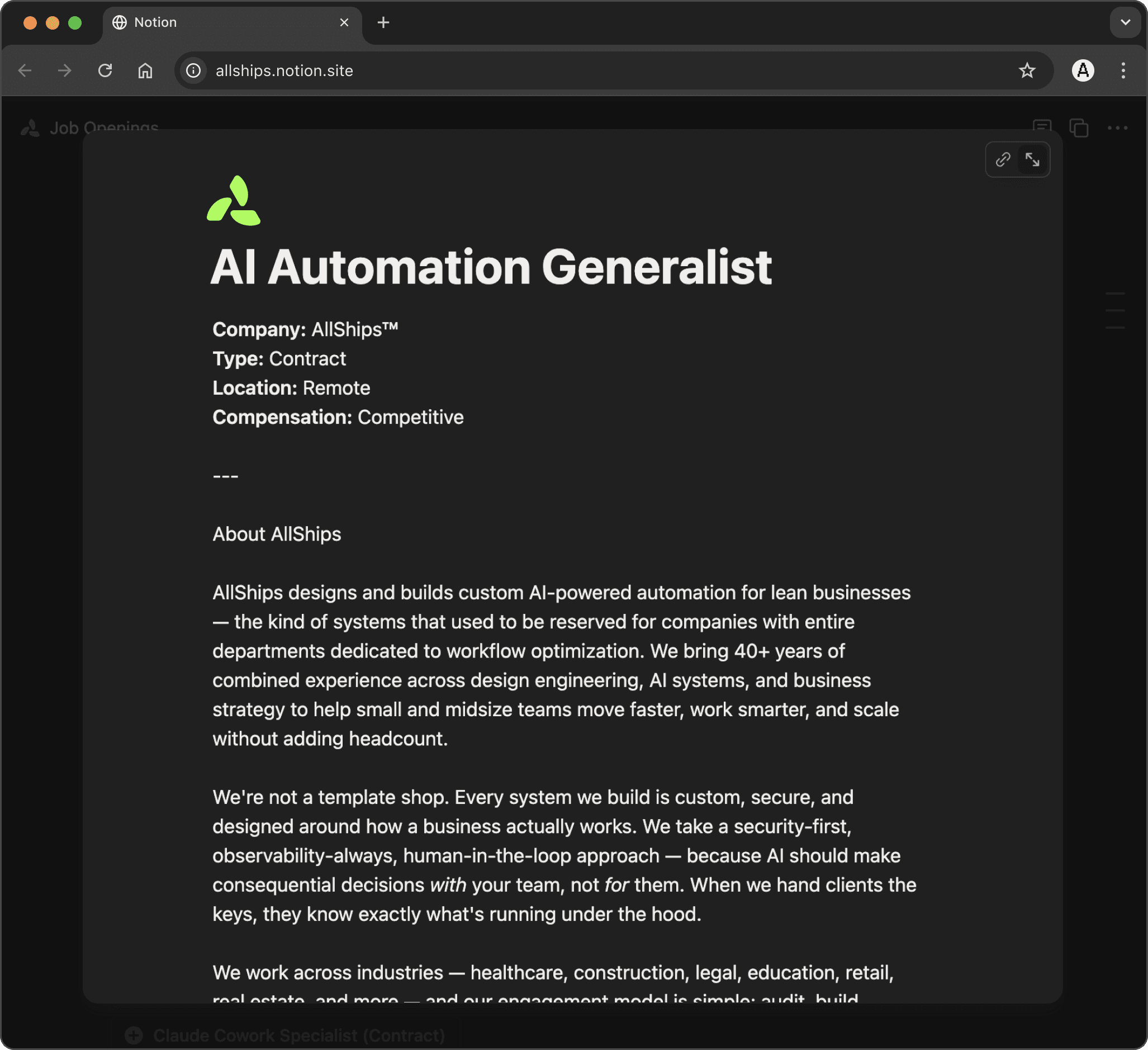
The website surfaces open job descriptions and accepts applications, which route through their own workflow — separate from sales but flowing through the same entry point. Building out job descriptions was actually a great learning exercise, in that it created space for me to define my perspective on what makes an effective AI consultant.
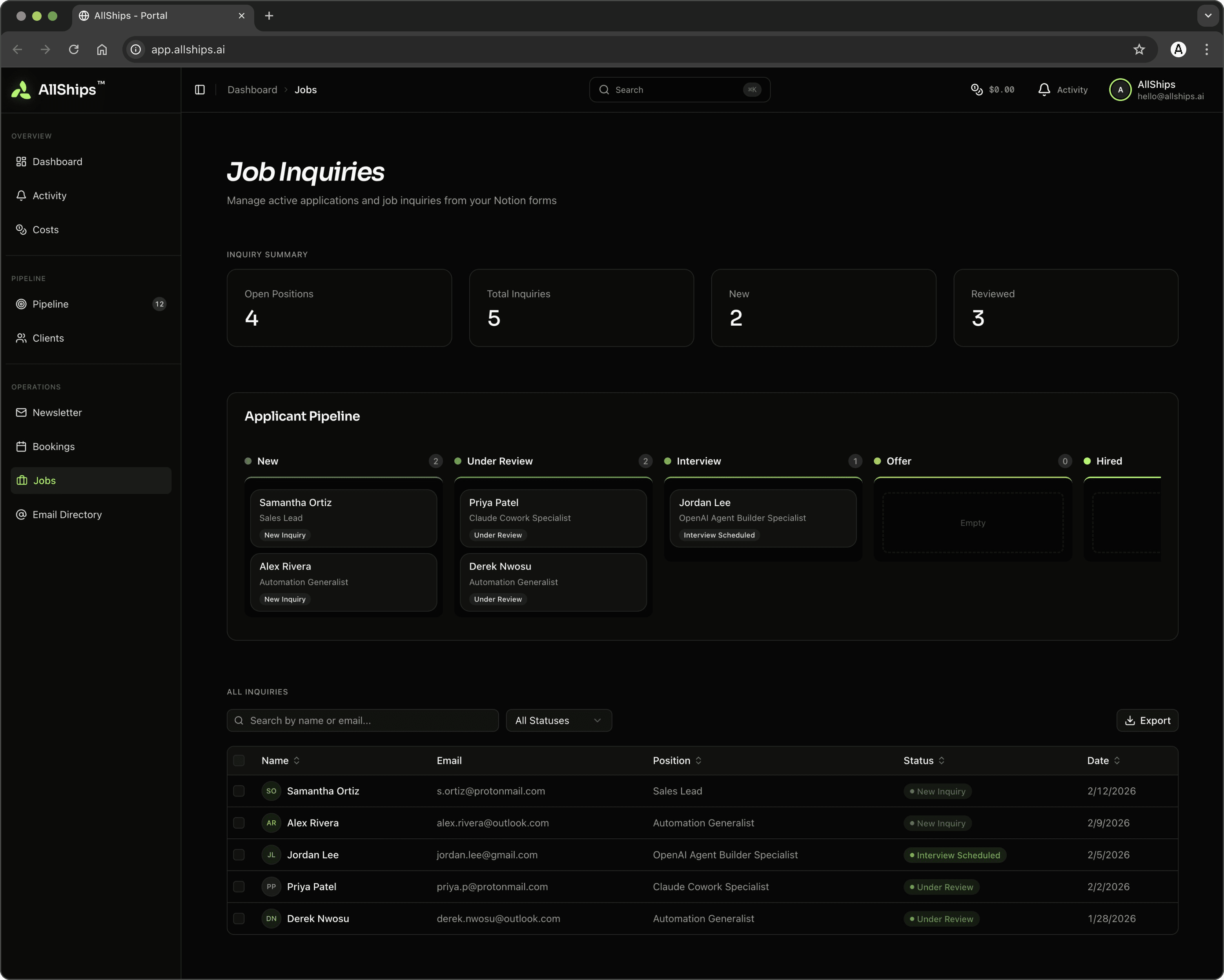
[JOB INQUIRIES]
Job inquiries route from the contact form's "Job Openings" path into their own workflow — separate from sales but flowing through the same entry point.
[EXAMPLE JOB DESCRIPTION]
Building out a collection of job descriptions was actually a great learning exercise, in that it created some space for me to define my perspective on what would be the makings of an effective AI consultant.
[NEWSLETTER]
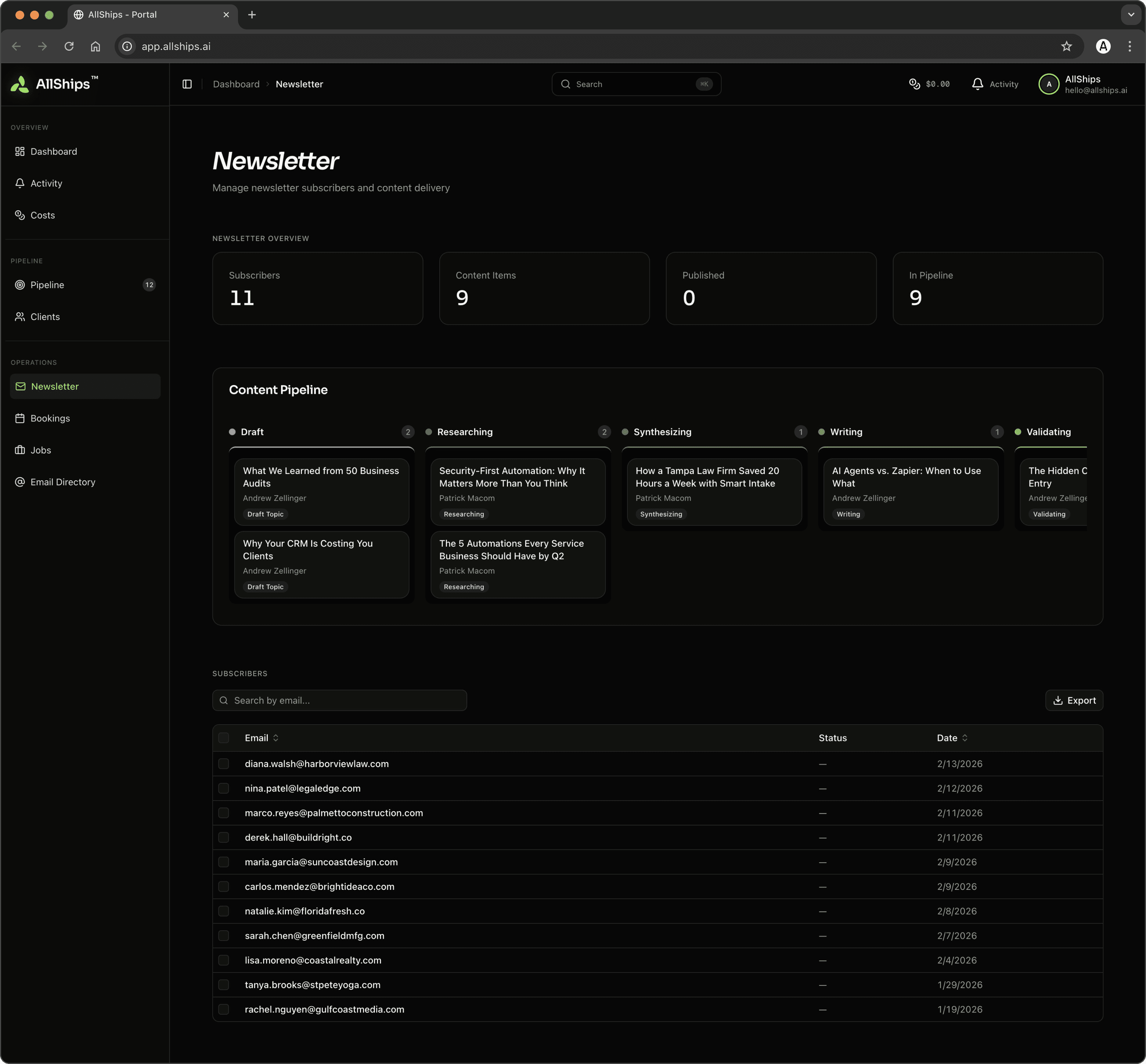
Subscriber tracking with signup timeline charts and a nine-stage content pipeline from Draft Topic through Published.

[NEWSLETTER AUTMATIONS]
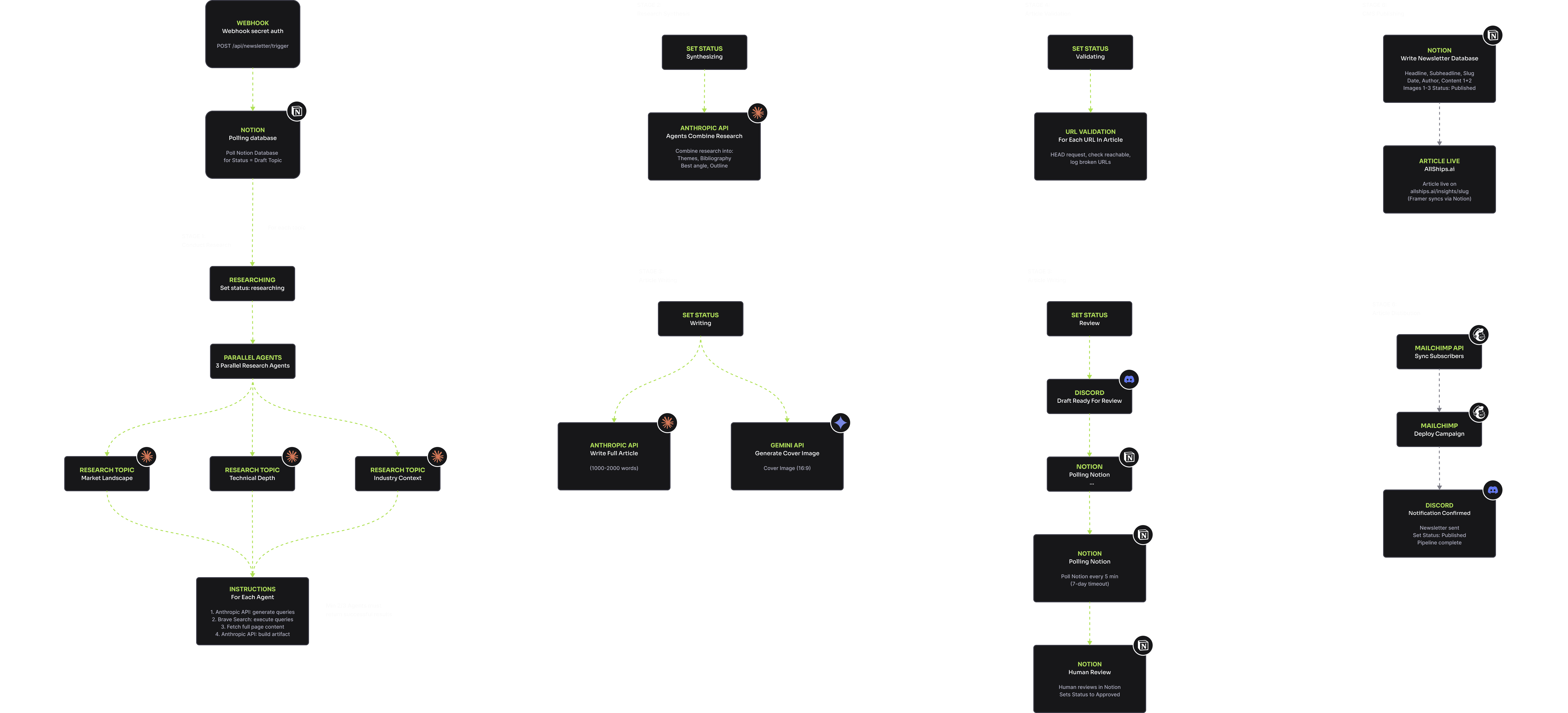
The newsletter pipeline is the most complex automation in the system, and the one that best demonstrates what I mean by "human-in-the-loop" design. A background poller watches for topics marked as "Draft." When it finds one, it kicks off a multi-agent research pipeline: three parallel agents each approach the topic from a different angle — industry context, technical depth, and market landscape. Each generates targeted queries, fetches and processes web content, and produces a structured research artifact. A synthesis agent distills the three into a consolidated summary with cross-cutting themes. The article writer uses Claude to produce a 1,000–2,000 word piece in the AllShips editorial voice. A cover image is generated via Gemini. Every cited URL is validated before the pipeline pauses at Review status and waits for my approval. If I take too long, Discord reminds me. A seven-day timeout prevents zombie topics. On approval, the article publishes to the Framer CMS and a Mailchimp campaign goes out to subscribers.
I COULD HAVE AUTOMATED THE EDITORIAL DECISION AWAY. BUT WHETHER SOMETHING REPRESENTS THE VOICE AND QUALITY I WANT ASSOCIATED WITH ALLSHIPS ISN'T SOMETHING I'M READY TO DELEGATE. MAYBE EVENTUALLY. NOT YET.
[COSTS]
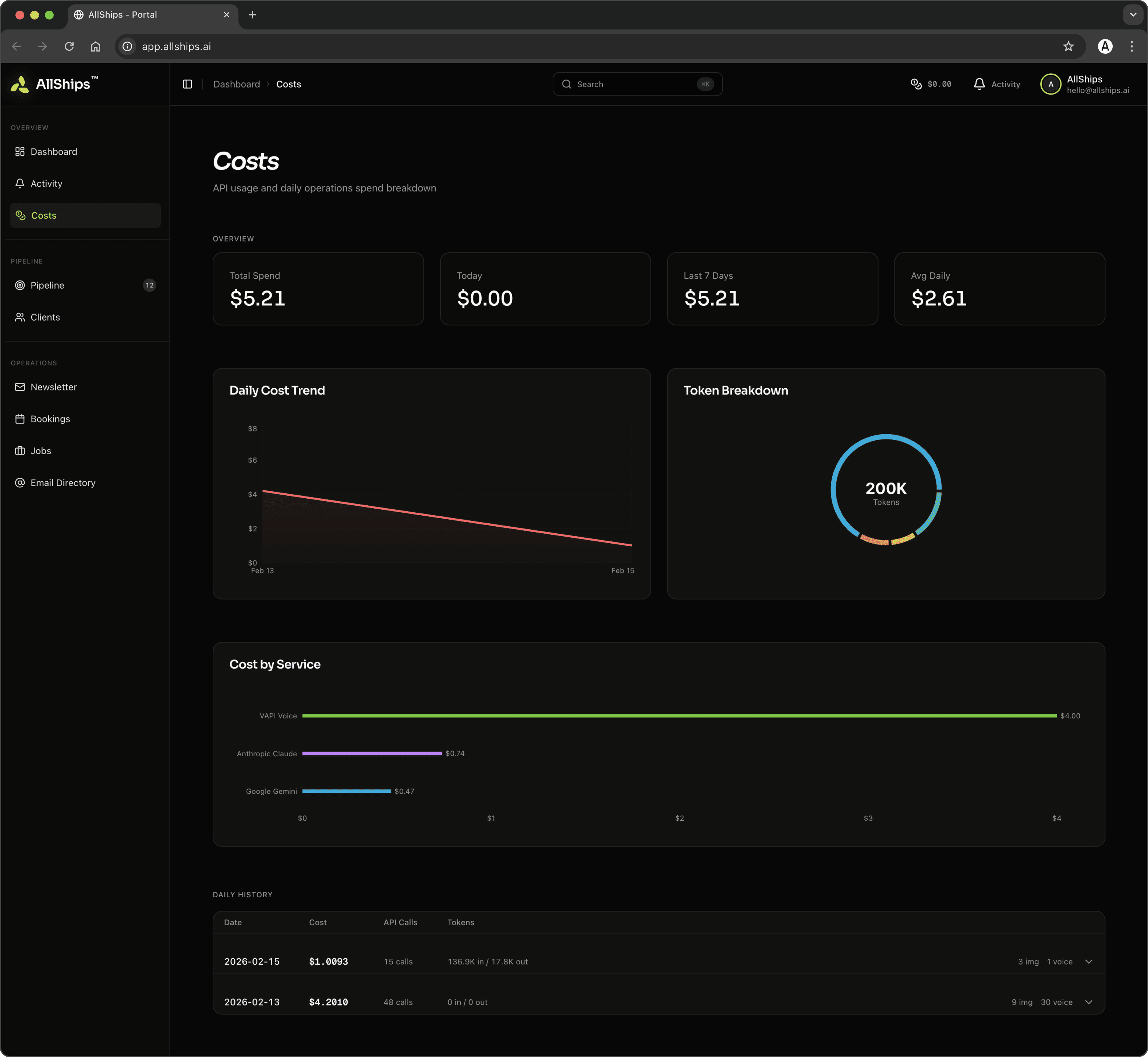
A cost dashboard tracks daily and monthly spend across every external API — Claude inference, Gemini images, Vapi voice minutes, Brave searches — because knowing your per-lead and per-article unit economics isn't optional when you're bootstrapping on AI infrastructure.
[ACTIVITY]
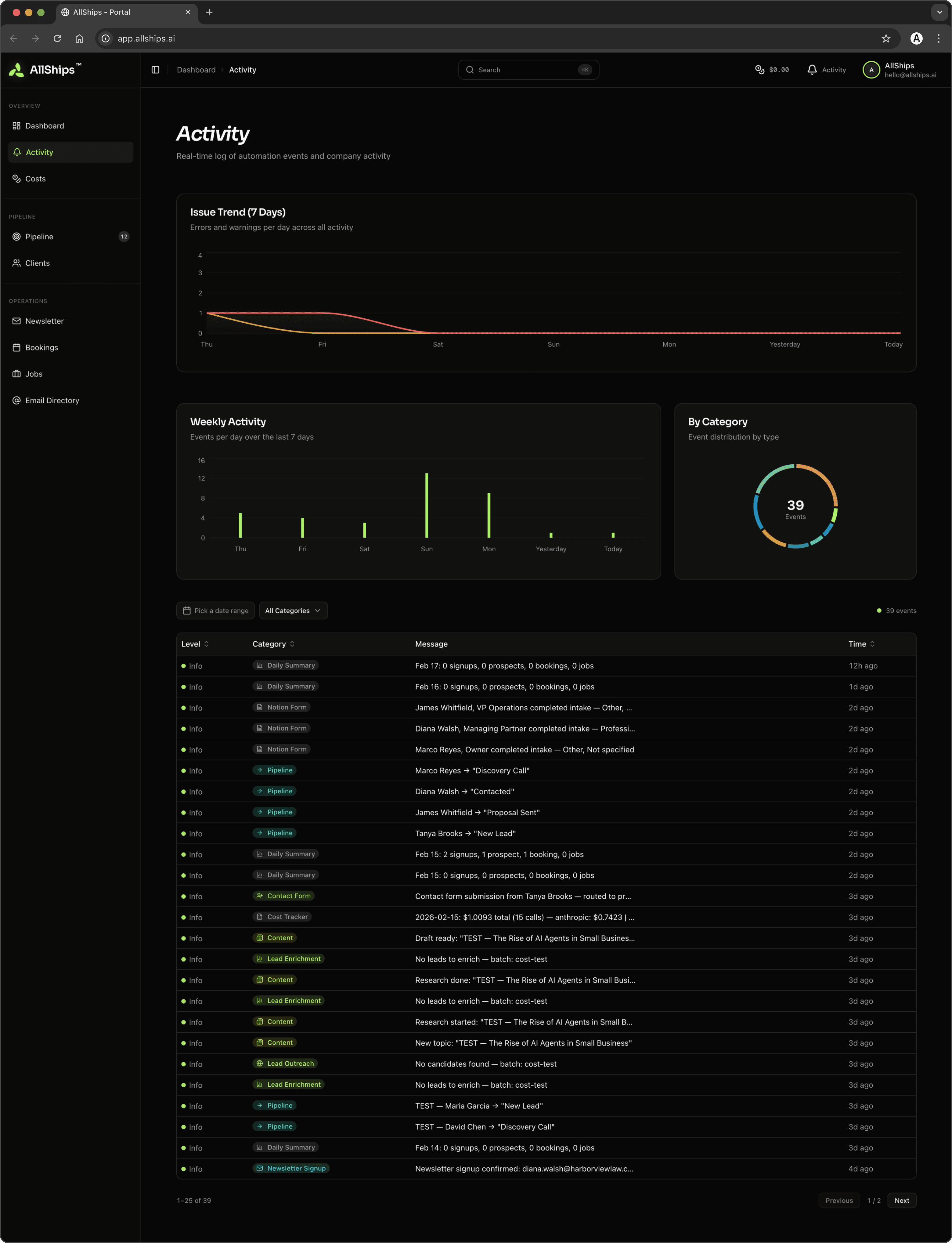
A chronological audit trail of every system event, pushed to the company Discord for continuous monitoring.
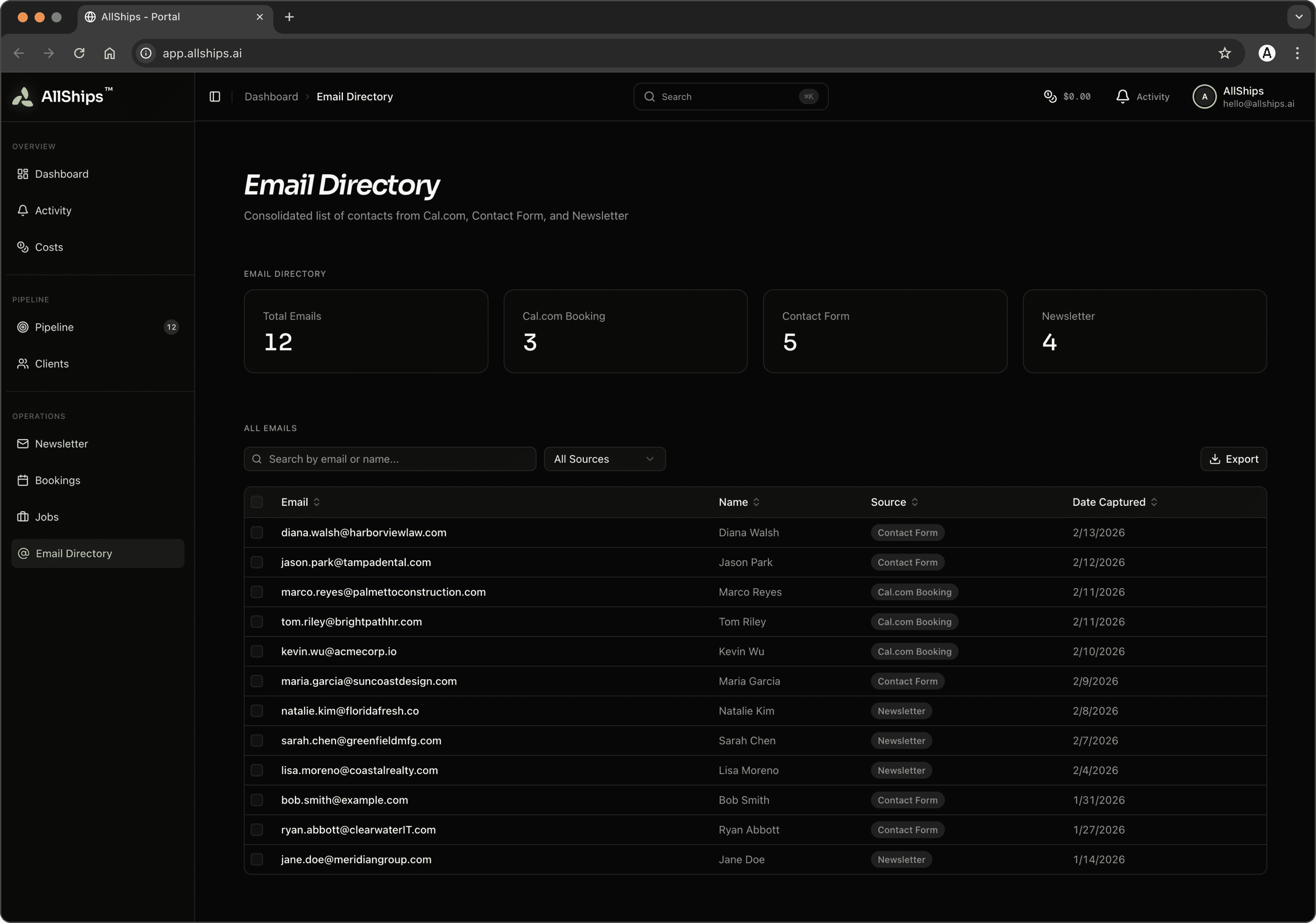
[EMAIL DIRECTORY
A unified directory serves as the deduplication backbone, preventing a prospect from getting three welcome emails in one week.
[CLIENT PORTAL]
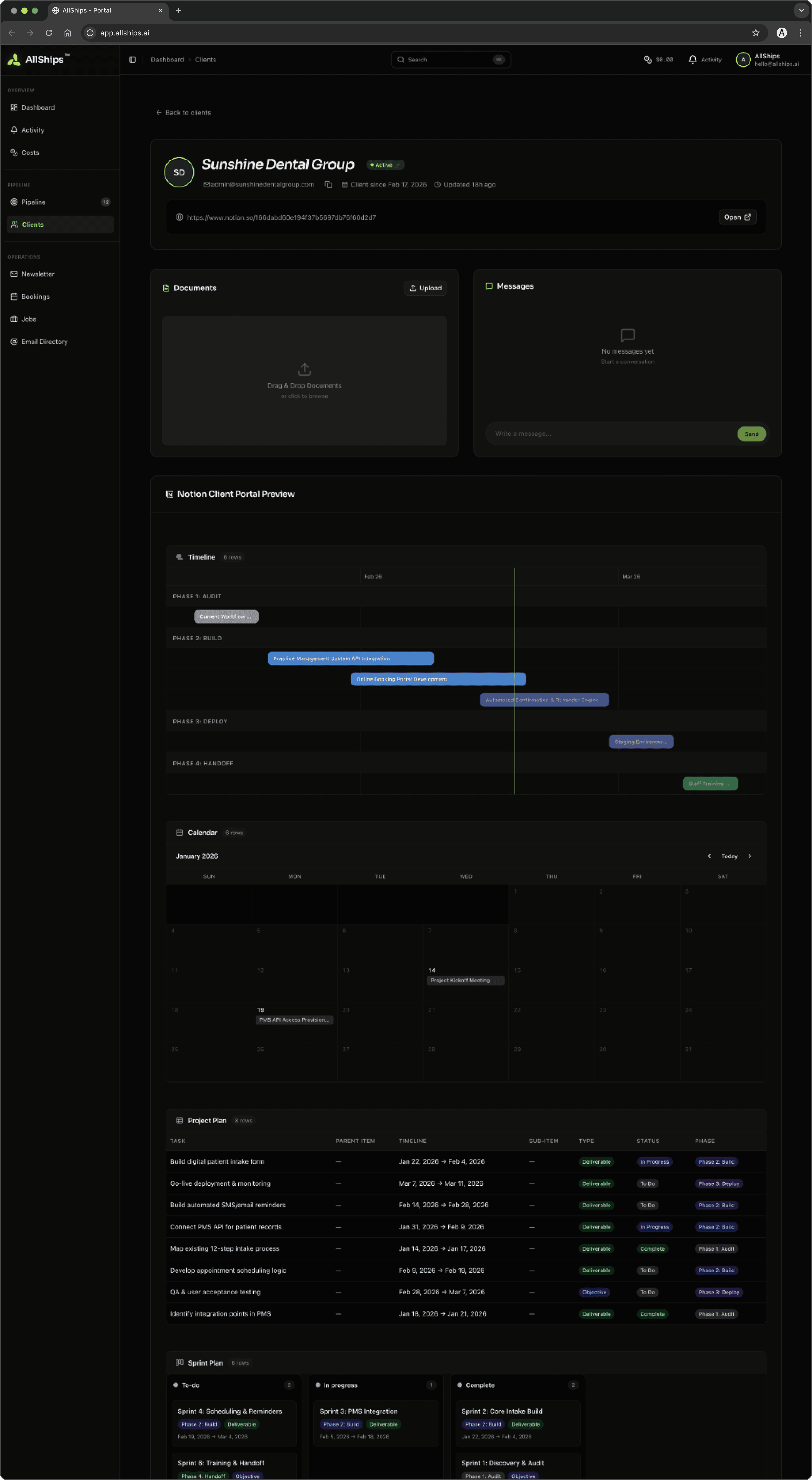
A white-labeled portal where active clients access their project information. Authentication against the database, simplified navigation, and project pages rendered dynamically from structured content blocks — headings, paragraphs, lists, images, tables, callouts, code blocks. I update a client's project page; the portal reflects it automatically. No custom CMS to build or maintain.
[ROADMAP & ESSENTIALS]
AllShips is a living system, and the roadmap is shaped by what would create the most value for clients. The client portal is expanding into a richer project management experience — real-time status updates via WebSockets, exportable reports, and deeper visibility into automation performance metrics. Lead scoring is evolving toward models trained on actual conversion data, so every new engagement makes the discovery engine smarter.
OUTRO
[FINAL THOUGHTS & REFLECTIONS]
What I ended up with is a business that runs on its own infrastructure. Prospects are contacted, qualified, and tracked automatically. Leads are discovered, enriched, and scored while I focus on other things. Articles are researched, drafted, and published with a single approval. Clients log into a portal that reflects their project status in real time. It works — not as a demo, but as the system I actually use every day to run the business.
I BUILT ALLSHIPS BECAUSE I BELIEVE SMALL TEAMS DESERVE THE SAME QUALITY OF AUTOMATION LARGE ORGANIZATIONS TAKE FOR GRANTED. THEN I PROVED IT BY BEING ONE OF THOSE SMALL TEAMS.


NEXT PROJECT
COMMERCIAL PROJECTS
[2014–2024]
[THE CHALLENGE]
Everything had to come together at once. The brand had to speak to business owners who are stretched thin and skeptical of hype. The website had to make a complex offering feel approachable. The infrastructure had to be production-grade from day one — this isn't a demo, it's the system I run my business on. The pieces of a system either reinforce or undermine each other. A website that promises simplicity but requires a ten-minute onboarding call is a broken promise. An automation that works perfectly but can't be observed is a liability. Everything had to be honest — marketing, engineering, and experience telling the same story. There was also a strategic dimension. I positioned AllShips as a generalist consultancy on purpose — to get close to different business types, learn their problems firsthand, and discover which verticals are worth going deeper on. The underlying infrastructure is intentionally industry-agnostic. AllShips is both a business and a research vehicle.
[THE CHALLENGE]
[WEBSITE DESIGN]
I designed and built the site in Framer — component architecture, responsive breakpoints, and CMS integration without the overhead of a custom frontend build. The design language pairs a dark-mode foundation with a signature green accent. Typography combines TT Hoves Pro for display with Inter for body. Generous whitespace and deliberate hierarchy let the content breathe. A key early decision: I structured the site as a single-page narrative where every section doubles as source material for the voice agent's knowledge base. If a section couldn't be understood when spoken aloud, it was too complex for the page. Designing for two audiences forced a clarity I might not have reached otherwise.
[MOBILE WALKTHROUGH]
[VOICE AGENT]
Aria — a fully custom voice assistant embedded as a React component, backed by a Cloudflare Workers API orchestrating Claude AI, OpenAI TTS, Whisper STT, and Cal.com booking in real time. I built her from scratch because every off-the-shelf platform I evaluated had the same problem: perceptible latency that breaks conversational rhythm. The solution: sentence-level TTS chunking. As Claude streams its response, a custom SentenceSplitter yields complete sentences immediately, each dispatched to TTS while Claude generates the next. Aria starts speaking within one to two seconds — fast enough to feel like a conversation, not a loading screen. The frontend manages audio playback with buffer queuing, microphone input routing to Web Speech API on desktop or Whisper on mobile, and a canvas-based waveform visualization responding to audio data in real time. The dots pulse with your voice when listening, sweep outward when thinking, dance with output when speaking. Those cues replace the uncomfortable silence that makes most voice interfaces feel broken. On the backend, Claude is configured with tools for checking availability and booking calls directly during conversation. The system prompt positions Aria as warm, helpful, never salesy — treating the prompt more like copywriting than engineering.
[VOICE AGENT WALKTHROUGH]
[VOICE COMPONENT WALKTHROUGH]
[CONTACT FORM]
Webhook submissions verified with
Aria speaking
Aria listening
[CONTACT OPPORTUNITIES]
The contact and booking systems are where the website becomes infrastructure. Every form submission and booking triggers coordinated routing, deduplication, enrichment, and follow-up. The subject field determines the path: prospect inquiries flow into the sales pipeline, job applications route to recruitment. Every submission gets deduplicated, written to the appropriate pipeline, and surfaced via Discord within seconds. Phone numbers trigger automatic outbound voice calls, respecting timezone.
[COMMUNICATION AUTOMATIONS]
When a prospect includes a phone number, the call scheduler resolves their timezone from the number, checks calling hours, and either initiates or queues the call. Outbound calls use Vapi's API with prospect data injected as template variables. Aria conducts each call, and structured processing routes by outcome: interested prospects get a booking link, callback requests go to Follow Up, no-answer cases trigger retry scheduling. Every call generates structured notes written back to the prospect record. The ethical details matter. A persistent opt-out list ensures we never call someone who's declined. Retry logic respects calling hours and caps attempts. These are the difference between automation that respects people and automation that annoys them. Discord serves as the observability layer — over 50 structured event types covering form submissions, database writes, voice calls, pipeline transitions, and errors. Pragmatic, and exactly the visibility needed at this scale.
[CLIENT CONTACT AUTOMATIONS]
[TARGETED INSTAGRAM ADVERTISEMENTS]
[KEY LEARNINGS]
The workflow with Claude Code was conversational — describe a spec, work through architecture, generate implementation, review, iterate, test. That cycle compressed weeks into days. The codebase grew to 420 passing tests across 10 automation packages on a timeline aggressive even for a small team. The debugging stories are where the real learning happened. The voice agent saying literal "name" instead of prospect data — LiquidJS syntax, not Python f-strings. Call scheduler firing immediately — EST timestamps compared against UTC strings. Gmail tokens failing on the production server — rsync preserving the wrong user ID. Each bug sounds obvious in one sentence; each took detective work. Each got resolved in the same session. The deeper takeaway: AI excels at implementation velocity. It catches edge cases you'd miss moving fast. But it doesn't replace architectural decisions, design sensibility, or judgment about what's worth building. The AI compresses the distance between deciding and doing. The deciding is still mine.
PART 2: AUTOMATING OPERATIONS
[INTRO TO ALLSHIPS PLATFORM]
The AllShips Platform is a Next.js 15 application serving as both an internal dashboard and a white-labeled client portal. It reads from the same databases the automation server writes to, with no direct coupling — the database is the single source of truth. I carried the AllShips visual identity into the dashboard — same green, same dark aesthetic, same typography. Starting with shadcn/ui, I built 38 custom component directories: Kanban boards, radial gauges, data tables, status editors, timeline views. Internal tools deserve the same design care as customer-facing products.
[INTRO TO ALLSHIPS PLATFORM]
[INTRO TO ALLSHIPS PLATFORM]
[PLATFORM FEATURES OVERVIEW]
The main dashboard aggregates eight core metrics, a daily briefing, an attention feed, a pipeline Kanban, bookings calendar, activity timeline, and charts for funnel progression, lead distribution, source attribution, and cost tracking. Seven territories — Leads, Prospects, Clients, Newsletter, Bookings, Jobs, Email Directory — each with consistent UX: list views, filters, detail pages with inline editing, and cross-references. Kanban boards support drag-and-drop with optimistic UI and automatic rollback.
[LEAD ENRICHMENT AND REACHOUT]
Discovery takes a location, industry, and batch name, generates search queries via Brave Search, and filters results through a 40-domain blocklist and URL-path pattern matching. Leads display as a Kanban with color-coded fit scores. Each detail page shows CMS detection, tech stack, social links, AI-generated pain point analysis, and a fit score radial gauge. Enrichment sends collected data to Claude for an automation readiness assessment — pain points, industry classification, service tier recommendation, and a 1-10 fit score. Outreach generates personalized emails referencing each business's specific pain points, with dry-run mode for review.
[KEY LEARNINGS]
I BUILT THE DATABASES IN A USER FRIENDLY PLATFORM [IN THIS CASE NOTION] AS IT ALLOWED ME TO MANUALLY MANIPULATE DATASETS WITH EASE WHEN BUILDING RAPIDLY - ONCE FULLY DEFINED I MIGRATED TO THE MONGO DB PLATFORM.
[NEWSLETTER AUTMATIONS]
The most complex automation in the system. A background poller watches for "Draft" topics, then kicks off three parallel research agents approaching the topic from different angles. A synthesis agent distills the results into a consolidated summary. Claude produces a 1,000-2,000 word article in the AllShips editorial voice. A cover image is generated via Gemini. Every cited URL is validated. The pipeline pauses at Review status and waits for my approval — with Discord reminders and a seven-day timeout. On approval, the article publishes to Framer CMS and a Mailchimp campaign goes out. The whole flow runs autonomously with one human checkpoint: is this good enough to publish? I could have automated that gate away. But the editorial decision isn't something I'm ready to delegate. Maybe eventually. Not yet.
[FINAL THOUGHTS & REFLECTIONS]
What I ended up with is a business that runs on its own infrastructure. Prospects are contacted, qualified, and tracked automatically. Leads are discovered, enriched, and scored. Articles are researched, drafted, and published with a single approval. Clients log into a portal reflecting their project status in real time. It works — not as a demo, but as the system I use every day. AI accelerates the building, but it doesn't replace the thinking. The architectural decisions, the brand sensibility, the design judgment — that's what I bring to client engagements. Working this closely with AI sharpened my sense of where human judgment is irreplaceable. The thing I'm most proud of is the coherence of the whole system. Brand voice, website, voice agent personality, platform design, engineering patterns — they all tell the same story. That coherence comes from one person holding the full picture, making thousands of small judgment calls that compound into something intentional. A team of specialists might have built any individual piece better in isolation. But the value is in how the pieces connect — how a form submission becomes a voice call becomes a pipeline entry becomes a client relationship, and every step feels like the same company built it. Six weeks from first commit to production: brand strategy, content design, a custom voice agent, a nine-endpoint automation server, a full-stack platform, 420 tests. Not a pace that AI alone could have achieved — without clear architectural thinking, speed just produces a bigger mess faster. The combination matters: someone who knows what to build, paired with tools that compress the distance between intent and implementation. I built AllShips because I believe small teams deserve access to the same quality of automation that large organizations take for granted. Then I proved it by being one of those small teams. Thoughtful automation, built with care, lets you do more than you thought you could. That's what I offer clients. And this is the evidence that it's real.
FINAL CHECKPOINT]
Liftoff Countdown
PROJECTS






1.0
ALLSHIPS™ AUTOMATION
The businesses with the most to gain from smart automation are the ones with the least access to it. Enterprise organizations have entire departments optimizing workflows. Small and midsize businesses get generic SaaS tools and YouTube tutorials. After twenty years building at the intersection of design, technology, and business strategy, I decided to close that gap. AllShips brings the same caliber of systems thinking to a ten-person construction company that a Fortune 500 gets from its internal ops team. Not a watered-down version — the real thing, designed around how each client's business actually works. Every automation that powers AllShips — from newsletter signups to prospect pipelines to outbound voice calls — is a living example of what I'd build for a client. The product is the portfolio piece. This case study walks through the full arc: brand strategy, website design, a custom voice agent, the backend automation suite, and the observability platform. All built with Claude Code as my development partner.
[YEAR]
2025-2026
[CLIENT]
Own Product
[TOOLS]
Figma, Claude Code,
Notion, Mongo DB